Why SEO Bots Can't Read Your Shopify Store (And How to Fix It)
Search OS
If Bots Can't Read It, AI Can't Find It:
shopify SEO Guide
Shopify SEO in the AI Era: Making Your Store Visible to Machines
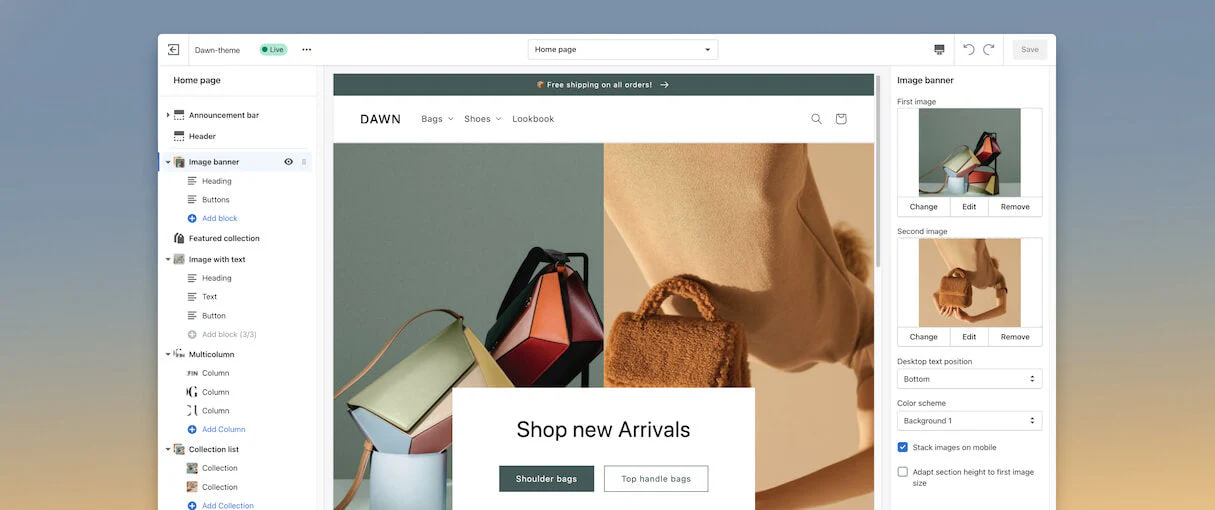
Dawn-theme Editor
- Theme Status
- Live
- Current Page
- Home page
Home page Sections
- Announcement bar
- Header
- Image banner (Heading, Buttons, Add block)
- Featured collection
- Image with text (Heading, Text, Button, Add block 3/3)
- Multicolumn (Column, Column, Column, Add Column)
- Collection list (Collection, Collection, Add Collection)
Website Preview Content
Free shipping on all orders!
Navigation Menu
- DAWN
- Bags
- Shoes
- Lookbook
Shop new Arrivals
Banner Buttons
- Shoulder bags
- Top handle bags
Image banner Settings
| Image Slot | Actions |
|---|---|
| First image | Change, Edit, Remove |
| Second image | Change, Edit, Remove |
- Desktop text position
- Bottom
- Color scheme
- Background 1
Display Options
- Stack images on mobile (Checked)
- Adapt section height to first image size (Unchecked)
shopify store design Your Shopify store looks great to humans. Clean product pages. Nice images. Decent traffic. But here's a question most store owners never ask: Can bots actually read it?
Not "crawl" it. Not "index" it. Read it—the way an AI agent needs to understand your products, pricing, and availability before it can recommend them to a potential buyer.
This is where traditional Shopify SEO guidance falls apart. Most advice focuses on keywords, meta tags, and backlinks. Important, yes. But these tactics assume a foundation that often doesn't exist: that search engines and AI assistants can actually parse your store's core information.
When that foundation breaks—when bots hit JavaScript walls, miss structured data, or fail to understand product relationships—no amount of keyword optimization will save you.
This guide is about fixing that foundation. It's about making your Shopify store machine-readable before you worry about making it rank.
Who This Guide Is For
Shopify store owners seeing traffic but weak conversion from search
E-commerce managers whose products don't appear in AI shopping assistants
Technical marketers troubleshooting crawl issues and rendering failures
SEO teams looking to move beyond keyword-only optimization
Anyone who's done "all the right SEO things" but still isn't seeing results
The Core Problem: SEO Advice Assumes Bots Can Already Read Your Store
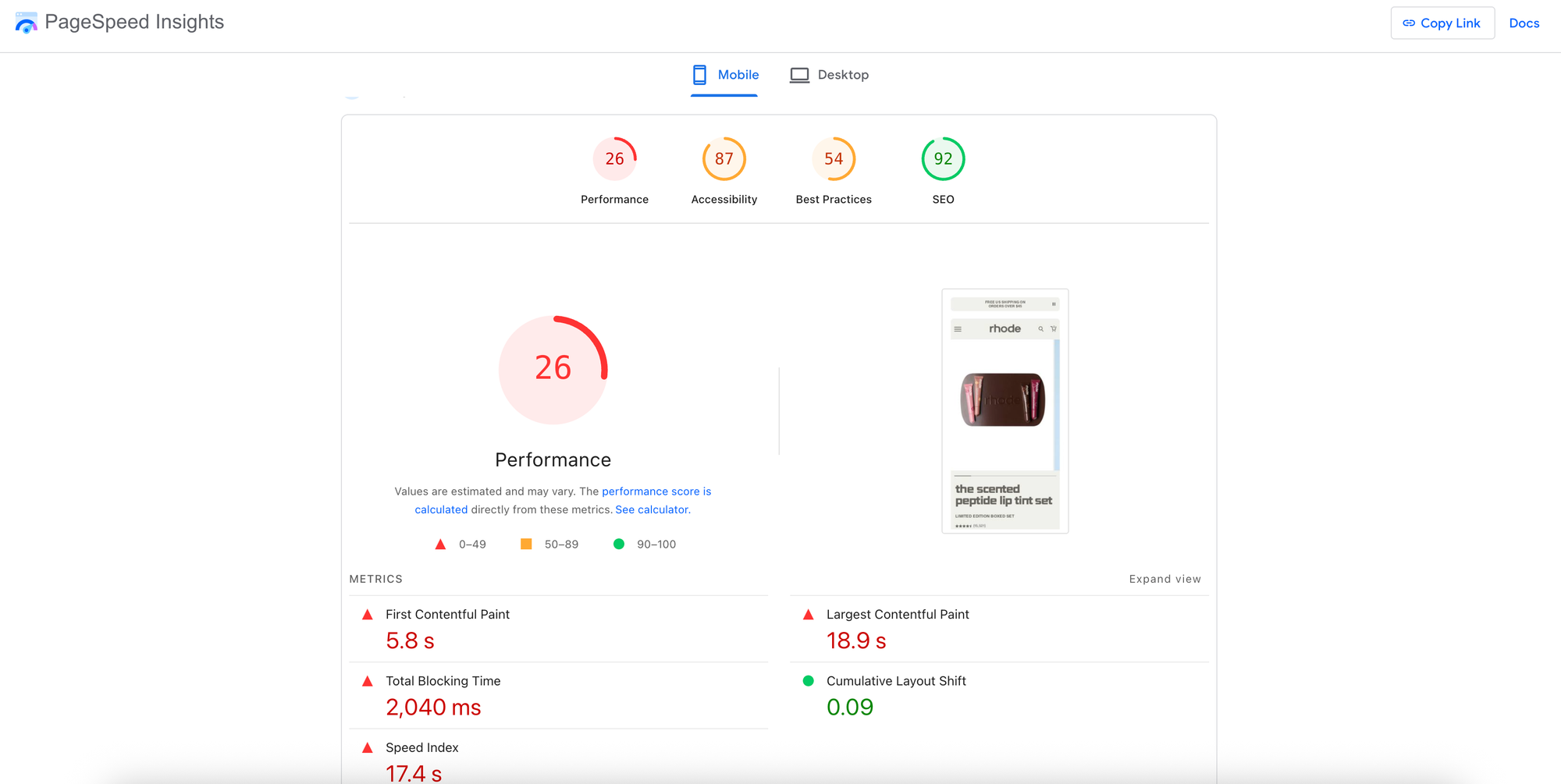
PageSpeed Insights
| Category | Score |
|---|---|
| Performance | 26 |
| Accessibility | 87 |
| Best Practices | 54 |
| SEO | 92 |
Performance
Values are estimated and may vary. The performance score is calculated directly from these metrics. See calculator.
Score Scale
- 0-49 (Red Triangle)
- 50-89 (Orange Square)
- 90-100 (Green Circle)
| Metric | Value | Status |
|---|---|---|
| First Contentful Paint | 5.8 s | Poor |
| Largest Contentful Paint | 18.9 s | Poor |
| Total Blocking Time | 2,040 ms | Poor |
| Cumulative Layout Shift | 0.09 | Good |
| Speed Index | 17.4 s | Poor |
Average Sopify Store
Here's what most Shopify SEO guides tell you:
Pick the right keywords
Write good meta descriptions
Get backlinks
Create blog content
All reasonable advice. But it skips a critical step.
Before any of that matters, bots need to successfully crawl your pages, correctly render your content, and accurately extract your product information. If they can't do that, everything else is optimization theater.
The reality? Shopify stores present unique challenges for bot readability:
JavaScript rendering bottlenecks. Modern Shopify themes rely heavily on JavaScript. Bots that don't execute JavaScript see incomplete pages—or nothing at all.
Fragmented product data. Product variants, dynamic pricing, and inventory status often live in JavaScript variables, not in the HTML that bots can easily parse.
Schema markup gaps. Many themes claim to support structured data, but the implementation is often incomplete or incorrectly formatted.
Canonicalization confusion. Multiple URL versions of the same store (with www, without www, on myshopify.com) create duplicate content signals that dilute your authority. The result? Crawl failures. Missed information. AI agents that can't understand—let alone recommend—your products.
What Does "Bot-Readable" Actually Mean?
Let's be precise. A bot-readable page is one where automated systems can:
Access the page without authentication barriers, rendering failures, or crawl blocks
Parse the content into structured, machine-understandable data
Extract core information (product name, price, availability, description) reliably
Understand relationships between pages (categories, variants, related products)
This isn't the same as "indexable." A page can be indexed while still being poorly understood. Google might add your product page to its database, but if it can't extract accurate pricing or availability, that page won't perform well in shopping results—or in AI-generated recommendations.
Common Misconception: "If my pages are showing up in Google Search Console, bots can read them fine."
Not necessarily. Search Console confirms indexing, not comprehension. A page can be indexed with incomplete data extraction, missing structured markup, or incorrect product information. The only way to know what bots actually see is to examine your bot logs directly.
The Foundation: Is Your Shopify Store Actually Crawlable?
Before optimizing anything, verify that bots can access your store at all.
Domain Configuration
Your Shopify store can be accessible at multiple URLs
example.comwww.example.comexample.myshopify.com
Shopify attempts to handle this by redirecting to what it believes is your preferred domain, but it doesn't always get it right. Multiple accessible versions create duplicate content issues and dilute link equity—the ranking authority your backlinks provide.
Verification step: In your Shopify admin, go to Settings → Domains. Confirm your primary domain is set correctly. Then test all variations manually to ensure they redirect properly.
Robots.txt and Sitemap
Shopify automatically generates a robots.txt file and XML sitemap. That's helpful. But "automatically generated" doesn't mean "correctly configured."
Check your robots.txt at yourdomain.com/robots.txt. Look for any unexpected disallow rules that might block important pages. Review your sitemap at yourdomain.com/sitemap.xml and verify that your key product and collection pages are included.
Page Speed and Rendering
Google confirmed mobile-friendliness as a ranking factor in 2015. All Shopify themes claim to be responsive, but claims and reality diverge.
Run your store through Google's Mobile-Friendly Test. But don't stop there. The mobile-friendly test confirms layout responsiveness—it doesn't confirm that your content actually renders for bots.
Use Google Search Console's URL Inspection tool to see how Googlebot renders your pages. Compare the rendered HTML to your live page. If they don't match, you have a JavaScript rendering problem.
Making Product Data Machine-Readable
Your product information exists in multiple forms:
Visual: The images, buttons, and layout humans see
HTML: The raw markup bots receive
Structured data: The machine-readable schema (JSON-LD) that explicitly tells bots what your content means
Most Shopify stores only optimize the first one. The third one—structured data—is where bot comprehension actually happens.
Why Schema Markup Matters
Schema markup (specifically JSON-LD format) is how you explicitly tell search engines and AI agents: "This is a product. Here's its name. Here's its price. Here's whether it's in stock."
Without it, bots have to infer this information from your HTML—a process that frequently fails.
Case studies have shown a 30% increase in click-through rates for pages with proper schema markup. That's because schema enables rich results: the enhanced search listings that show price, availability, and review stars directly in Google.
Here's the difference:
Without rich results: Your listing shows a plain blue link and meta description. Users have to click to learn anything about your product.
With rich results: Your listing shows product image, price ($89.99), availability (In Stock), and review rating (4.7 stars). Users can evaluate your product before they click. Which listing gets more qualified clicks?
The Schema Implementation Problem
Most Shopify themes claim to support schema "out of the box." The reality is more complicated. Yes, filling in product information in your Shopify dashboard often generates some structured data. But "some" isn't enough. Common issues include:
Missing properties: Price might be included, but availability isn't.
Incorrect formatting: Dates, currencies, or product identifiers formatted in ways Google can't parse.
Variant handling: Schema for the main product exists, but individual variants lack proper markup.
Review aggregation: Review ratings exist on the page visually but aren't included in the schema.
If your theme doesn't support comprehensive schema, you'll need a Shopify SEO app to fill the gaps—or implement custom JSON-LD in your theme's code.
Common Misconception: "I installed a schema app, so my structured data is fine."
Installation isn't verification. Test your pages with Google's Rich Results Test tool. Look for warnings and errors. Check that all the properties you expect are actually present and correctly formatted.
Site Structure: Helping Bots Understand Relationships
Search engines don't just evaluate individual pages. They evaluate how pages relate to each other. A clear site structure helps bots understand which pages are most important and how your products are organized.
The Ideal Hierarchy
For e-commerce, the standard structure is: Homepage → Collections (Categories) → Subcollections → Products Each level links to the next. The homepage provides access to all major collections. Collections link to relevant subcollections and products. Products link back to their parent collections.
This structure serves two purposes:
User navigation: Shoppers can browse logically from broad categories to specific products.
Link equity distribution: Authority from backlinks flows from your homepage down through collections to individual products.
In Shopify terminology, "collections" are your categories. Create them with intention. Don't just add products and hope bots figure out the organization.
The Product Variant Question
Here's a decision that affects both user experience and bot comprehension: Should product variants (different colors, sizes, materials) be separate URLs or parameters on a single URL?
By default, Shopify handles variants as URL parameters: example.com/products/wallet?variant=12345.
These parameterized URLs are canonicalized to the main product URL, meaning search engines treat all variants as a single page. That's usually fine—you probably don't want "Blue Widget" and "Red Widget" competing against each other in search results.
But sometimes it's not fine. If people actively search for specific variants—if "black gucci wallet" has meaningful search volume distinct from "gucci wallet"—you might be losing traffic by not letting that variant rank independently.
The keyword research matters here. Search volume for "black gucci wallet" is significant enough that creating a separate product (not just a variant) might capture traffic you'd otherwise miss.
The principle: Default to variants for products where color/size is incidental. Consider separate products when variant-specific search demand exists.
Beyond Keywords: What AI Agents Actually Look For
Traditional keyword research isn't obsolete. But it's no longer sufficient. AI agents and LLM-powered search don't just match keywords. They attempt to understand what your page is about and whether it answers the user's underlying question.
This changes how you should think about optimization.
Category and Collection Pages
For category pages (Shopify collections), the goal is matching what researchers call "search intent." When someone searches for "electric guitars," are they looking to:
Browse options (commercial intent)
Learn about different types (informational intent)
Buy a specific model (transactional intent)
Look at what currently ranks. If the top results are all category pages with product listings, that tells you Google interprets this as commercial/browsing intent. Your collection page is the right format.
If the top results are buying guides or comparison articles, you might struggle to rank a collection page alone—you may need supporting content.
Product Pages
For branded products, keyword research is almost unnecessary. If you sell the "PRS McCarty 594" guitar, your product page will naturally target that keyword. You can't not target it.
Where keyword research matters for products is unbranded or generic items. If you sell a "light blue electric guitar" that isn't a famous brand, you need to confirm that search demand exists for that descriptor and that your product page matches the intent of people searching for it.
The Blog Layer
Category and product pages capture people ready to buy. Blog content captures people earlier in their journey—researching, comparing, learning.
For a guitar store, that might mean content targeting questions like "how much is a guitar" (showing purchase consideration) rather than "how to tune a guitar" (where the searcher almost certainly already owns one).
The keyword research principle: Target questions where the answer leads naturally toward your products.
Content That Bots Can Parse vs. Content That Ranks
There's a tension in e-commerce SEO. The content practices that help pages rank aren't always the same as the practices that help bots understand your products.
The Unique Description Problem
Generic product descriptions—copied from manufacturers or duplicated across similar products—create duplicate content issues. Search engines struggle to determine which page should rank, and often the answer is "none of them, because they're all identical".
The traditional advice: Write unique descriptions for every product and category page. The practical reality: Most stores have hundreds or thousands of products. Writing truly unique descriptions for each is often impossible.
The prioritization approach:
Identify your highest-traffic, highest-margin products and collections.
Write genuinely unique descriptions for those first.
For long-tail products with minimal search volume, ensure descriptions are at least accurate—even if templated.
Bot comprehension depends more on structured data than on prose descriptions. If your schema markup clearly defines product name, price, brand, and availability, bots can understand the product even if the description is formulaic.
Common Misconception: "I need to include my target keyword in my product description multiple times."
This is outdated advice that often produces awkward, unnatural copy. Modern search engines understand synonyms and context. Focus on describing your product accurately and helpfully. If "acoustic guitar" is your target keyword, you don't need to repeat it five times. Mention it once naturally, then use normal variations ("this guitar," "the instrument," etc.).
Image Optimization
Product images matter for conversions. They also matter for search—both traditional image search and AI agents that analyze visual content.
Alt text is the baseline. Every product image should have descriptive alt text that helps search engines understand what the image shows: "PRS McCarty 594 electric guitar in vintage cherry finish" rather than "IMG78456".
File names matter too. prs-mccarty-594-cherry.jpg communicates more than product-photo-3.jpg. File size affects performance. Heavy images slow page loading, which affects both user experience and rankings. Compress images before uploading—Shopify apps like Crush.pics can automate this.
Building Authority Through Bot-Friendly Signals
Content optimization gets you part of the way. But for competitive keywords, you also need authority—signals that tell search engines your store is trustworthy and worth ranking.
The Backlink Foundation
Backlinks remain a core ranking factor. Links from other websites to yours signal that your store is a legitimate, valuable resource.
For Shopify stores, the challenge is that product and category pages rarely attract links naturally. People link to useful content, interesting research, or helpful tools—not to product listings.
The practical approach:
Find where competitors get links. Tools exist to identify websites linking to multiple competitors but not to you. These are often directories, resource pages, or publications that cover your industry.
Guest posting. Writing articles for relevant publications gets your expertise in front of new audiences—and typically includes a link back to your store.
Linkable assets. Create content specifically designed to attract links: research studies, free tools, comprehensive guides, interactive resources.
Internal link distribution. Backlinks often point to your homepage or blog content. Use internal links to distribute that authority to your product and collection pages.
Video Content and Multi-Format Visibility
Product reviews and comparison videos capture search traffic that blog posts can't. When someone searches for "PRS Custom 24 SE review," they often want video content—Google shows a "Videos" SERP feature at the top of results.
If you have expertise in your products, video reviews create visibility in YouTube search, Google video results, and increasingly in AI agents that can parse video content.
Operational Guidance: Running Bot Visibility as a System
Fixing bot readability isn't a one-time project. Search engines update. Your product catalog changes. New AI agents emerge with different parsing capabilities. You need a system.
The Monitoring Cadence
Weekly:
Check Google Search Console for crawl errors and coverage issues
Review any new indexing warnings
Verify that recently added products appear in your sitemap
Monthly:
Run structured data tests on key product and collection pages
Check page speed metrics for your highest-traffic pages
Review bot access logs (if available) for any unusual patterns or failures
Quarterly:
Conduct full crawl audit of your store
Compare your schema implementation against competitors
Review and update keyword targeting for top collections
The Evidence Layer
Traditional SEO often operates on faith. You make changes and hope rankings improve. But without visibility into what bots actually see, you can't diagnose failures or verify fixes.
Bot log analysis is the missing piece. Actual records of which bots accessed which pages, what they received, and whether they succeeded or failed.
Most store owners never see this data. It lives in server logs that Shopify doesn't expose by default. But this is exactly the evidence you need to understand bot behavior—and to prove that your optimization efforts are working.
The Search OS Approach: Bot-First Commerce
Everything in this guide points toward a single principle: Make your store machine-readable first, then optimize for rankings second. Search OS exists to operationalize this principle. Here's how.
Bot-First Pages
Rather than hoping your existing pages render correctly for bots, Search OS generates bot-optimized page structures—versions of your content designed specifically for machine parsing. Clean HTML. Complete structured data. No JavaScript dependencies that might fail.
Automatic Schema Generation (JSON-LD)
Instead of manually implementing schema or relying on apps that may miss edge cases, Search OS automatically generates comprehensive JSON-LD for your products, collections, and content. Every property that search engines and AI agents might need—price, availability, variants, reviews, brand—included and correctly formatted.
Cross-Platform Support
This approach works whether your store runs on Shopify, Wix, Substack, or another platform. Bot visibility isn't platform-specific. The principles of machine-readable content apply everywhere.
Full Bot Log Visibility
Here's what changes everything: With Search OS, you can inspect all bot logs. Not a summary. Not estimated data. The actual records of bot access—what was requested, what was served, whether it succeeded.
This transforms bot visibility from guesswork to evidence. You can see exactly which pages bots struggle with, diagnose why, and verify that fixes work.
Keyword and Prompt Prediction
As AI agents become primary discovery channels, understanding how users prompt these systems becomes as important as traditional keyword research. Search OS analyzes prompt patterns to identify how AI users are discovering (or failing to discover) products like yours.
Continuous Optimization
Bot visibility isn't a destination. It's a process. Search OS runs a continuous optimization loop:
Analyze current bot access patterns and failures
Identify pages with comprehension issues
Generate optimized content and structured data
Verify through bot log evidence that fixes succeeded
Iterate until target pages reliably surface in search and AI results
This isn't a promise of guaranteed rankings. Search performance depends on many factors beyond bot visibility. But bot visibility is the foundation. Without it, nothing else you do can work.
Measured Results (Search OS)
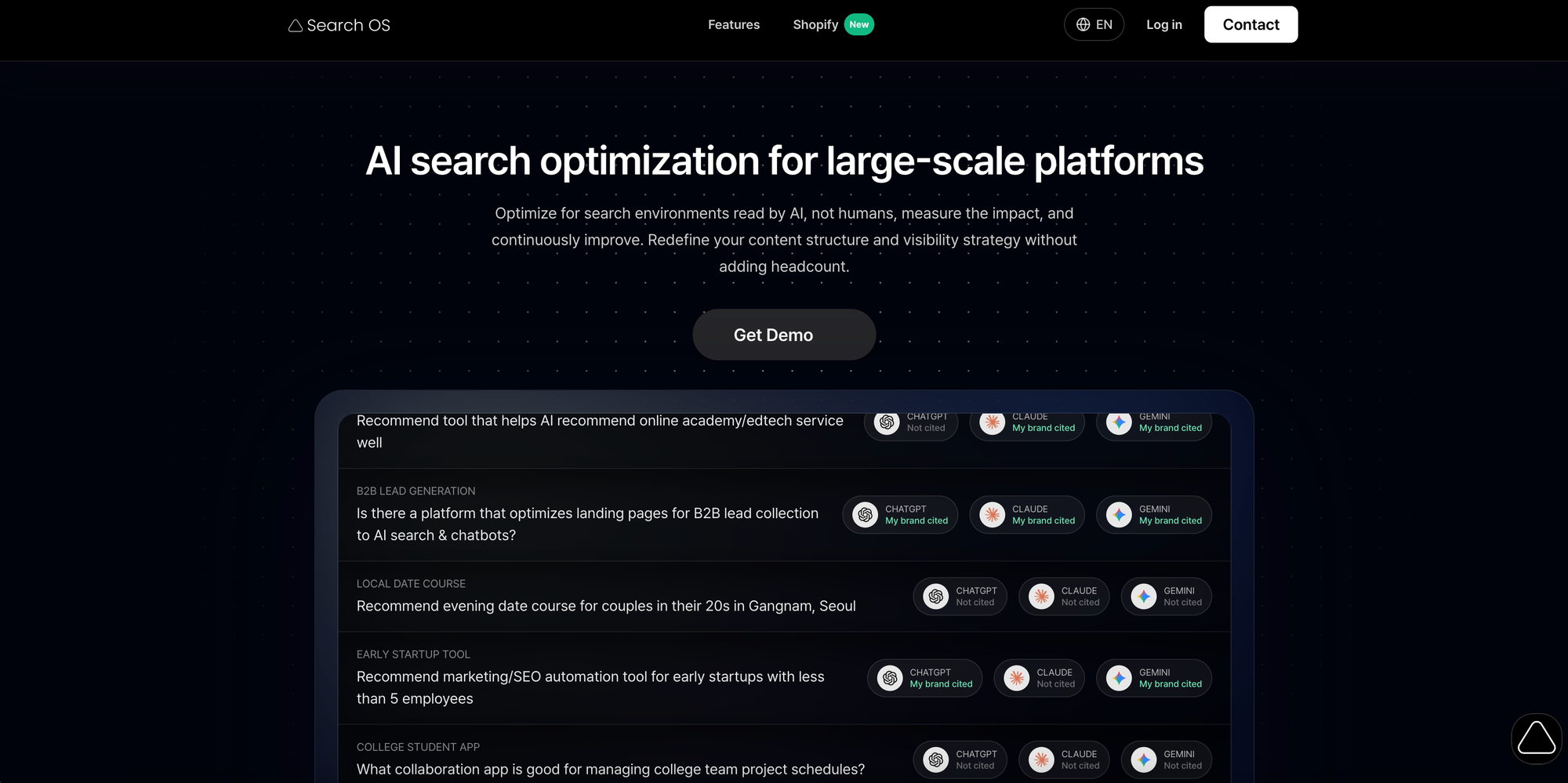
AI search optimization for large-scale platforms
Optimize for search environments read by AI, not humans, measure the impact, and continuously improve. Redefine your content structure and visibility strategy without adding headcount.
| Category | Query | ChatGPT Status | Claude Status | Gemini Status |
|---|---|---|---|---|
| Recommend tool that helps AI recommend online academy/edtech service well | Not cited | My brand cited | My brand cited | |
| B2B LEAD GENERATION | Is there a platform that optimizes landing pages for B2B lead collection to AI search & chatbots? | My brand cited | My brand cited | My brand cited |
| LOCAL DATE COURSE | Recommend evening date course for couples in their 20s in Gangnam, Seoul | Not cited | Not cited | Not cited |
| EARLY STARTUP TOOL | Recommend marketing/SEO automation tool for early startups with less than 5 employees | My brand cited | Not cited | My brand cited |
| COLLEGE STUDENT APP | What collaboration app is good for managing college team project schedules? | Not cited | Not cited | Not cited |
Search OS Landing Page What does bot-first optimization produce? Here are the performance improvements Search OS customers have documented:
300× faster crawling.
0 crawl failures.
In the same time window, bots ingest 300× more information.
80% labor cost reduction.
These aren't hypothetical projections. They're measured outcomes from making stores truly machine-readable.
Conclusion: Five Key Takeaways
Bot readability precedes ranking. If search engines and AI agents can't parse your content correctly, no amount of keyword optimization will help. Verify crawlability and comprehension before optimizing for visibility.
Structured data is non-negotiable. Schema markup (JSON-LD) is how you tell bots what your content means. Test your implementation with Google's Rich Results Test. Gaps in your schema are gaps in bot comprehension.
Site structure distributes authority. A clear hierarchy from homepage to collections to products helps both users and bots navigate your store. Internal links move ranking power from your strongest pages to the products that need it.
Evidence beats assumptions. Without bot log visibility, you're optimizing blind. The only way to know what bots actually see—and whether your fixes work—is to examine the evidence directly.
Optimization is continuous. Search engines evolve. AI agents have different requirements. Your product catalog changes. Bot visibility requires ongoing monitoring, not one-time fixes.
Next Step
Not sure whether bots can actually read your Shopify store? Search OS offers a quick diagnostic: We'll analyze your store's bot accessibility, structured data implementation, and crawl patterns—then show you exactly what's working and what's broken.
No guesswork. Just evidence.