BASE: Why the Shop Isn't in Search and How to Fix It
Navigation
- Search OS
- BASE
BASE: Why the Shop Isn't in Search and How to Fix It
- Category
- Tips
- Reading Time
- 6 min read
- Topic
- Japan EC platform guides for search and AI search
When a BASE shop doesn't show up in search, the cause is one of two things: it isn't indexed yet, or the pages lack descriptions that can be assessed. This article lays out the order of checks and the fixes, from the visibility setting to whether bots are fetching pages.
- Source
- searchos.io/en/blog
- Copyright
- © 2026 Search OS
Two months after opening a BASE shop, the Instagram posts show up in search but the shop site itself doesn't. Shops that recently started on BASE raise this often.
The causes fall into two groups: the shop isn't indexed yet, or it is indexed but the pages hold no information that can be assessed. Find out which applies before you touch anything.
This article sorts the causes into five. It covers the order of checks, the fixes, and how long to expect before a fix is reflected.
Conclusion: Check in order and the cause is almost always one of five
Order | Cause | How to check | Fix |
|---|---|---|---|
1 | Search engine visibility setting is off | Check the public and SEO-related settings in the admin panel | Change the setting to public |
2 | Custom domain and shared domain URLs are mixed | Check whether the same page opens on both URLs and where the canonical points | Consolidate on the custom domain as canonical |
3 | Sitemap not submitted | Sitemaps section in Search Console | Submit sitemap.xml |
4 | No assessable text on the page | Product descriptions image-only, no intro text on the top page | Add descriptions as text |
5 | Bots can't fetch the page | URL Inspection in Search Console, logs | Fix rendering and errors |
Navigation
- Search OS
- Guide 01
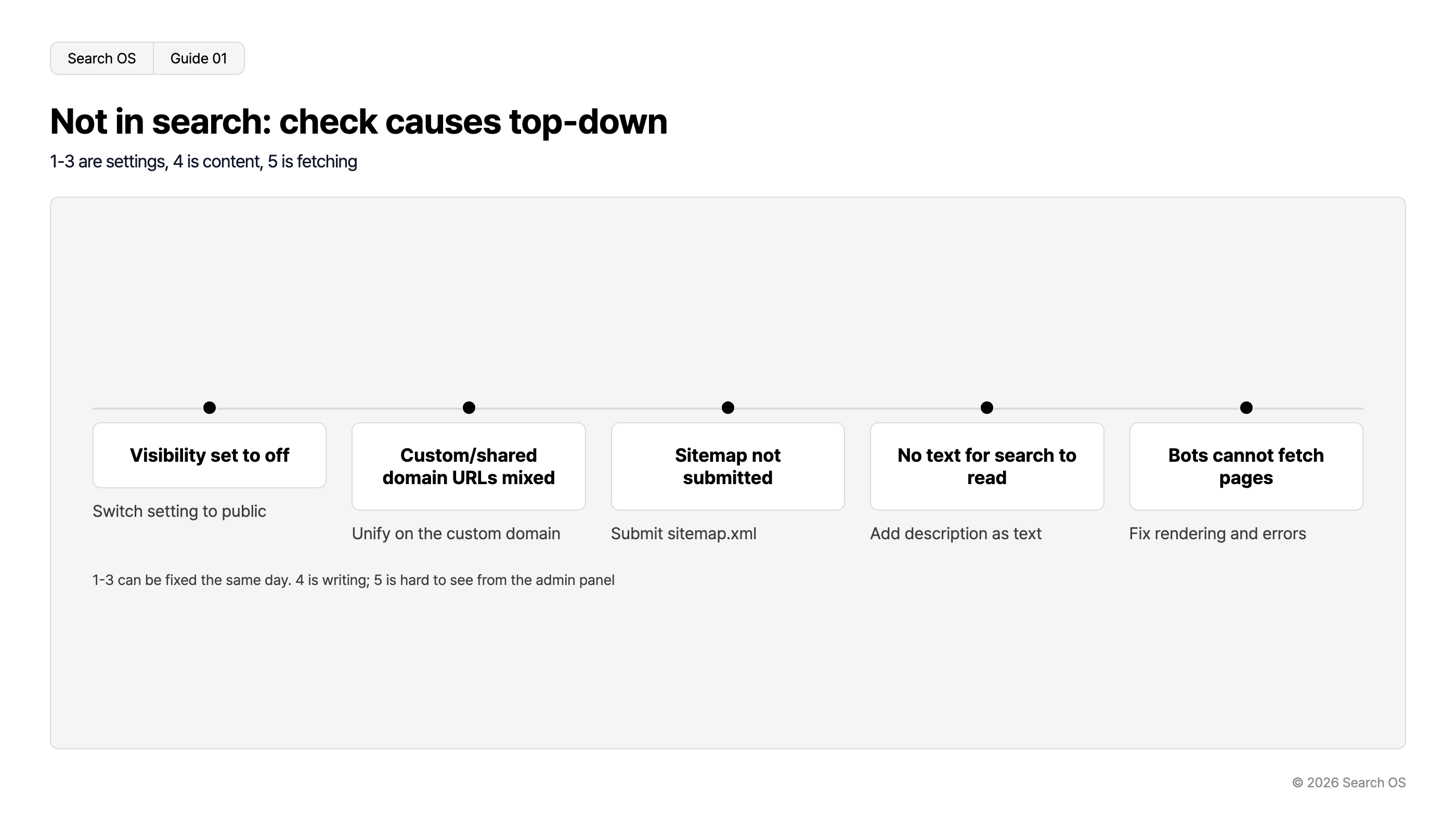
Not in search: check causes top-down
1-3 are settings, 4 is content, 5 is fetching
| Cause | Action |
|---|---|
| Visibility set to off | Switch setting to public |
| Custom/shared domain URLs mixed | Unify on the custom domain |
| Sitemap not submitted | Submit sitemap.xml |
| No text for search to read | Add description as text |
| Bots cannot fetch pages | Fix rendering and errors |
1-3 can be fixed the same day. 4 is writing; 5 is hard to see from the admin panel
© 2026 Search OS
Go through the table from the top. Causes 1 to 3 are settings problems, fixable the same day. Cause 4 is content work, such as writing product descriptions. Cause 5 is hard to investigate from the admin panel alone, so it needs other means of checking.
Data point: In an experiment tracking 81 pages on a high-authority domain for 30 days, Google AI Mode cited 36% within 24 hours of publication. Pages not cited in the first week, on the other hand, were rarely cited afterward. The longer a "published but not showing" state is left alone, the harder it is to recover.
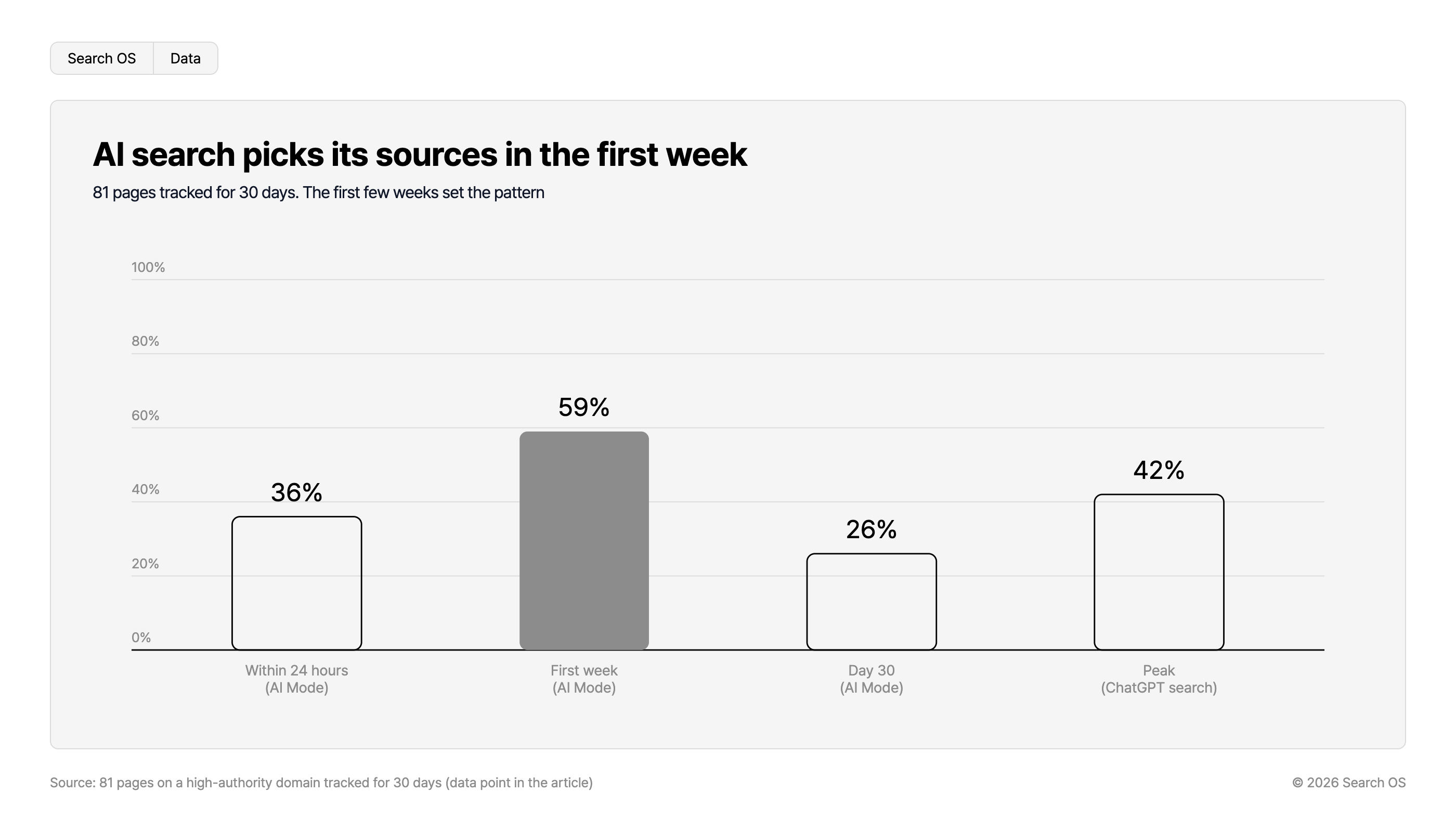
AI search picks its sources in the first week
81 pages tracked for 30 days. The first few weeks set the pattern
| Timeframe / Mode | Percentage |
|---|---|
| Within 24 hours (AI Mode) | 36% |
| First week (AI Mode) | 59% |
| Day 30 (AI Mode) | 26% |
| Peak (ChatGPT search) | 42% |
Source: 81 pages on a high-authority domain tracked for 30 days (data point in the article)
© 2026 Search OS
Cause 1: The search engine visibility setting
BASE has a setting that toggles whether the shop is shown to search engines. Check the admin panel for its name and location. Some shops turned it off while preparing to open and left it that way. If it's off, no other fix will get you into search.
First verify ownership in Search Console. Then use URL Inspection on the top page and product pages one at a time. If it says "URL is not on Google", the page isn't indexed yet.
Cause 2: Custom domain and shared domain mixed
BASE starts you on a shared-domain URL. Once you set a custom domain, the shop opens there too. It's the same store with two addresses side by side. If the canonical is ambiguous, the performance splits across two URLs.
Look at where the shared-domain URL redirects. Check that it redirects to the custom domain, or that canonicalization is in place. If a search for the store name returns the shared domain, this is your problem.
Cause 3: Sitemap not submitted
A sitemap is a file that tells search engines the list of URLs in the shop. Check whether BASE generates sitemap.xml automatically. If it does, submit that URL in Search Console.
In the Search Console Pages report, compare the number of indexed URLs against excluded ones. If you see "Crawled - currently not indexed", cause 4 is likely.
Cause 4: Nothing on the page to assess
BASE has many templates that display product images large. Pages that put even the material description in the image and leave the body short are common. Search engines can't read text in images reliably, so what you sell never comes across.
Add product descriptions as text. Write a 2 to 3 sentence shop introduction on the top page, and give each product a description of 3 to 5 sentences or more. For categories, write why someone would choose that product group. This work also becomes the foundation for AI search to recommend your products.
Cause 5: Bots can't fetch the page
If settings and content are fine, look at bot fetching. Bots are programs that collect page information. Product descriptions that appear only after JavaScript runs may not be fetched as-is. Slow-loading external apps and error responses are causes too.
"Test live URL" in URL Inspection shows the fetched HTML and a screenshot. If the product information isn't there, rendering has a problem. GPTBot and PerplexityBot status, however, isn't visible in Search Console. Look at Google's fetch first, then check the AI side in bot logs.
How long until a fix is reflected
Target | Expected time | Notes |
|---|---|---|
Google search index | A few days to two weeks | Requesting indexing from URL Inspection can speed it up |
Google AI Mode | 24 to 48 hours after indexing at the earliest | Citations turn over frequently |
ChatGPT search | 1 to 2 weeks or more | Relatively stable once cited |
Navigation
- Search OS
- Guide 02
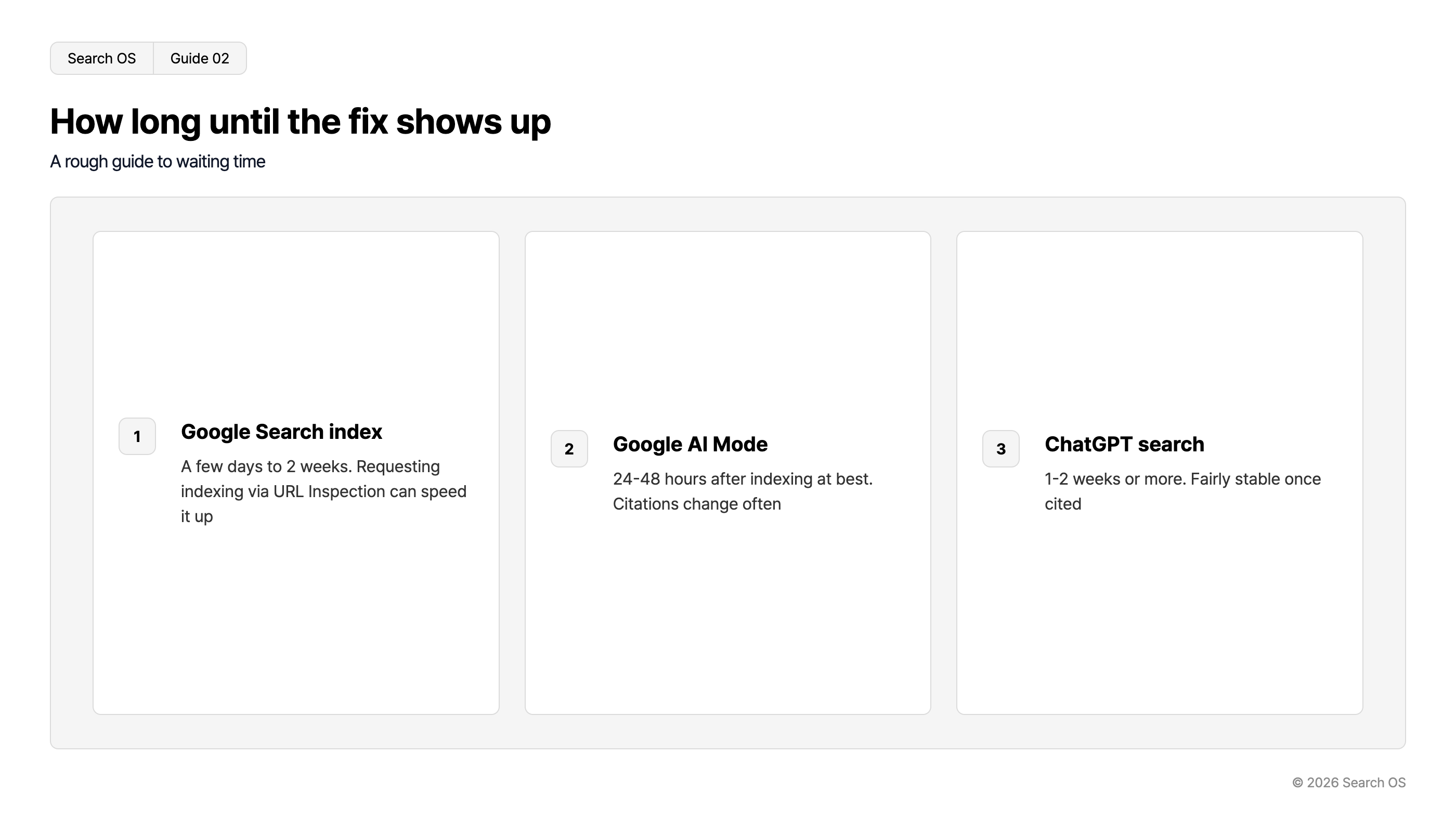
How long until the fix shows up
A rough guide to waiting time
| Step Number | Platform | Estimated Time | Notes |
|---|---|---|---|
| 1 | Google Search index | A few days to 2 weeks. | Requesting indexing via URL Inspection can speed it up |
| 2 | Google AI Mode | 24-48 hours after indexing at best. | Citations change often |
| 3 | ChatGPT search | 1-2 weeks or more. | Fairly stable once cited |
© 2026 Search OS
Adding descriptions doesn't always change search results right away. If nothing has changed after two weeks, recheck causes 1 to 3.
What to do once you're in search
Appearing in search is where operations begin. To be found by people searching by product category or use, add category descriptions, comparisons and buying guides, and FAQs bit by bit. After adding products, check causes 4 and 5 again.
Search OS supports this day-to-day operation. It gives existing sites such as BASE a structure that search and AI can read easily. Metadata, structured data, and sitemaps are in scope too. Bot logs confirm fetches by Googlebot and GPTBot, and index gaps and rendering failures are compiled as fix candidates.
Frequently asked questions
How long until the shop appears in search?
With settings in order, a few days to two weeks is the guide. If it takes longer, there's likely a problem somewhere in the visibility setting, domain, or sitemap.
Is a custom domain required?
It isn't required. If you want brand-name search results consolidated on one URL, unifying on the custom domain as canonical is the better option.
Will the shop appear in search with only a few products?
Yes. Even with few products, whether descriptions exist changes the result. Prepare text that search engines and AI can assess, and review the description on each product page.
Related reading
Sitemap Operations for Large Sites: lastmod, Splitting, and Submission
STORES Shop Not Showing in Search: Settings Problem or Waiting for Indexing
References
Google Search Central: URL Inspection Tool
Google Search Central: Page Indexing report
Google Search Central: Consolidate duplicate URLs