futureshop Structured Data: What to Add for AI Search
Navigation
- Search OS
- futureshop
futureshop Structured Data
What to Add for AI Search
- Category
- Guides
- Reading Time
- 7 min read
- Topic
- Japan EC platform guides for search and AI search
The structured data futureshop outputs automatically covers the basics of telling search engines about a product. To be cited by AI search, you also need Article and breadcrumb markup that matches the visible text, FAQs, and consistency in stock and options. This article covers how to check the scope of the automatic output and what to add.
- Source URL
- searchos.io/en/blog
- Copyright
- © 2026 Search OS
- Brand
- Search OS
futureshop outputs structured data automatically. Structured data is a description of a page's content written in a form machines can read. So people in charge at mid-sized brands on futureshop increasingly ask whether that already takes care of AI search.
The answer: partly, but not enough to meet the conditions for being cited by AI search. Automatic structured data output covers what a search engine needs to know about a product's basics. The information an AI needs to assemble an answer overlaps with that in some places and not in others.
This article covers how to check the scope of the automatic output, the difference between markup for rich results and markup for AI understanding, and the priority of what to add.
Conclusion: Automatic output stops at product basics. AI search needs four additions
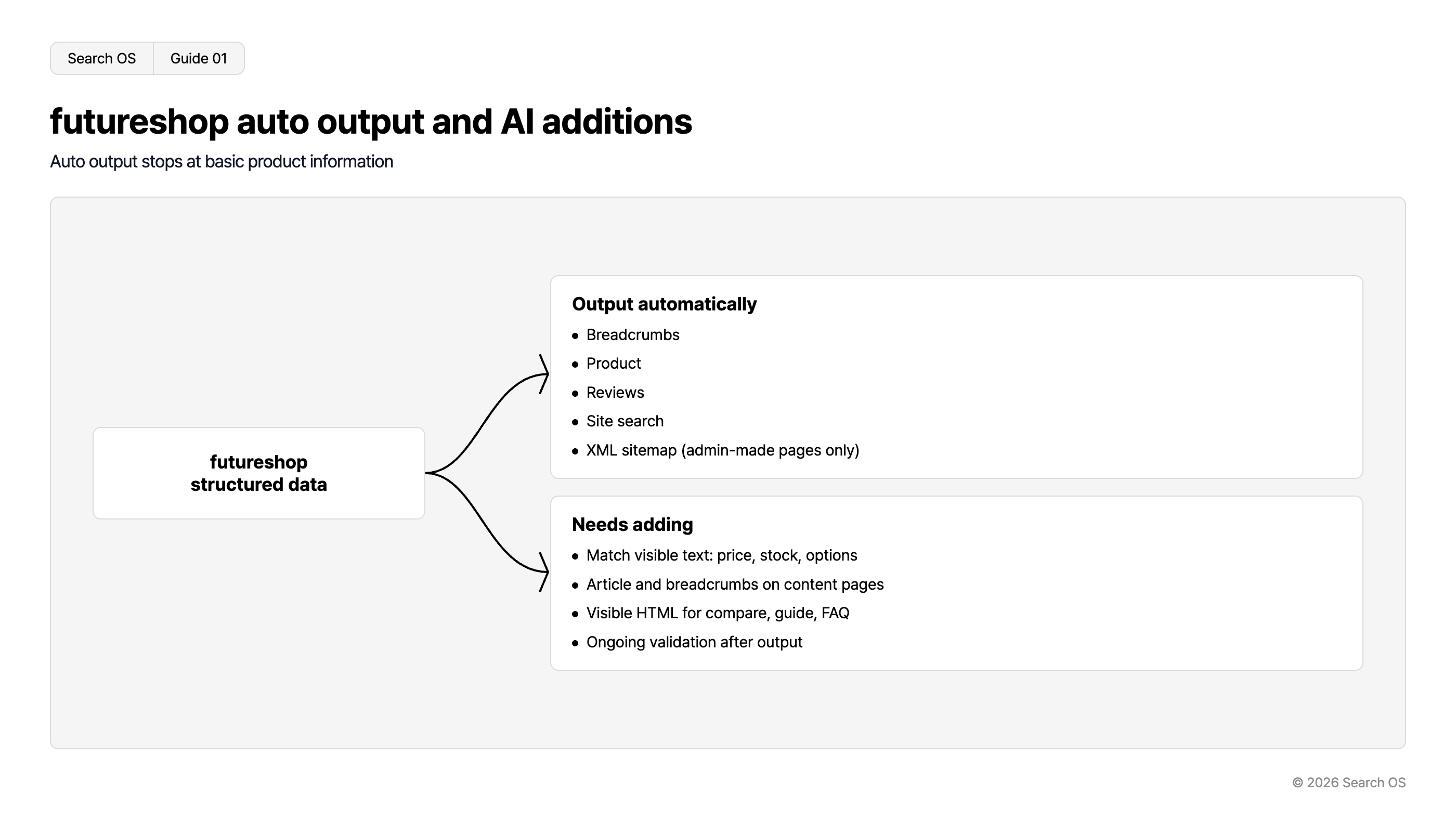
futureshop automatically outputs structured data for breadcrumbs, products, reviews, and site search. An XML sitemap is generated automatically too. That scope is wider than other Japanese hosted carts, and for product pages it's a sufficient starting point. There are two holes, though. The automatic sitemap includes only pages created in the admin panel. Linked WordPress posts and uploaded static HTML are not included. And Article for content pages is outside the scope of automatic output.
What's missing for AI search is, in most cases, these four things.
Mismatches between visible text and structured data values (price, stock, options)
Article and breadcrumbs for content pages such as features and blog posts
Comparison, buying-guide, and FAQ body text that doesn't exist as visible HTML
A way to keep verifying after output (breakage from a template update goes unnoticed)
Navigation
- Search OS
- Guide 01
futureshop auto output and AI additions
Auto output stops at basic product information
futureshop structured data
Output automatically
- Breadcrumbs
- Product
- Reviews
- Site search
- XML sitemap (admin-made pages only)
Needs adding
- Match visible text: price, stock, options
- Article and breadcrumbs on content pages
- Visible HTML for compare, guide, FAQ
- Ongoing validation after output
© 2026 Search OS
Key idea: Invalid structured data can be worse than none. When there's an error, the whole block may be ignored. Don't stop at turning on automatic output; run it as an operation that includes verification. Start by running a product page through the Rich Results Test and checking for errors.
Rich results and AI understanding serve different purposes
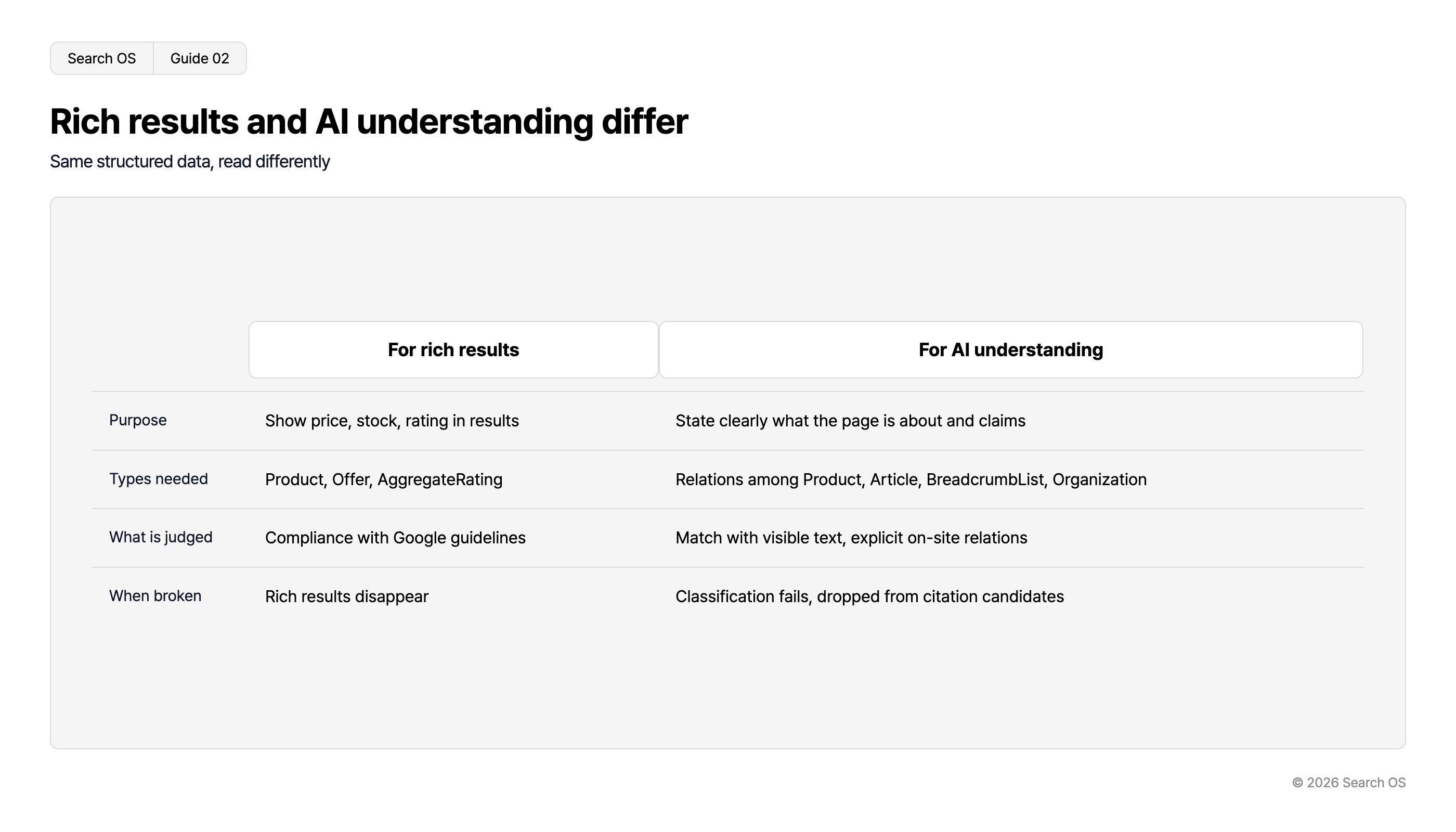
The same JSON-LD has different requirements depending on its use: aiming for rich results in a search engine, or helping an AI understand what the page means.
Aspect | For rich results | For AI understanding |
|---|---|---|
Purpose | Show price, stock, and ratings in search results | Convey without ambiguity what the page is about and what it claims |
Types needed | Product, Offer, AggregateRating | Product, Article, BreadcrumbList, and the relationship to Organization |
What's assessed | Compliance with Google's guidelines | Match with visible text; explicit relationships within the site |
Impact when broken | Rich results disappear | Page classification fails and the page drops out of citation candidates |
Navigation
- Search OS
- Guide 02
Rich results and AI understanding differ
Same structured data, read differently
| For rich results | For AI understanding | |
|---|---|---|
| Purpose | Show price, stock, rating in results | State clearly what the page is about and claims |
| Types needed | Product, Offer, AggregateRating | Relations among Product, Article, BreadcrumbList, Organization |
| What is judged | Compliance with Google guidelines | Match with visible text, explicit on-site relations |
| When broken | Rich results disappear | Classification fails, dropped from citation candidates |
© 2026 Search OS
futureshop's automatic output focuses on the left column. To satisfy the right column, the shop side has to guarantee the match with visible text and make the relationships between pages explicit. Show the relationship between product pages and feature pages with breadcrumbs. Hold your shop against the table to see how much of the right column it meets.
How to check the scope of the automatic output
Don't guess. Check the actual output.
Run four kinds of URL through Google's Rich Results Test: a product page, a category page, a feature page, and the top page.
Record the types detected (Product, BreadcrumbList, Organization, and so on) plus any errors and warnings.
Check that the Offer price and availability on the product page match the price and stock shown on screen.
For a product whose stock differs by option (color, size), check which state the structured data represents.
Check whether Article appears on feature pages and blog posts. If not, check whether it can be added from the template.
These five steps show the scope of the automatic output. They also separate what template editing can fill from what it can't. Start by running one main product through the Rich Results Test and recording the result.
What to add, in priority order
Priority | Item | Reason | Where to implement |
|---|---|---|---|
1 | Consistency of price, stock, and options | A mismatch is a direct reason for exclusion from AI product recommendations | Product data and template |
2 | Article + BreadcrumbList on content pages | Prerequisite for comparison and buying-guide articles to be cited | Template head |
3 | Put FAQs and comparison tables in visible HTML | AI can't reliably read hidden information or text inside images | Body text |
4 | Ongoing verification | Template updates and app additions break the output | Operations |
A note on FAQs. Google restricted FAQ rich results mainly to authoritative sites such as government and medical ones. So adding FAQPage structured data on an ordinary ecommerce site is unlikely to produce anything in search results. Even so, the FAQ text itself becomes a citation source when AI assembles an answer. Prioritize the FAQ as visible HTML over the FAQ as structured data. The table above works as a checklist, from highest priority down.
Three pitfalls shop operators tend to miss
Text inside images. If product descriptions, usage scenes, and the brand story exist only in images, to an AI they might as well not exist. Write them out as text in the body.
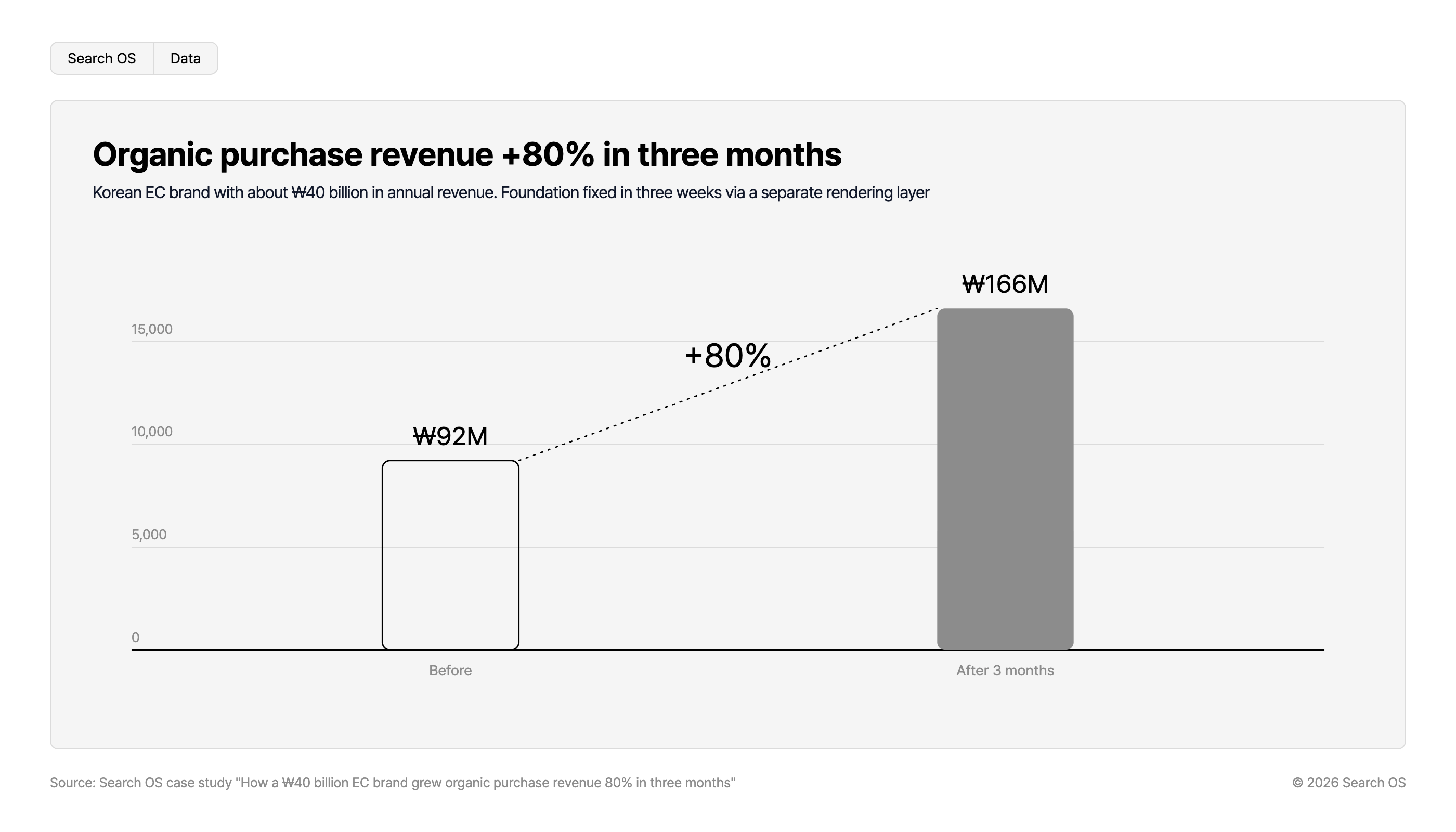
Hidden stock notices. A product on sale can still carry "out of stock" text left over from the template. AI may then drop the product from its recommendation candidates. In fact, at a Korean ecommerce brand with annual revenue of about ₩40 billion (about ¥4 billion), removing this hidden out-of-stock text was the starting point of the improvement.
No verification after a template update. Automatic output is convenient. But when the output breaks the day after a template change, nobody notices. This is the most common failure. After changing a template, run the Rich Results Test the next day.
Organic purchase revenue +80% in three months
Korean EC brand with about ₩40 billion in annual revenue. Foundation fixed in three weeks via a separate rendering layer
| Period | Revenue | Growth |
|---|---|---|
| Before | ₩92M | |
| After 3 months | ₩166M | +80% |
Source: Search OS case study "How a ₩40 billion EC brand grew organic purchase revenue 80% in three months"
© 2026 Search OS
Structured data isn't a task to install; it's an operation to keep in sync
For a few dozen products, the Rich Results Test and manual work are enough for everything above. Things change when products reach the thousands, templates split into several, and feature pages multiply each season. Keeping visible text and structured data in sync becomes a job in itself.
Search OS treats maintaining that match as an operation. It doesn't replace futureshop's automatic output. It continuously verifies the state of JSON-LD, metadata, and canonical across every page of the site. It finds places that contradict the visible text and content pages missing Article. Including URLs that bots fail to fetch, it turns them into a prioritized list of fixes. Structured data is judged not by whether it was added, but by whether it's still correct today.
Frequently asked questions
If there's automatic output, do I still need to write JSON-LD myself?
For product basics, usually not. But Article on content pages, and the match between visible text and structured data, are the shop's responsibility. Check the scope with the five steps above first.
Should I add FAQPage structured data?
On an ordinary ecommerce site, don't expect it to show in search results. Prioritize placing the FAQ in the body as visible HTML. The structured data is optional.
How do I represent a product whose stock differs by option?
Check which option's stock the structured data represents, and make it consistent with what's on screen. If a contradiction can't be avoided, it's safer to leave the stock value out of the structured data.
Related reading
References
Google Search Central: Product structured data
Google Search Central: General structured data guidelines
Google Search Central: FAQ structured data
Google: Rich Results Test