Structuring Online and In-Store Inventory for Search and AI
Navigation Tags
- Search OS
- EC in general
Structuring Online and In-Store Inventory for Search and AI
- Category
- Guides
- Reading Time
- 7 min read
- Topic
- Japan EC platform guides for search and AI search
For search engines and AI to read online and in-store inventory correctly, two conditions apply: separate the stock state by channel, and keep the on-screen display and the structured data showing the same value. This article covers how inventory affects AI recommendations, a case of hidden out-of-stock text, per-channel representation, and the connection to store information.
- Source URL
- searchos.io/en/blog
- Copyright
- © 2026 Search OS
Products that are out of stock online but in stock at a store are not unusual. Shops ask how to structure inventory information so that search and AI can tell people they can buy nearby.
The answer has two stages. First, represent the stock state separately for each channel. Don't mix online stock with store stock. Second, keep the stock wording visible on screen and the stock value in the structured data always the same. Structured data is a description of a page's content written in a form machines can read. When either of these breaks, search engines stop trusting the inventory information. AI drops the product from its recommendation candidates too.
This article covers how inventory information affects AI recommendations, a real case of hidden out-of-stock text, per-channel representation, the connection to store information, and update operations.
Conclusion: Separate by channel, and match the screen and the structured data values
Situation | On-screen display | Structured data representation |
|---|---|---|
Online in stock | "In stock", "Add to cart" | Offer.availability = InStock |
Online out of stock, in stock at store | "Out of stock online. Available at the XX store" | Online Offer is OutOfStock. Hold a separate store Offer that points to the store with availableAtOrFrom |
Out of stock online and in store | "Out of stock", "Awaiting restock" | OutOfStock or BackOrder |
Taking pre-orders | "Taking pre-orders" | PreOrder |
Store pickup only | "Store pickup" | InStoreOnly, or a store Offer only |
Breadcrumbs
- Search OS
- Guide 01
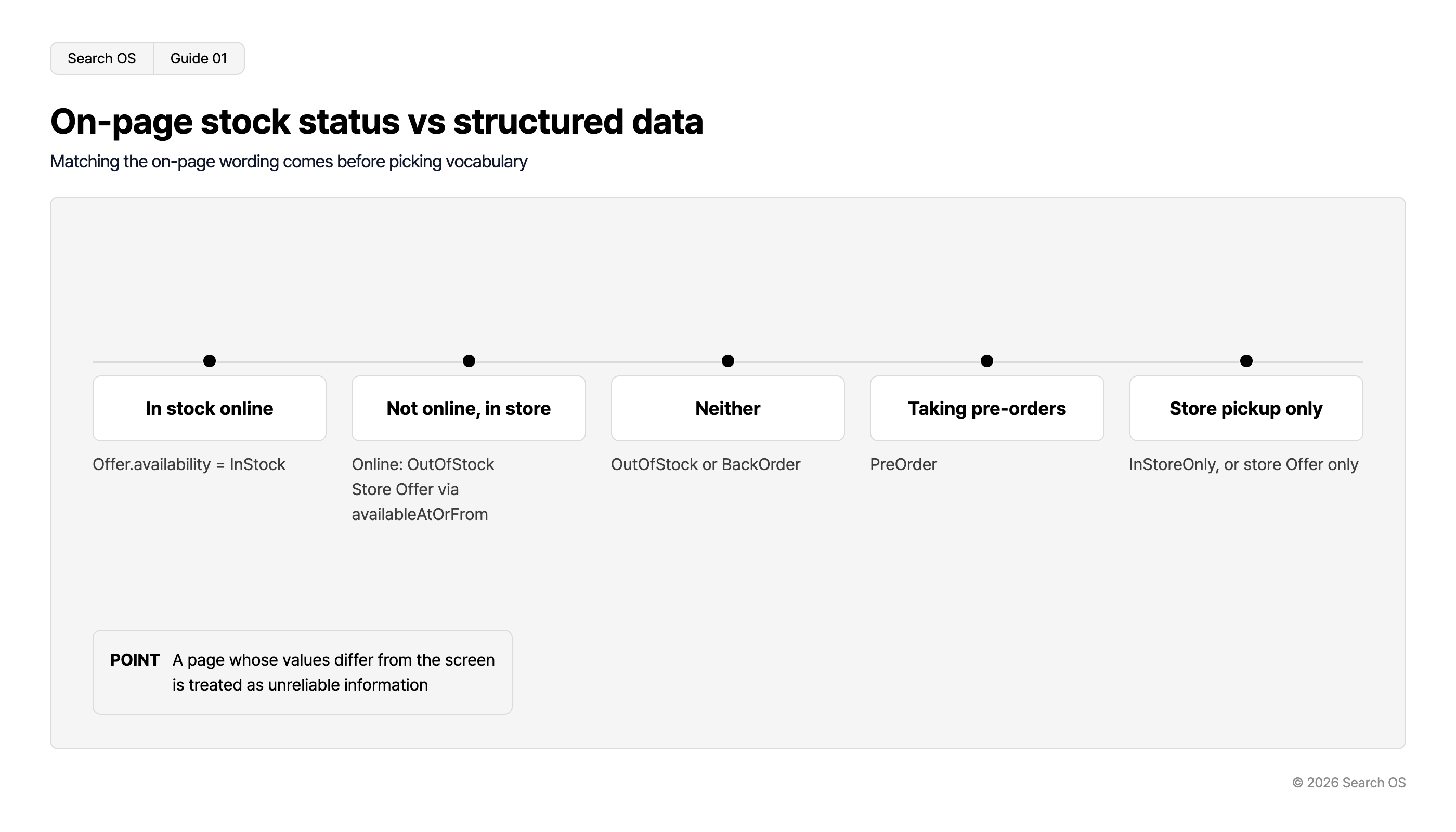
On-page stock status vs structured data
Matching the on-page wording comes before picking vocabulary
| On-page wording | Structured data mapping |
|---|---|
| In stock online | Offer.availability = InStock |
| Not online, in store | Online: OutOfStock Store Offer via availableAtOrFrom |
| Neither | OutOfStock or BackOrder |
| Taking pre-orders | PreOrder |
| Store pickup only | InStoreOnly, or store Offer only |
- POINT
- A page whose values differ from the screen is treated as unreliable information
© 2026 Search OS
For the structured data representation, use the Schema.org Offer and ItemAvailability vocabulary. What matters more than the choice of vocabulary is the match with the on-screen wording.
Key idea: AI treats a page whose on-screen wording and structured data values differ as untrustworthy information. In structuring inventory, consistency comes before precision. Compare the "On-screen display" and "Structured data representation" columns above against your own product pages.
How inventory information affects AI recommendations
When AI search recommends a product, whether it can be bought now is a main criterion. A product judged out of stock drops out of the candidates even with a good price and reviews.
The problem is that AI doesn't judge out-of-stock status from what's visible on screen alone. If template-derived "out of stock" text remains in the HTML, the AI reads that text even when an "Add to cart" button is showing on screen. Then it excludes the product. Check by searching the source of a product page that's on sale for the words "out of stock".
Case: Hidden out-of-stock text
This happened at a Korean ecommerce brand with annual revenue of about ₩40 billion (about ¥4 billion). Product pages for items on sale still carried "sold out" text that was only hidden, not deleted. To the human eye, they were normal product pages. But the AI may have read that text and dropped products that were on sale from its recommendation candidates.
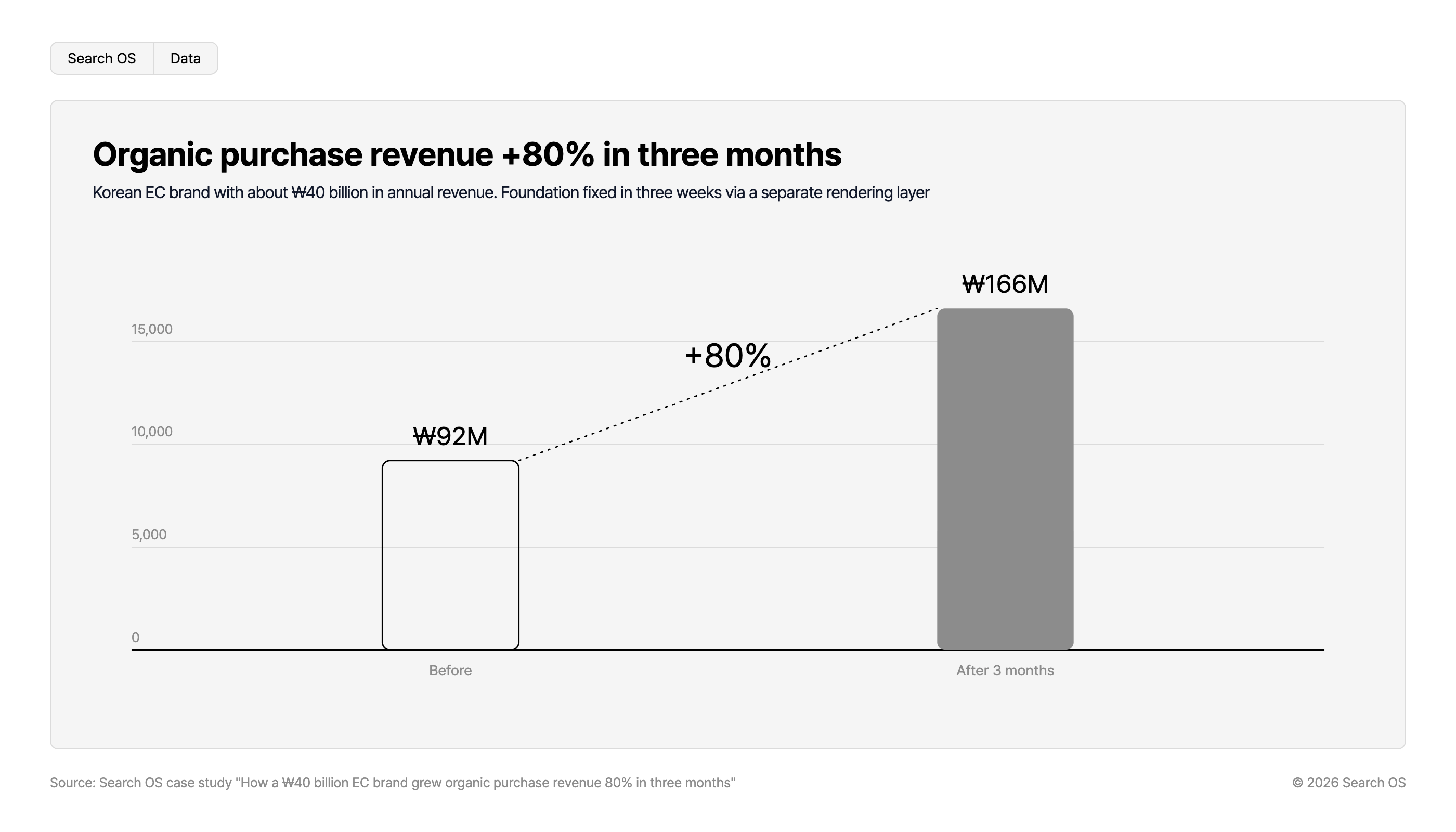
Organic purchase revenue +80% in three months
Korean EC brand with about ₩40 billion in annual revenue. Foundation fixed in three weeks via a separate rendering layer
| Period | Revenue | Growth |
|---|---|---|
| Before | ₩92M | |
| After 3 months | ₩166M | +80% |
Source: Search OS case study "How a ₩40 billion EC brand grew organic purchase revenue 80% in three months"
© 2026 Search OS
The improvement began by removing this hidden text. The on-screen stock display and the structured data values were also brought into line. After that, product descriptions that existed only in images were converted to text. Watching fetch status in bot logs, product and category pages were improved first. As a result, organic purchase revenue grew about 80% in three months. The starting point of this improvement was consistency in how inventory was represented.
Per-channel representation: separate online from store
The basic structure is a separate Offer for online and for store on the same product. Even for the same sneaker, warehouse stock and the Shibuya store's stock are different shelves.
Online Offer: holds the price, availability, and shipping terms. availability refers to the online stock state.
Store Offer: for each store, holds availability and a reference to the store (availableAtOrFrom). With many stores, narrow it to main stores or a representative expression such as "available at stores".
On-screen display: shows the same content as the two above in wording people can read. Something like "Out of stock online. Available at the XX and YY stores".
Whether per-store stock can be shown on the product page depends on the platform's features. If it can't be shown, don't write per-store stock in the structured data either. Stay at the granularity of "carried in stores". Check that you aren't writing information in the structured data alone that isn't on screen.
Connecting to store information
For store stock to mean anything, search engines and AI first have to know about the store itself.
Element | What to do |
|---|---|
Store pages | A URL per store, showing name, address, opening hours, and phone number as visible text |
Store structured data | LocalBusiness or Store, representing name, address, and opening hours |
Reference from product page to store | The store Offer's availableAtOrFrom points to the store page (or its @id) |
Google Business Profile | Keep store information consistent. Leads to "In stock" display in local search |
When product pages and store pages reference each other, AI can understand that this product can be bought at this store. Start by checking that store pages carry name, address, and opening hours as visible text.
Update operations: inventory moves
Inventory changes daily. If structured data updates lag, consistency breaks.
Item | Recommendation |
|---|---|
When to update structured data | At the same time as the on-screen stock display (generated from the same data source) |
sitemap lastmod | Don't update on stock changes. Only when price, description, or specifications change |
Verification | Weekly, sample out-of-stock and in-stock products and check that screen and structured data match |
Detecting hidden text | After template changes, search for stock-related text inside hidden elements |
Navigation
- Search OS
- Guide 02
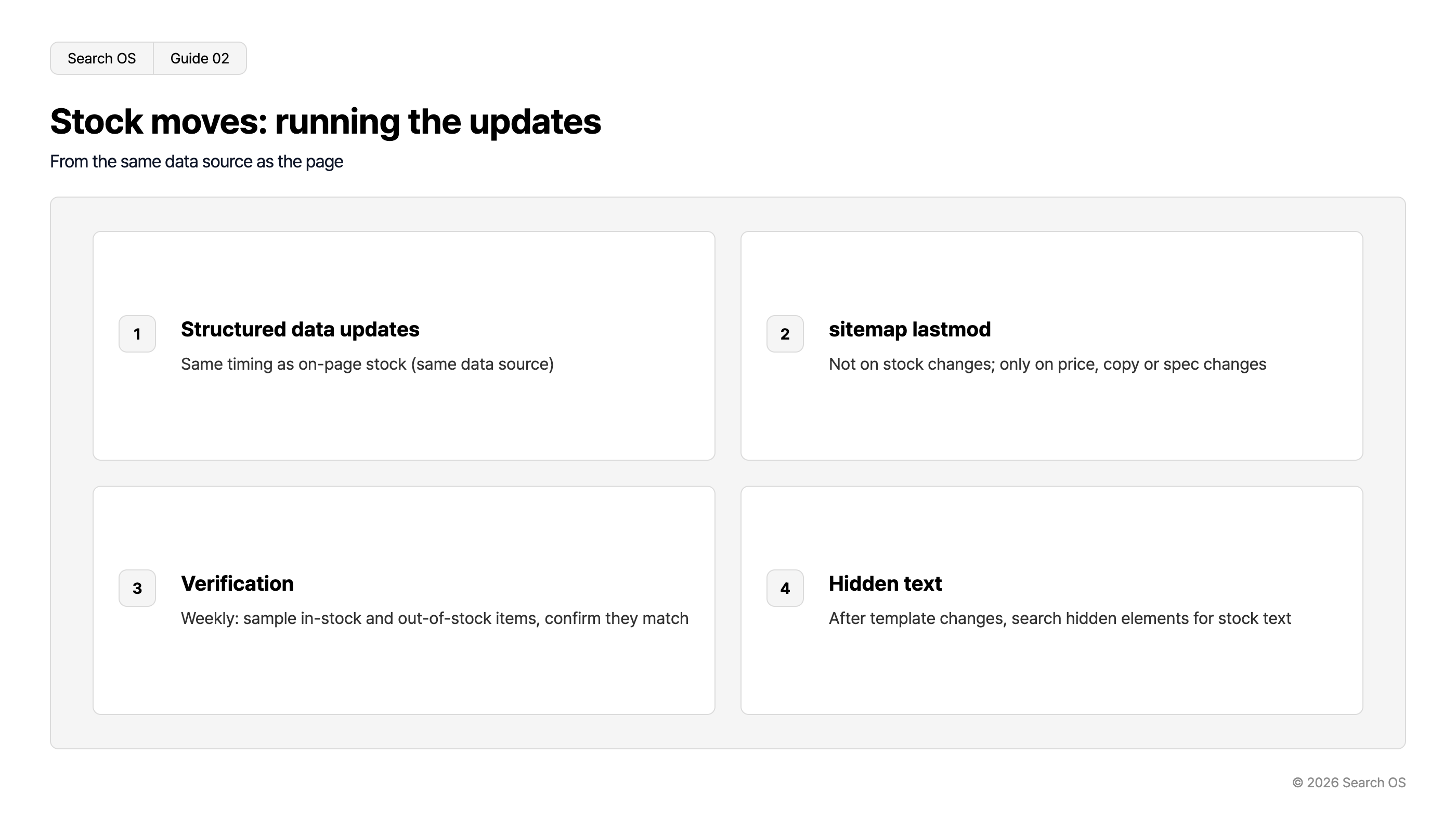
Stock moves: running the updates
From the same data source as the page
| step_number | title | description |
|---|---|---|
| 1 | Structured data updates | Same timing as on-page stock (same data source) |
| 2 | sitemap lastmod | Not on stock changes; only on price, copy or spec changes |
| 3 | Verification | Weekly: sample in-stock and out-of-stock items, confirm they match |
| 4 | Hidden text | After template changes, search hidden elements for stock text |
© 2026 Search OS
If lastmod updates on stock changes, crawlers stop trusting the update signal. Represent stock in structured data, and limit lastmod to content changes. Check that lastmod doesn't change when stock moves.
Operations for keeping consistency
Inventory structuring is assessed on today's state, not on the day it was designed. The more products, the more stores, and the more often stock moves, the heavier the load. Having people keep checking that screen and structured data match stops being realistic.
Search OS treats maintaining that consistency as an operation. It doesn't change the existing platform. It continuously verifies the match between visible text and structured data on product pages, and detects hidden stock text. It also watches the references to store pages and the operation of the sitemap and lastmod. Bot logs confirm whether search engines and AI crawlers are actually fetching product and store pages. On that basis, the places where discrepancies arise are compiled as fix candidates. You can start by picking one in-stock and one out-of-stock product and comparing the screen with the structured data.
Frequently asked questions
Should I write per-store stock counts in the structured data?
Stock counts (inventoryLevel) can be represented. But it's safer not to write information that isn't shown on screen. The more often a value changes, the higher the risk of a mismatch.
When online stock runs out, should I put the page on noindex?
It's safer not to. If there's store stock, the page has value as information that the product can be bought in store. Represent OutOfStock correctly, and place the store guidance as visible text.
Does inventory structured data appear in rich results?
Google's product rich results can show availability. But the focus of this article isn't rich results; it's consistency as a criterion when AI recommends products.
Related reading
References
Google Search Central: Product structured data
Google Search Central: Local business structured data
Schema.org: Offer, ItemAvailability
Google Merchant Center Help: Local inventory ads