Shopify Collection and Tag Duplicate URLs and Crawling
Navigation
- Search OS
- Shopify
Shopify Collection and Tag Duplicate URLs and Crawling
| Category | Read Time | Description | Source |
|---|---|---|---|
| Guides | 6 min read | Japan EC platform guides for search and AI search | Search OS |
On Shopify, the same product opens at both a collection-path URL and a standalone URL. Because the canonical points to the standalone URL, duplicate indexing is prevented, but crawl budget is still consumed. This article covers the scope of the impact, including tag pages and filter URLs, and three ways to handle them.
- URL
- searchos.io/en/blog
- Copyright
- © 2026 Search OS
On Shopify, the same product opens at both /collections/collection-name/products/product-name and /products/product-name. Tag-filtered URLs appear as well. Store owners often ask whether this duplication affects crawling.
The answer is that it does, but duplicate indexing and wasted crawling are separate problems. Shopify's standard themes output a canonical on collection-path product URLs that points to the standalone URL. Because search engines are told which one is authoritative, the index normally doesn't end up with two copies. A crawler is a program that reads pages one after another. Before it can read the canonical, though, it has to fetch that URL. Every fetch consumes crawl budget.
This article lays out how duplicate URLs arise and what canonical does and doesn't solve. It also covers what to check from a crawl budget perspective and how to handle tag and filter URLs.
Conclusion: canonical prevents duplicate indexing. Wasted crawling has to be managed separately
Problem | Shopify default | Impact | Action |
|---|---|---|---|
Same product opens at multiple URLs | Canonical points to the standalone URL | Duplicate indexing almost never occurs | Confirm the theme outputs the canonical correctly |
Collection-path URLs used in internal links | Depends on theme settings | Crawlers fetch large numbers of duplicate URLs | Unify internal links to standalone URLs |
Tag filter URLs multiply without limit | Often left indexable | Low-value pages consume crawl budget | Control with noindex or robots |
Sort and filter query parameters | Indexable | Same as above | Control with canonical and robots |
Breadcrumbs
- Search OS
- Guide 01
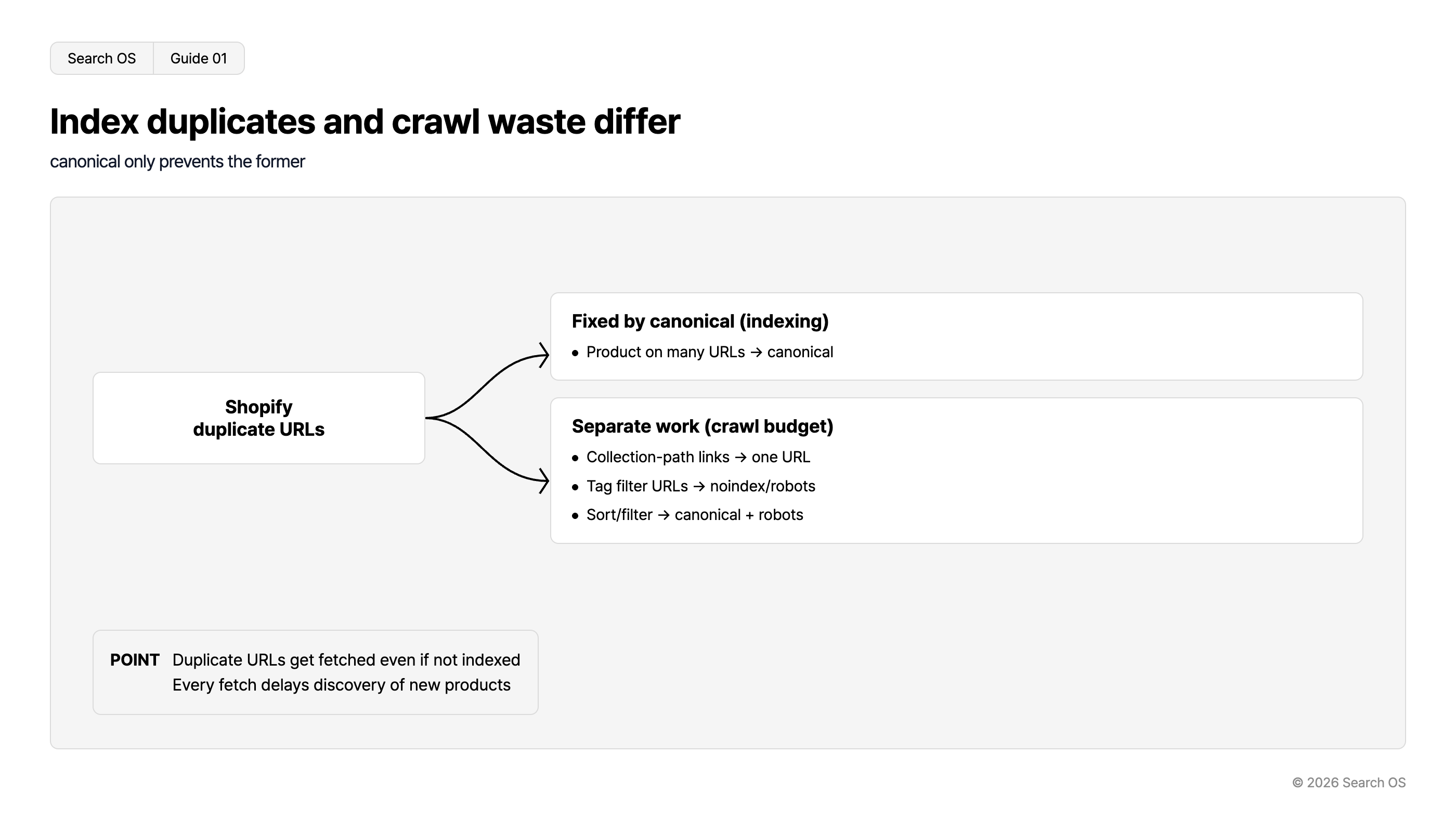
Index duplicates and crawl waste differ
canonical only prevents the former
| Category | Details |
|---|---|
| Shopify duplicate URLs | Root cause for the following issues |
| Fixed by canonical (indexing) | Product on many URLs → canonical |
| Separate work (crawl budget) | Collection-path links → one URL; Tag filter URLs → noindex/robots; Sort/filter → canonical + robots |
- POINT
- Duplicate URLs get fetched even if not indexed. Every fetch delays discovery of new products
© 2026 Search OS
With a few hundred products and few collections and tags, this problem rarely causes real harm. The picture changes once you have thousands of products, hundreds of tags, and a growing number of collection combinations. The crawler uses up its budget before it reaches the pages you actually want indexed.
Key idea: Crawl budget is the ceiling on how many URLs a crawler processes for a domain in a given period. Duplicate URLs are fetched even if they are never indexed. Every fetch spent on them delays the discovery of new products and updated product pages.
Where duplicate URLs come from
A Shopify product can exist under three types of URL.
Standalone URL: /products/product-handle. This is the authoritative URL.
Collection-path URL: /collections/collection-handle/products/product-handle. The theme generates this URL when a shopper clicks a product from a collection page.
Tag, filter, and sort URLs: /collections/collection-handle/tag-name, or URLs with query parameters such as ?sort_by= or ?filter.v.option=.
Types 1 and 2 are consolidated by canonical. Type 3 is not a product page but a variant of the listing page. Where its canonical points varies by theme, and these URLs are often left indexable. Open a tag-filtered URL and check where its canonical points.
What canonical solves and what it doesn't
A canonical is a declaration to search engines that the authoritative version of this URL is a different URL. It solves index consolidation and the pooling of ranking signals. It doesn't restrict crawler behavior itself.
What it solves: It prevents the same product from appearing twice in search results. It pools link signals on the standalone URL.
What it doesn't solve: Crawlers still fetching duplicate URLs. Duplicate URLs listed in the sitemap. Internal links pointing to duplicate URLs.
When internal links point to collection-path URLs, the crawler fetches that URL every time, reads the canonical, and then moves to the standalone URL. Across an entire site, these round trips add up and crawl efficiency drops noticeably. Check whether your product card links go directly to /products/.
What to check from a crawl budget perspective
Item | How to check | Benchmark |
|---|---|---|
Share of indexed URLs that are collection-path URLs | Search Console pages report, site: search | The closer to zero, the better |
Number and type of crawled but unindexed URLs | Search Console "Crawled - currently not indexed" | Needs action if tag and parameter URLs make up most of them |
Whether internal links point to standalone URLs | Check the link targets of the theme's product cards | Ideally all go directly to /products/ |
Sitemap contents | /sitemap.xml and the sitemaps under it | Only standalone URLs listed |
Bot fetch logs | Server logs or bot logs | Needs action if duplicate URLs are fetched frequently |
The last item is the most direct evidence. The Shopify admin, however, doesn't show bot fetch logs. You need another way to see them. Start with "Crawled - currently not indexed" in Search Console.
Handling tag and filter URLs: three options
Option | What it does | Best for | Caution |
|---|---|---|---|
A. Keep them out of the index | Add noindex to tag and parameter URLs, or restrict crawling itself in robots.txt.liquid | Tags with no search demand (color, size, etc.) | Blocking in robots means the canonical is never read either |
B. Promote some to proper pages | Turn tags with search demand (use, occasion, etc.) into standalone collections with descriptions | Filters people search for, such as "gift" or "summer" | Don't add pages without descriptions |
C. Consolidate to the parent collection with canonical | Point filter URL canonicals at the parent collection | Middle ground between A and B | Crawling itself continues |
Navigation
- Search OS
- Guide 02
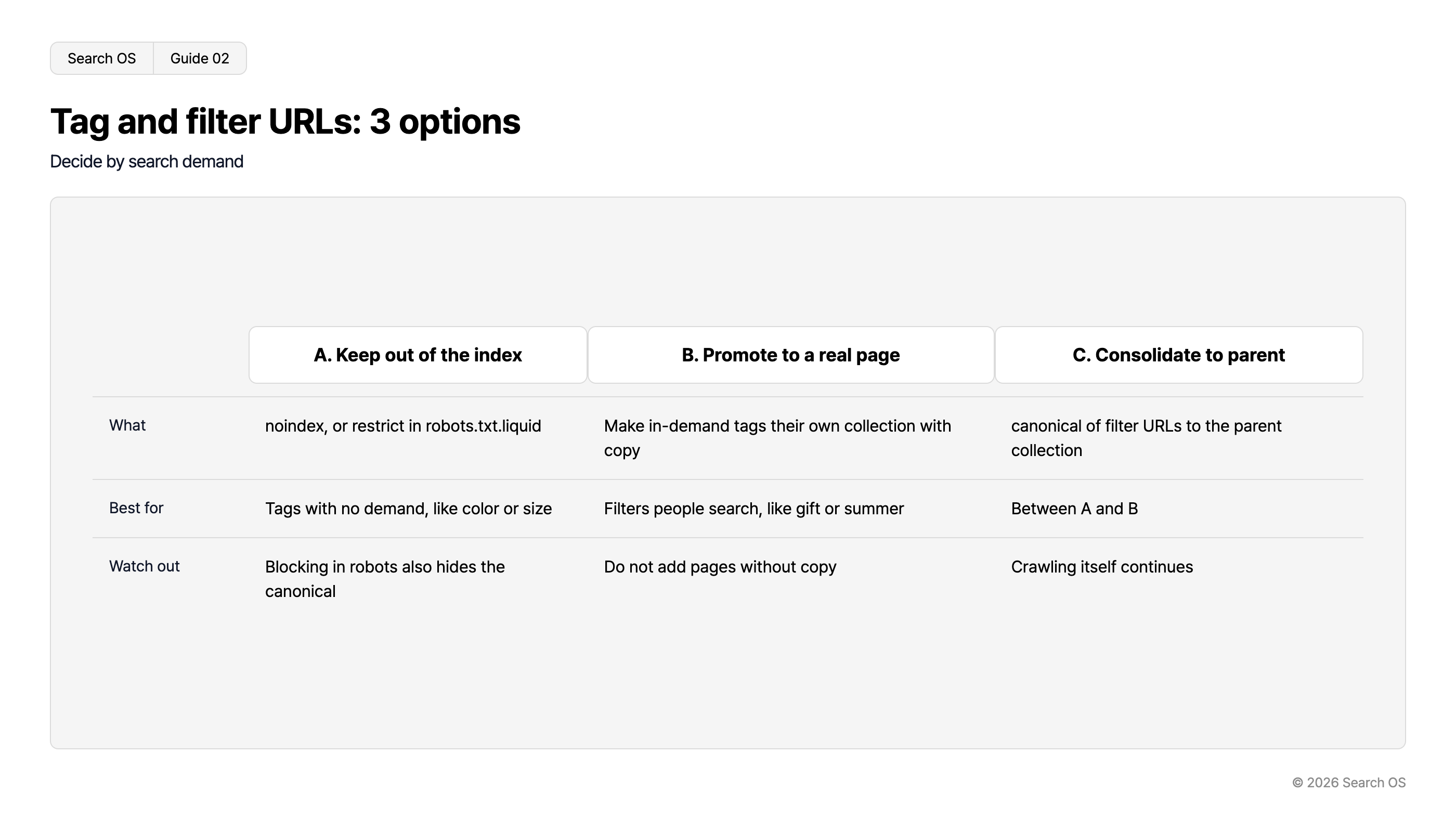
Tag and filter URLs: 3 options
Decide by search demand
| 구분 | A. Keep out of the index | B. Promote to a real page | C. Consolidate to parent |
|---|---|---|---|
| What | noindex, or restrict in robots.txt.liquid | Make in-demand tags their own collection with copy | canonical of filter URLs to the parent collection |
| Best for | Tags with no demand, like color or size | Filters people search, like gift or summer | Between A and B |
| Watch out | Blocking in robots also hides the canonical | Do not add pages without copy | Crawling itself continues |
© 2026 Search OS
For most stores, combining A and B is the practical choice. Only the filters people search for, such as "gift", become proper pages under B. Everything else, such as color and size, is stopped under A. Start by splitting your tags into those with search demand and those without.
What happens as the product count grows
With thousands of products, dozens of collections, and hundreds of tags, the theoretical URL count reaches many times the product count. Add a new product in this state and the crawler takes a long time to find it. Seasonal products can miss their selling window before they get indexed.
For stores at this stage, Search OS uses bot logs to check which URLs Googlebot and GPTBot fetch and how often. It makes the share of fetches spent on duplicate and low-value URLs visible. On that basis, it organizes canonical, noindex, sitemap, and internal link fixes in priority order. It doesn't change your Shopify theme or product data. The approach is to cut waste in the layer bots read and redirect budget to the pages you want indexed.
Frequently asked questions
Should I eliminate all collection-path product URLs?
You don't need to. If the canonical is correct, indexing is consolidated. Unifying internal links to standalone URLs, however, does improve crawl efficiency.
If I noindex tag pages, won't I lose people searching for those tags?
Don't noindex tags that have search demand. Promote them to standalone collections with descriptions (option B). Stop only the tags without demand.
Which is better for filter URLs, blocking in robots.txt or noindex?
Blocking in robots reduces crawling itself. Canonical and noindex, however, are then never read. To remove URLs that are already indexed, use noindex first. The safe order is to block in robots only after the URLs have dropped out of the index.
Related reading
Why SEO Bots Can't Read Your Shopify Store (and How to Fix It)
Sitemap Operations for Large Sites: lastmod, Splitting, and Submission
References
Google Search Central: Managing crawl budget for large sites
Google Search Central: Consolidate duplicate URLs
Google Search Central: Faceted navigation best practices
Shopify Help Center: SEO