When ShopServe Pages Take More Than 3 Seconds
Navigation
- Search OS
- ShopServe
When ShopServe Pages Take More Than 3 Seconds
| Category | Read Time | Topic | Content | Source | Copyright |
|---|---|---|---|---|---|
| Insights | 6 min read | Japan EC platform guides for search and AI search | When a ShopServe page takes more than 3 seconds to display, it affects both human bounce rates and bot fetch failures. The bigger problem isn't a direct ranking factor but crawlers giving up before rendering and failing to read product information. This article breaks down the causes, how to measure, and the order of fixes. | searchos.io/en/blog | © 2026 Search OS |
Product pages on a ShopServe store take 3 seconds or more to display, and the rise in bounce rate is noticeable even without analytics. Store owners often ask whether this state also affects SEO performance.
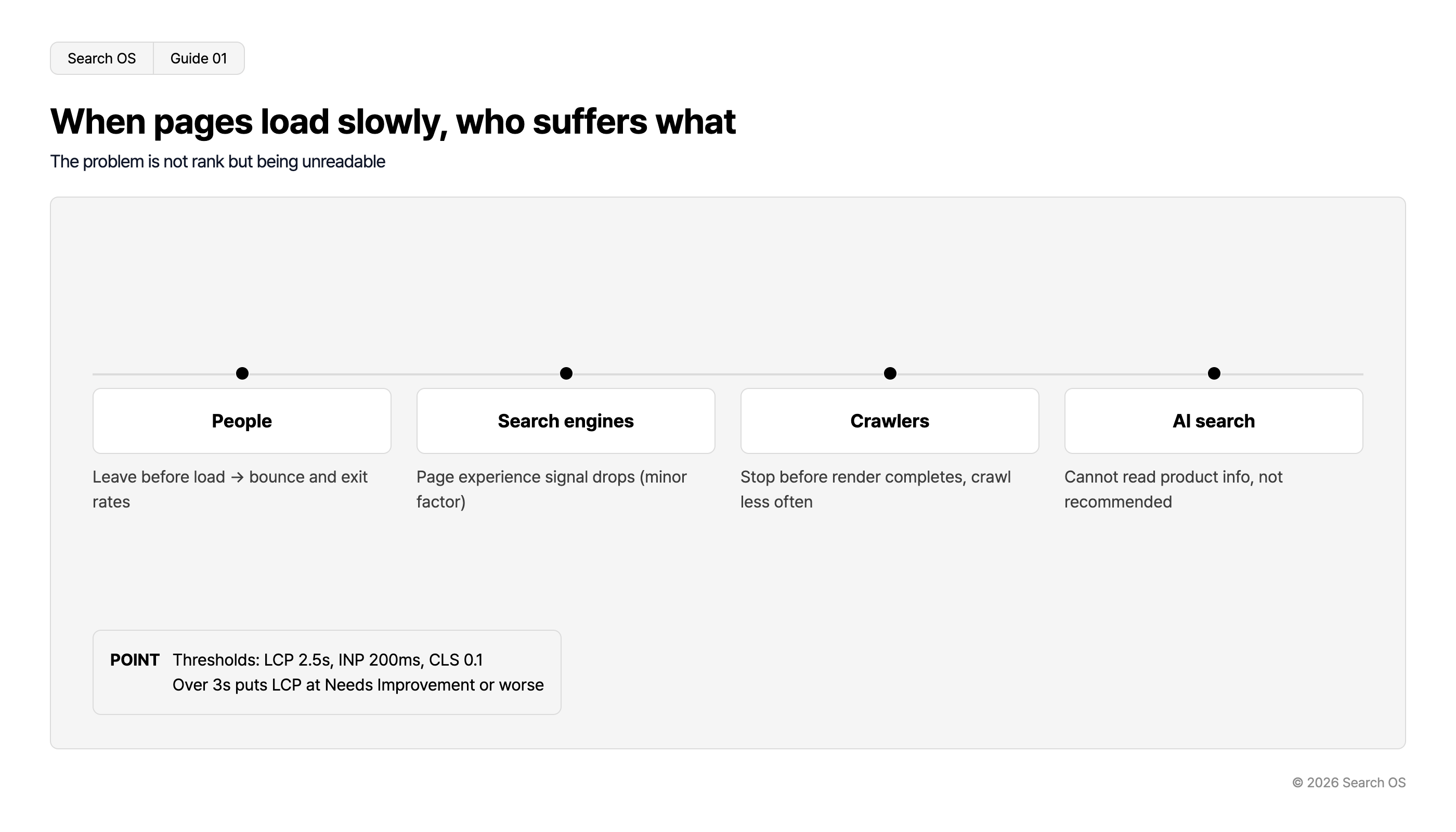
The answer is that it affects both, but in different ways. For people, it shows up as bounces. For search engines and AI, rankings don't drop directly. A crawler is a program that reads pages one after another. The effect shows up as the crawler giving up before rendering and failing to read product information. Or it shows up as fewer fetches. Because nothing appears on screen, this side is easy to miss.
This article covers what the 3-second figure means and the difference between human bounces and bot fetch failures. It also breaks down the causes, how to measure, and the order of fixes.
Conclusion: "can't be read" matters more than rankings. Causes split into three: external scripts, images, and rendering dependence
Affected | What happens | How it shows |
|---|---|---|
People | Leave without waiting for the page | Higher bounce and exit rates in analytics tools |
Search engines | Lower page experience score. A low-weight factor, though | Small ranking movement |
Crawlers | Abandon the fetch before rendering completes, or fetch less often | Visible only in Search Console or logs |
AI search | Can't read product information, so the product drops out of recommendation candidates | Only visible as not being cited |
Navigation
- Search OS
- Guide 01
When pages load slowly, who suffers what
The problem is not rank but being unreadable
| Target | Impact |
|---|---|
| People | Leave before load → bounce and exit rates |
| Search engines | Page experience signal drops (minor factor) |
| Crawlers | Stop before render completes, crawl less often |
| AI search | Cannot read product info, not recommended |
- POINT
- Thresholds: LCP 2.5s, INP 200ms, CLS 0.1 Over 3s puts LCP at Needs Improvement or worse
© 2026 Search OS
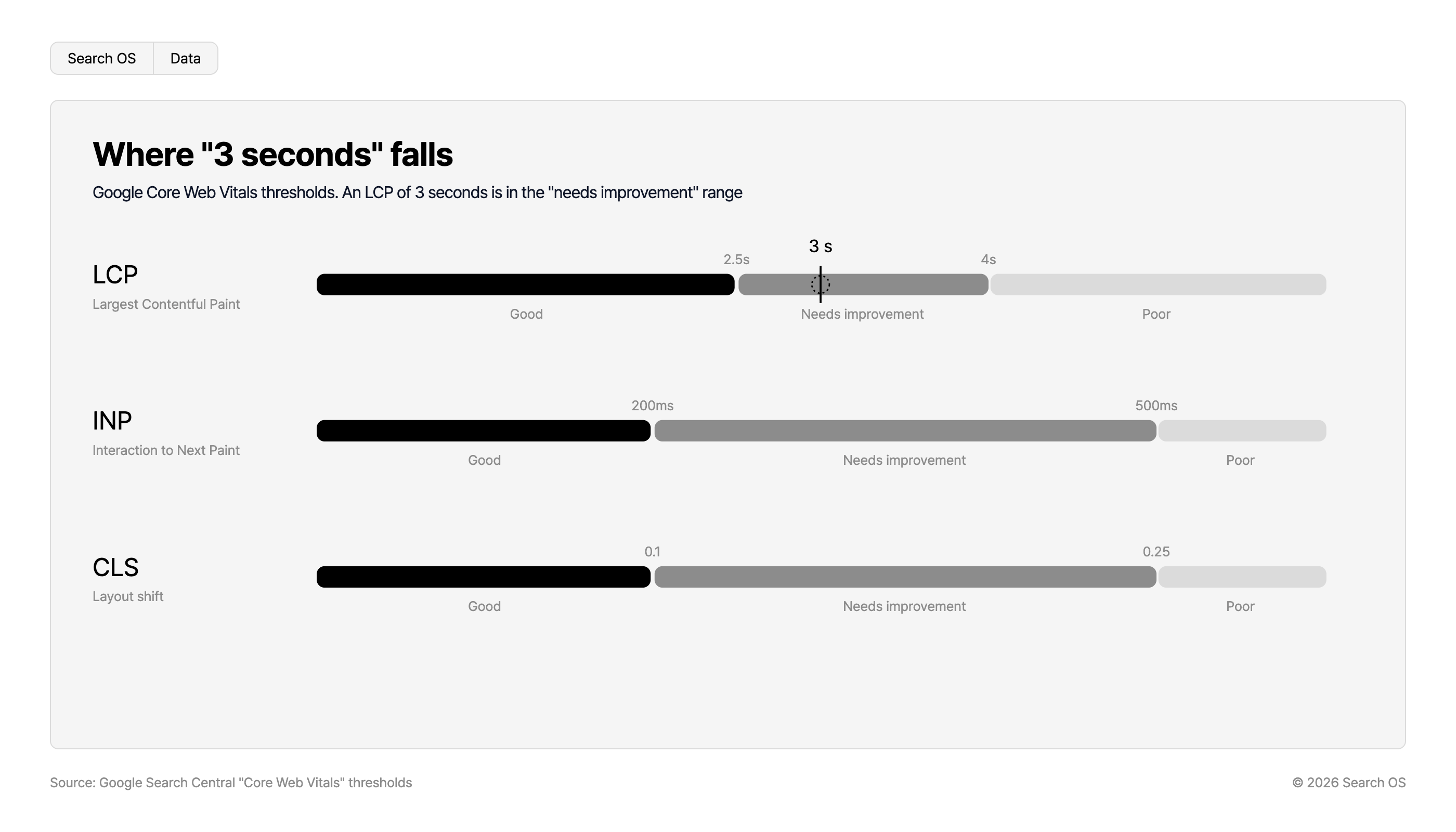
The number "3 seconds" has no meaning as a threshold in itself. Google's Core Web Vitals publish different criteria. Largest Contentful Paint (LCP) within 2.5 seconds. Interaction to Next Paint (INP) within 200 milliseconds. Cumulative Layout Shift (CLS) within 0.1. A page over 3 seconds is very likely in LCP's "needs improvement" or "poor" range.
Where "3 seconds" falls
Google Core Web Vitals thresholds. An LCP of 3 seconds is in the "needs improvement" range
| Metric | Description | Good | Threshold 1 | Needs improvement | Threshold 2 | Poor |
|---|---|---|---|---|---|---|
| LCP | Largest Contentful Paint | Good | 2.5s | Needs improvement (3 s falls here) | 4s | Poor |
| INP | Interaction to Next Paint | Good | 200ms | Needs improvement | 500ms | Poor |
| CLS | Layout shift | Good | 0.1 | Needs improvement | 0.25 | Poor |
Source: Google Search Central "Core Web Vitals" thresholds
© 2026 Search OS
Key idea: Even if the ranking impact is small, the impact of crawlers failing to read product information is large. Before display speed is an SEO factor, it is a precondition for whether bots can read the page at all. Check whether the page is being read before you check rankings.
Human bounces and bot fetch failures share a cause but differ in outcome
The same cause leads to different outcomes for people and for bots.
Waiting for external scripts: People wait on a white screen. Bots don't wait and end the fetch.
Large images: People wait for images to appear one by one. Bots don't read images, but they do wait for rendering to complete.
Product information that only appears after JavaScript rendering: People eventually see it. Bots may read the pre-render HTML and conclude there is no information.
The third is the most serious. It looks normal to people, so operators don't notice. Suspect that prices or descriptions are being rendered later by JavaScript.
Breaking down the causes
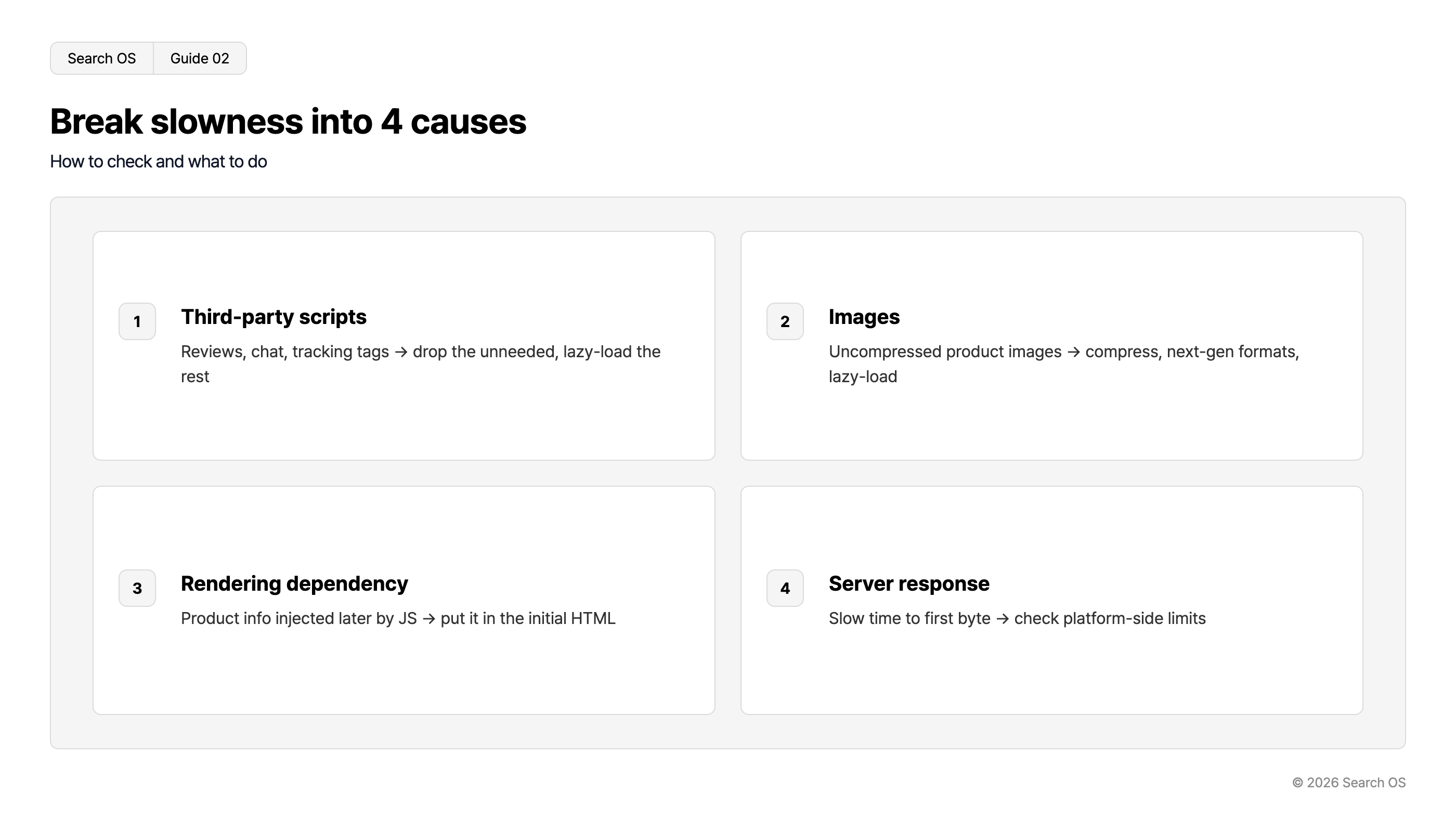
Cause | Typical examples | How to check | Fix |
|---|---|---|---|
External scripts | Reviews, chat, recommendations, tracking tags, ads | Load order and timing in the browser's developer tools | Remove what isn't needed. Lazy-load what stays |
Images | Uncompressed product images, dozens per page | "Optimize images" item in PageSpeed Insights | Compression, next-gen formats, lazy loading |
Rendering dependence | Product description, price, and stock injected later by JavaScript | Fetched HTML in Search Console URL inspection | Include product information in the initial HTML |
Server response | Slow time to first byte | "Server response time" in PageSpeed Insights | Check the platform's constraints |
Navigation
- Search OS
- Guide 02
Break slowness into 4 causes
How to check and what to do
| number | cause | description |
|---|---|---|
| 1 | Third-party scripts | Reviews, chat, tracking tags → drop the unneeded, lazy-load the rest |
| 2 | Images | Uncompressed product images → compress, next-gen formats, lazy-load |
| 3 | Rendering dependency | Product info injected later by JS → put it in the initial HTML |
| 4 | Server response | Slow time to first byte → check platform-side limits |
© 2026 Search OS
On ShopServe, what operators can directly touch is mainly external scripts and images. Review widgets and oversized product photos fall here. Rendering dependence and server response belong to the template and the platform. They need checking, but the fixes are limited. Confirm what you can control in the admin and the help docs.
Measuring: three tools that show different things
Tool | What it shows | What it doesn't |
|---|---|---|
PageSpeed Insights | Real-user experience data, lab measurements, improvement items | What bots read |
Search Console URL inspection | The HTML and screenshot Google fetched | Fetch status of AI-side bots |
Server logs, bot logs | Fetch counts, responses, and errors for Googlebot, GPTBot, PerplexityBot | User experience |
Only by combining all three can you tell whether people are being kept waiting, whether Google can read the page, and whether AI bots can read it. The ShopServe admin doesn't show bot logs. Arrange another way to see the third.
Fixes, in this order
Inventory external scripts. Remove unused tags and widgets that aren't delivering results. Cutting more than a second this way alone isn't unusual.
Compress images and lazy-load images outside the viewport. If a page has dozens of product images, this is the biggest factor.
In URL inspection, confirm that the HTML Google fetched contains the product name, price, and description. If not, it's a rendering dependence problem. Consider revising the template.
Check bot fetch status. If fetch counts are falling or errors are rising, this is where you verify the effect of the speed improvements.
Speed isn't a one-time fix
External scripts multiply with every campaign and app added. Product images multiply with every listing. Speed tends to slide back the month after you improve it.
Search OS provides a separate layer of structure and metadata that search engines and AI crawlers can read easily, for existing sites including ShopServe stores. Through bot logs, it continuously checks fetch status, response times, and errors for Googlebot and GPTBot. The screens people see stay as they are. It keeps bots in a state where they can read without waiting, as an ongoing operation.
Frequently asked questions
Will getting under 3 seconds raise my rankings?
The direct effect on rankings is limited. The gains come in more stable indexing and a better bounce rate. That's because crawlers can reliably read product information.
Should I remove all external scripts?
Keep the ones that contribute to sales. Defer their loading, though, so they don't block the initial display. Remove the ones that aren't delivering results.
Do AI bots look at display speed too?
They look less at speed itself than at whether the fetch succeeds and whether the pre-render HTML contains the information. Slow pages get their fetches cut off or fetched less often. Check that the pre-render HTML contains your product information.
Related reading
Is Color Me Shop Weak at SEO: The Facts and the Limits of Countermeasures
If AI Assistants Can't Find Your Answer, Google Rankings Won't Save You
References
web.dev: Web Vitals
Google Search Central: Understanding page experience in Google Search results
Google Search Central: JavaScript SEO basics
Google: PageSpeed Insights