Connecting STORES and Google Business Profile
Navigation
- Search OS
- STORES
Connecting STORES and Google Business Profile
- Category
- Guides
- Reading Time
- 6 min read
- Topic
- Japan EC platform guides for search and AI search
When a physical store is the main business, as with a salon, cafe, or classroom, and the STORES online store plays a supporting role, the store often shows up in search while the online shop doesn't. This article lays out how to link Google Business Profile and the online store to each other so the store's search performance flows into the shop.
- Source
- Search OS
- URL
- searchos.io/en/blog
- Copyright
- © 2026 Search OS
If you run a salon and also sell products through STORES, a search for the store name may bring up the store's information while the online shop's pages don't appear.
This is the most common situation for shops using STORES. The cause is that the store and the online store look like separate entities to search engines. The store is recognized through Google Business Profile, and the online store through its STORES URL. Without a signal connecting the two, the store's performance doesn't flow into the shop.
This article lays out how to get search engines and AI to see the store and the shop as the same business.
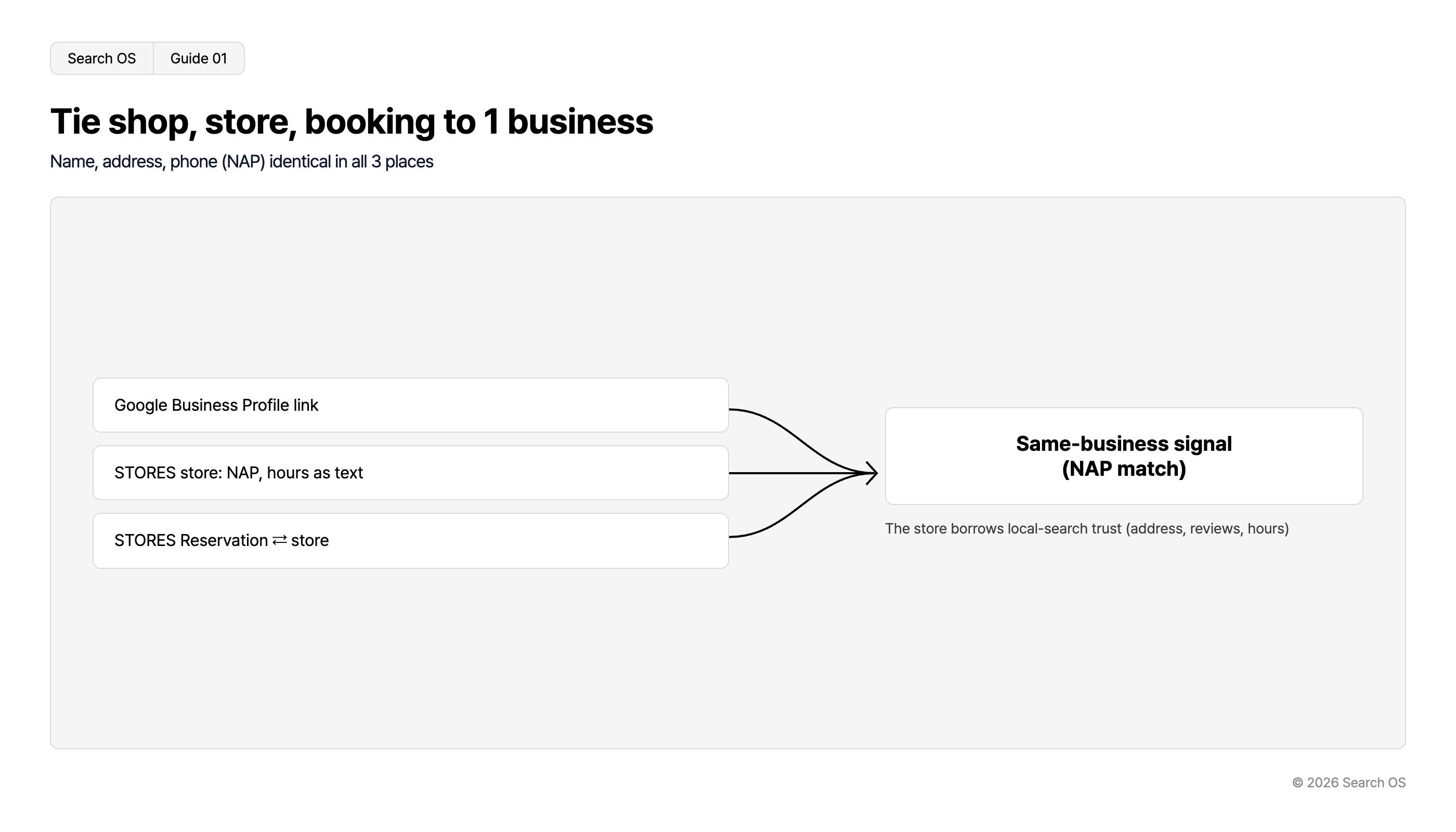
Conclusion: Link the three places to each other and align name, address, and phone number
Place | What to do | Effect |
|---|---|---|
Google Business Profile | Register the STORES shop URL in the website field | A path from store search to the shop, and a same-business signal |
STORES shop | Show store name, address, phone number, and hours as text | Tells search engines the shop is part of the store |
STORES Reservations (if used) | Link the reservation page and the shop to each other | Bundles the three paths of reservation, purchase, and visit into one business |
Navigation
- Search OS
- Guide 01
Tie shop, store, booking to 1 business
Name, address, phone (NAP) identical in all 3 places
| Input Sources | Resulting Signal | Outcome Description |
|---|---|---|
| Google Business Profile link | Same-business signal (NAP match) | The store borrows local-search trust (address, reviews, hours) |
| STORES store: NAP, hours as text | Same-business signal (NAP match) | The store borrows local-search trust (address, reviews, hours) |
| STORES Reservation ⇄ store | Same-business signal (NAP match) | The store borrows local-search trust (address, reviews, hours) |
© 2026 Search OS
Name, address, and phone number (NAP) must be identical to the letter in all three places. Even a difference in word order, such as "Salon ABC" versus "ABC Salon", can lead search engines to treat them as separate businesses.
Key idea: Stores are strong in local search because Google Business Profile carries real-world signals (address, reviews, hours). Tie the shop to those signals and the shop borrows the same trust. Check whether the shop URL is in the website field of your Business Profile.
Why the store shows up but the shop doesn't
The store's search result is built from Google Business Profile information. With address, hours, reviews, and photos all present, it's treated as a business that really exists.
A STORES online store, by contrast, is often just a page with products lined up. It doesn't say whose store it is or where it is, so search engines can't tie the shop to the store. It's the same as opening a shop with no sign. AI search is no different: asked for a salon in a given city that sells a recommended shampoo, it can't answer when the store and the shop are separate. Check whether the shop's top page states the store's name and location in text.
What to put on the shop side
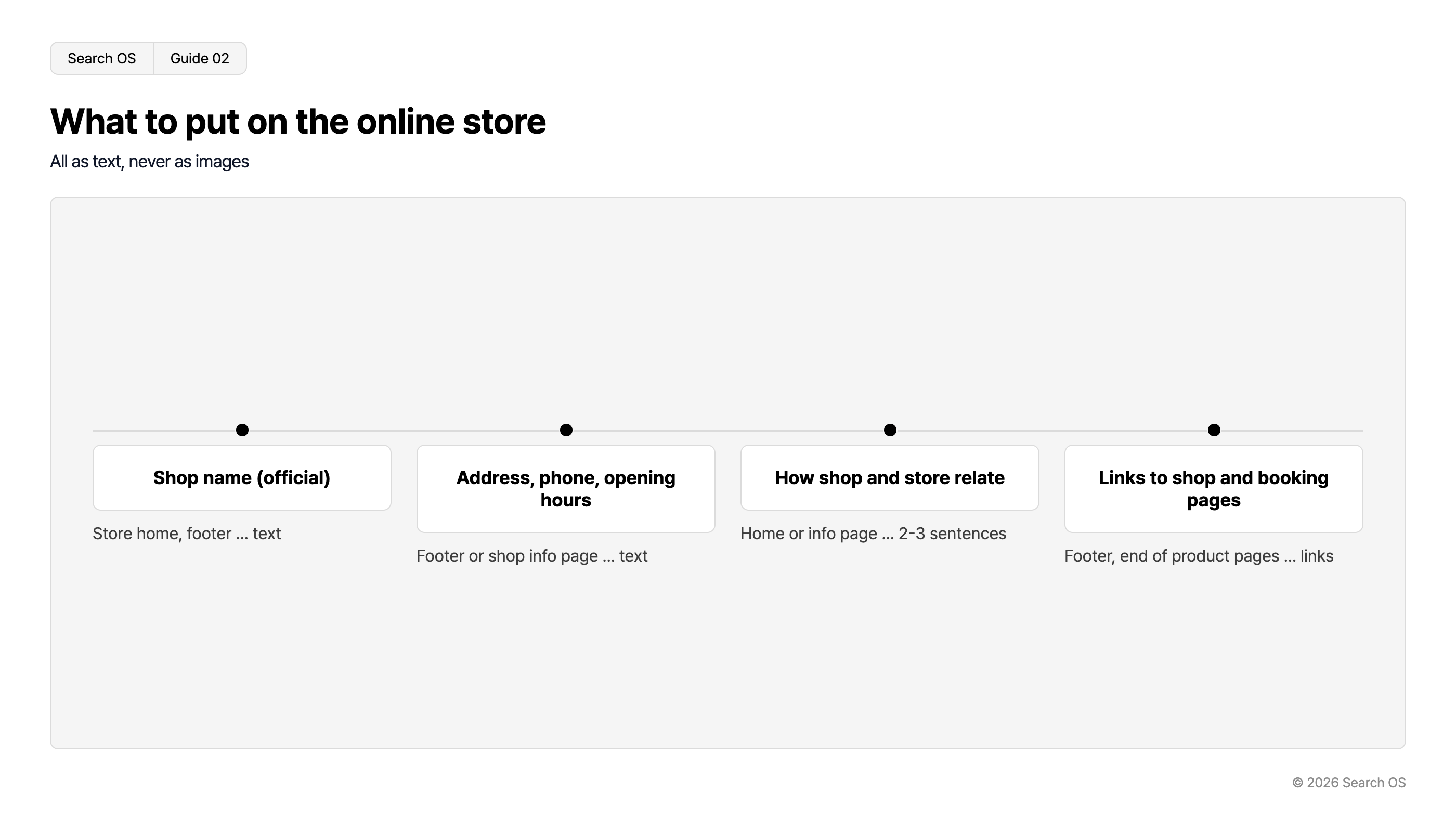
Information | Where | Format |
|---|---|---|
Store name (official name) | Shop top page, footer | Text |
Address, phone number, hours | Footer or store information page | Text (not an image) |
How the services offered in the store relate to what's sold in the shop | Top page or information page | 2 to 3 sentences |
Links to the store page and reservation page | Footer, end of product pages | Links |
Navigation
- Search OS
- Guide 02
What to put on the online store
All as text, never as images
| Content Type | Location and Format |
|---|---|
| Shop name (official) | Store home, footer ... text |
| Address, phone, opening hours | Footer or shop info page ... text |
| How shop and store relate | Home or info page ... 2-3 sentences |
| Links to shop and booking pages | Footer, end of product pages ... links |
© 2026 Search OS
Check the admin panel for whether STORES has a feature for showing store information. If there's no dedicated feature, placing it as text in the footer or on a static page is enough. Put the store name, address, and phone number in the footer as text.
State the relationship to the store on product pages
For a salon: "The shampoo we use in the salon. Also available for purchase when you visit." For a classroom: "The materials used in lessons. Non-students can purchase too." Write the relationship between the product and the store in one sentence like this. It becomes a signal to search engines and material for AI search to list it as a product available at this store. Add the relationship to the store on your main product pages.
What to do on the Google Business Profile side
Register the STORES shop URL in the website field (there's a separate field for the reservation URL)
If your category has the Products feature, register your main products and link to the shop's product pages
Use posts to announce new products and campaigns, linking to the relevant shop pages
These are paths that send people from the store's search result to the shop. At the same time, they signal that it's the same business. Confirm that the URL in the website field points to the shop.
How to confirm the connection
Search the store name and check whether the knowledge panel's website link points to the shop
Search the store name plus a product category ("ABC salon shampoo") and check whether the shop's page appears
Check the shop's index status in Search Console and confirm the store information page and main product pages are indexed
Operation as stores multiply
With one store, you can align everything by hand. With several stores or several shops, though, it's a different matter. In a setup mixing reservations, point of sale, and merchandise, NAP drift, broken links, and index gaps become easy to cause.
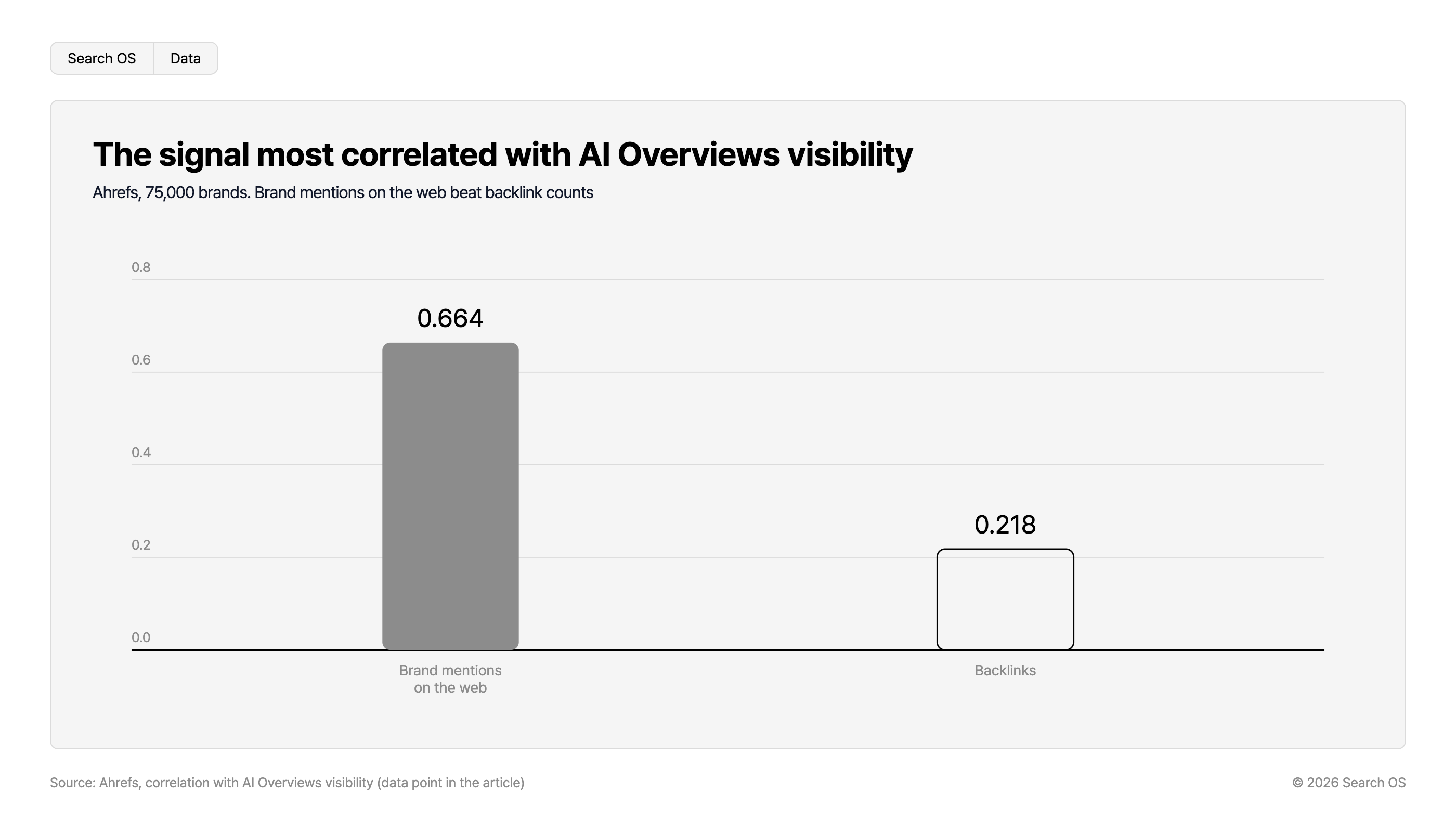
Data point: In an Ahrefs study of 75,000 brands, the signal most strongly correlated with exposure in AI Overviews was not backlink count (0.218) but brand mentions on the web (0.664).
Navigation
- Search OS
- Data
The signal most correlated with AI Overviews visibility
Ahrefs, 75,000 brands. Brand mentions on the web beat backlink counts
| Signal | Correlation Value |
|---|---|
| Brand mentions on the web | 0.664 |
| Backlinks | 0.218 |
Source: Ahrefs, correlation with AI Overviews visibility (data point in the article)
© 2026 Search OS
Search OS is a layer that supports existing shops such as STORES. It provides structure, metadata, and structured data that search engines and AI crawlers read easily, as a separate layer. It also continuously checks store information consistency, cross-references between the shop and store pages, and bot fetch status. It keeps the store's search performance flowing into the shop, not just on the day it was set up. When stores are added, review whether the NAP is aligned everywhere.
Frequently asked questions
Should the Google Business Profile website field point to the homepage or the shop?
If the business has a homepage, register that. Then place a prominent link from the homepage to the shop. If there's no homepage, the shop URL is enough.
What if I don't want to publish the store's address?
For mobile or online-only businesses, Google Business Profile has a setting to hide the address. Even then, put the business name and contact information on the shop side as text.
Does the reservation page show up in search?
Whether STORES Reservations pages are indexed is a separate check. The basic step is linking the reservation page and the shop to each other. On the shop side, place a "Book here" path.
Related reading
STORES shop not showing in search: settings problem or waiting for indexing
Do STORES Reservations pages show up in search: the reservation page and the shop
Structuring online and in-store inventory so both search and AI can read it
References
Google Business Profile Help: Add or claim your Business Profile
Google Search Central: Local business structured data
Google Business Profile Help: Improve your local ranking on Google