B-Cart: What to Publish When Public Pages Are Thin
Navigation
- Search OS
- B-Cart
B-Cart: What to Publish When Public Pages Are Thin
| Category | Read Time | Description | Summary | Source URL | Copyright |
|---|---|---|---|---|---|
| Guides | 6 min read | Japan EC platform guides for search and AI search | On B2B ecommerce like B-Cart, most information sits behind member login. Trade terms can stay closed. This article lays out the thinking behind publishing specs, uses, buying guides, and FAQs, and how to build pages that answer B2B purchasing staff. | searchos.io/en/blog | © 2026 Search OS |
Running a wholesale site on B-Cart, prices and trade terms end up members-only, and few pages are visible from outside. B2B shops often ask what they should publish so search and AI can find them.
In short, trade terms can stay closed. What you publish is specs, uses, buying guides by industry, and FAQs. Convey what the product is and who it's for, and search and AI have what they need to know the product and list it as a candidate.
This article covers where to draw the line on public information in B2B, how information behind login appears from outside, the questions purchasing staff ask, how to build public pages, and the operations that follow.
Conclusion: Close trade terms, open specs, uses, buying guides, and FAQs
Type of information | Public | Reason |
|---|---|---|
Product name, model number, specs, material, size, standards | Public | Basic information search and AI use to identify the product |
Uses, applicable industries, usage scenarios | Public | Answers "[product] for the [X] industry" questions |
Buying guides by industry and use | Public | Answers comparison and condition-based questions |
FAQ (minimum lot, lead time guide, service areas, sample availability) | Public (structure alone, with figures withheld, is fine) | The first items purchasing staff check |
Prices, discount rates, payment terms, credit | Members only | Trade terms. No need to publish |
Member-specific prices, past transaction history | Members only | Private, naturally |
Navigation
- Search OS
- Guide 01
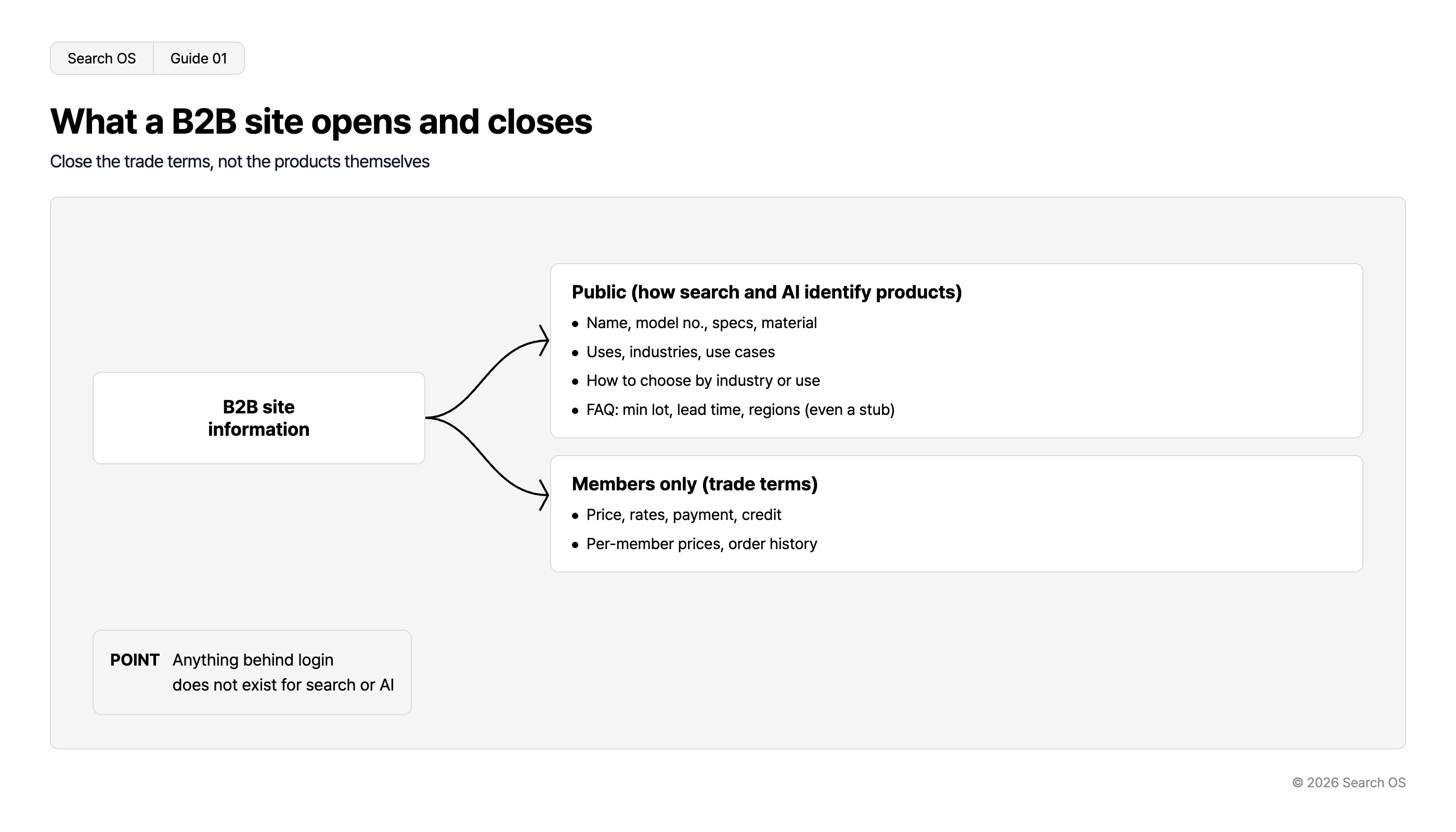
What a B2B site opens and closes
Close the trade terms, not the products themselves
| Category | Details |
|---|---|
| B2B site information | Root information source |
| Public (how search and AI identify products) | • Name, model no., specs, material • Uses, industries, use cases • How to choose by industry or use • FAQ: min lot, lead time, regions (even a stub) |
| Members only (trade terms) | • Price, rates, payment, credit • Per-member prices, order history |
- POINT
- Anything behind login does not exist for search or AI
© 2026 Search OS
On B2B sites with thin public pages, it's not just the bottom two rows that are closed; the top four often are too. That means hiding even the specs printed in the catalog. Open the top four rows and search and AI can see the products.
Key idea: Information behind login is invisible to search and AI. The room to make products known while protecting trade terms lies outside that wall. Start by separating product descriptions from trade terms.
Information behind login is invisible from outside
Search engine crawlers and AI bots are programs that collect information, and they don't log in. A members-only spec sheet is like a document in a locked room: since it's never fetched, it's neither indexed nor cited.
Microsoft advises against placing key information only in hidden places such as tabs, PDFs, images, or behind login. B2B sites sometimes put even product specs behind login, and then AI never learns the product exists.
Check the response of members-only URLs together with the status code and noindex directive. noindex is the directive that keeps a page out of search results. If large numbers of URLs that redirect to login get indexed, they're treated as thin pages and drag on the whole site's performance.
What B2B purchasing staff ask
Purchasing staff start with conditions and fit before price. Questions like "can this be used in a restaurant". Pick one product category and write out the questions along the axes in the next table.
Axis | How purchasing staff phrase it | What the public page answers |
|---|---|---|
Definition | "What is [X]", "What does [X] standard compliance mean" | Glossary, explanation of standards |
Comparison | "Difference between A and B", "Substitutes" | Spec comparison table, selection criteria |
Conditions | "[X] for restaurants", "Available in small lots" | Buying guide by industry, minimum lot guide |
Execution | "Onboarding steps", "Can I get a sample" | How trading starts, sample request guidance |
Risk | "Lead time", "Handling of defects", "Service areas" | Lead time guide, warranty and return policy, delivery areas |
Purchase | "Account opening requirements", "How to get a quote" | Member registration flow, quote request guidance |
- Search OS
- Guide 02
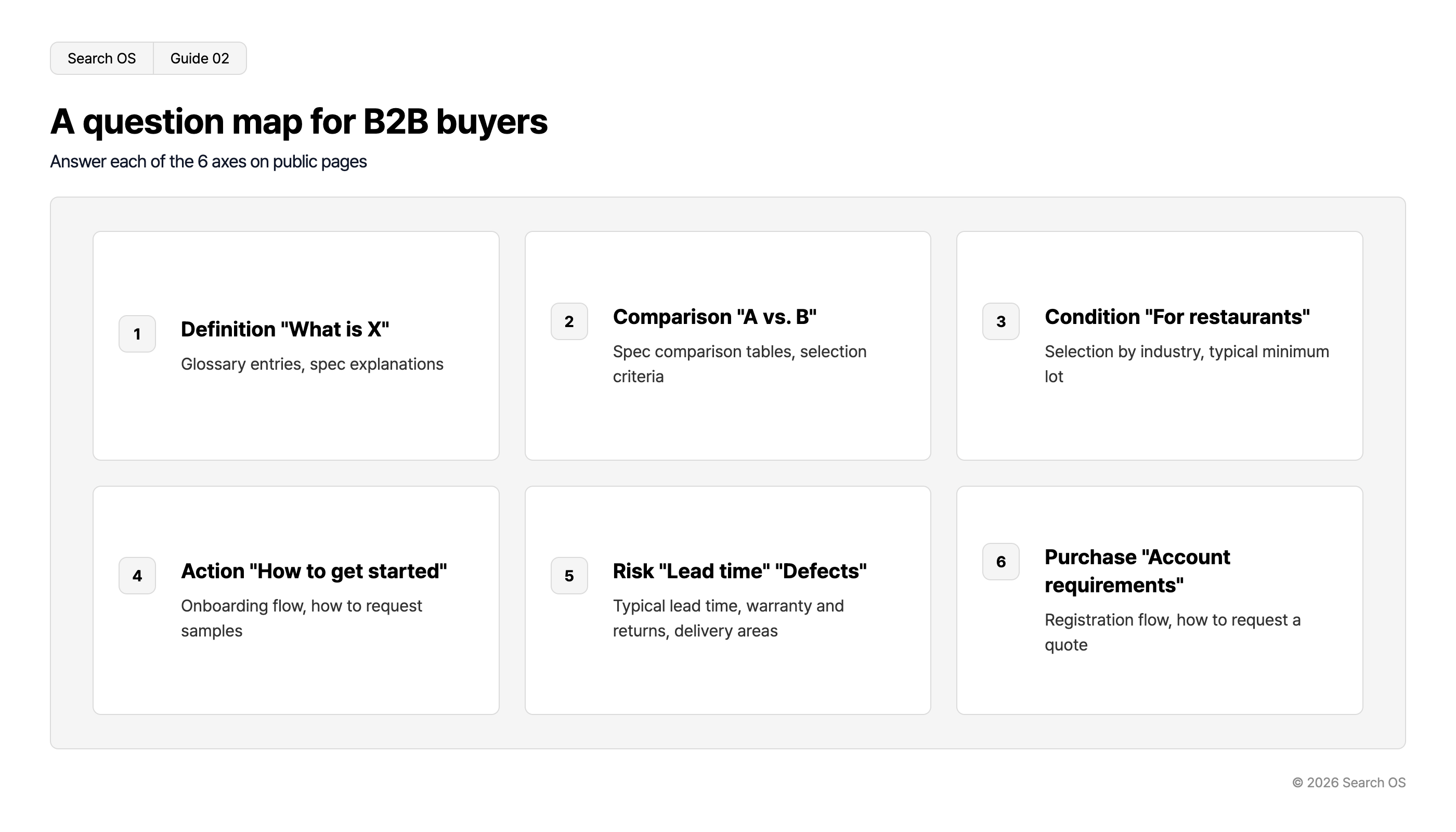
A question map for B2B buyers
Answer each of the 6 axes on public pages
| number | title | description |
|---|---|---|
| 1 | Definition "What is X" | Glossary entries, spec explanations |
| 2 | Comparison "A vs. B" | Spec comparison tables, selection criteria |
| 3 | Condition "For restaurants" | Selection by industry, typical minimum lot |
| 4 | Action "How to get started" | Onboarding flow, how to request samples |
| 5 | Risk "Lead time" "Defects" | Typical lead time, warranty and returns, delivery areas |
| 6 | Purchase "Account requirements" | Registration flow, how to request a quote |
© 2026 Search OS
Even purchase questions can be answered without showing prices. How to get a quote and the account opening requirements are examples. With the information, you're a candidate; without it, you're dropped. Write the steps up to starting a trade on a public page.
What to put on public pages
Page | What to publish | Structured data |
|---|---|---|
Product detail (non-member view) | Product name, model number, specs, uses, applicable industries, images, FAQ. Show price as "member price" | Product (omit price or indicate it's behind login) |
Category | Description of the product group, buying guide by industry, paths to main products | CollectionPage, BreadcrumbList |
Industry guide | "How to choose [X] for the [Y] industry". Comparison table and links to main products | Article, BreadcrumbList |
Trade guide | How trading starts, minimum lot, lead time guide, service areas, samples | FAQ as visible text (FAQPage structured data optional) |
Company information | Business description, locations, track record | Organization (once, on the top or company page) |
Whether product detail pages can show specs and images to non-members depends on B-Cart's settings. If that's difficult, describe the products on industry guide and category pages. The structured data in the table tells machines what each page means. Start by checking the non-member view.
How to decide when unsure about publishing
Whether it would hurt for competitors to see it. Prices, discount rates, and terms are what you want private. Specs and uses are the same information you print in the catalog.
Whether the buyer needs it at the shortlisting stage. Information needed there gets published. Price becomes necessary at the stage after.
Whether not publishing costs you an opportunity. Without the information you don't make search and AI's shortlist, and if only a competitor publishes it, they become the candidate. List out what shortlisting requires.
What to check after publishing
Once published, track fetching, indexing, and citations. B2B sites add and discontinue model numbers frequently, and sometimes only the new model numbers have slipped back behind login, specs included. Check that the public scope is consistent across products.
Search OS supports this operation. B-Cart's member features and trade terms stay as they are. For public pages, it provides metadata, structured data, sitemap, and canonical in a separate layer. Bot logs confirm fetches by Googlebot and GPTBot. Gaps in publication and indexed login-redirect URLs are compiled as fix candidates.
Frequently asked questions
Does not publishing prices hurt search?
Without prices, you still make the shortlist if specs, uses, buying guides, and FAQs are there. Search engines and AI treat unpublished B2B pricing as a given. Prepare descriptions that let them understand the product.
Should members-only pages be noindex?
The members-only pages themselves aren't fetched, so the goal is to keep URLs that redirect to login out of the index. One method is adding noindex to the login page they redirect to. Also check that members-only URLs are kept out of the sitemap.
Should the FAQ give specific figures for minimum lot and lead time?
If you can, be specific. If that's difficult, a note such as "minimum lot applies" is fine. You can show the shape of the answer, as in "lead time: roughly [N] business days after order". Within what you can publish, start from the conditions asked about most.
Related reading
How to Win Organic Search and AI Citations on an ecforce Site Built Around Ad Landing Pages
What Keywords Alone Miss in AI Search: A Query Fan-Out Research Guide
References
Google Search Central: Product structured data
Google Search Central: Organization structured data
Microsoft Bing Blogs: AI search visibility guidance
B-Cart: Official site