Schema Markup
Schema markup is standardized structured data that uses the schema.org vocabulary to spell out the meaning of a page's content (author, rating, price, event, and so on) so search engines can understand it. Google reads this markup to display rich results such as star ratings, FAQs, and breadcrumbs, and although it supports JSON-LD, Microdata, and RDFa, it recommends JSON-LD because it is the easiest format to implement and maintain.
- Schema markup is standardized structured data that uses the schema.org vocabulary to spell out a page's meaning for search engines.
- When markup is in place, Google can surface rich results such as star ratings, FAQs, and breadcrumbs, lifting visibility and click-through rate.
- JSON-LD, Microdata, and RDFa are all supported, but Google recommends JSON-LD because it is the easiest to implement and maintain.
- You must fill in every required property for a given type to be eligible for enhanced display (rich results).
- Markup values must match what is actually visible on the page, and you should validate with the Rich Results Test before shipping.
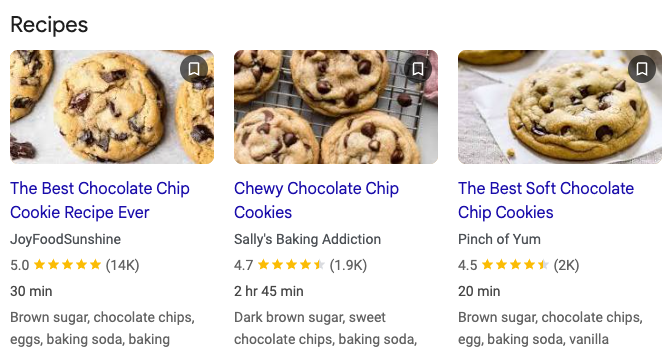
Recipes
| Title | Source | Rating | Review Count | Time | Ingredients |
|---|---|---|---|---|---|
| The Best Chocolate Chip Cookie Recipe Ever | JoyFoodSunshine | 5.0 | 14K | 30 min | Brown sugar, chocolate chips, eggs, baking soda, baking |
| Chewy Chocolate Chip Cookies | Sally's Baking Addiction | 4.7 | 1.9K | 2 hr 45 min | Dark brown sugar, sweet chocolate chips, baking soda, |
| The Best Soft Chocolate Chip Cookies | Pinch of Yum | 4.5 | 2K | 20 min | Brown sugar, chocolate chips, egg, baking soda, vanilla |
What is schema markup
Schema markup is the standard way to embed structured data in a page so you can give search engines explicit clues about "what this text actually means." To borrow Google's own framing: on a recipe page, it labels which values are the ingredients, the cook time, the temperature, and the calorie count. To a human the characters look the same either way, but a search engine struggles to tell whether "Avatar" refers to a movie or a profile picture, so you attach meaning to the content with the schema.org vocabulary.
Once schema markup is applied, Google uses it as the basis for rich snippets (rich results). Enhanced displays such as star ratings, expandable FAQs, breadcrumb navigation, price and availability, and event schedules are all examples. Because schema.org is a shared vocabulary used jointly by Google, Microsoft (Bing), Yandex, and Yahoo, a single implementation can be referenced by multiple search engines and AI answer engines at once.
JSON-LD example (Google's recommended format)
JSON-LD wraps the data inside a <script type="application/ld+json"> block. Because it does not get interleaved with the visible body content, it is the easiest format to work with. Below is a valid snippet for the Article type. You can place it in either the <head> or the <body>.
<script type="application/ld+json">
{
  "@context": "https://schema.org",
  "@type": "Article",
  "headline": "The Complete Guide to Schema Markup",
  "image": "https://example.com/images/cover.jpg",
  "datePublished": "2026-01-05T08:00:00+09:00",
  "dateModified": "2026-02-05T09:20:00+09:00",
  "author": {
    "@type": "Person",
    "name": "Jane Doe",
    "url": "https://example.com/profile/jane"
  },
  "publisher": {
    "@type": "Organization",
    "name": "SearchOS",
    "logo": {
      "@type": "ImageObject",
      "url": "https://example.com/logo.png"
    }
  }
}
</script>
There are three key pieces. @context declares the vocabulary source (https://schema.org), @type declares the kind of object (Article, Product, FAQPage, and so on), and the properties beneath it are the fields that type requires or recommends. Google states that "you must include all required properties to be eligible for enhanced display," and advises adding as many recommended properties as you can while prioritizing accurate, complete values even if there are fewer of them over forcing in inaccurate ones.
JSON-LD vs Microdata vs RDFa
Google supports all three formats equally (as long as they are implemented validly) and recommends JSON-LD in most cases. It is the easiest to implement and maintain at scale and the least error-prone.
| Dimension | JSON-LD (recommended) | Microdata | RDFa |
|---|---|---|---|
| Form | Separated as JSON inside a <script> block | Inline as HTML tag attributes | Inline as HTML tag attributes |
| Relationship to body | Not interleaved with the body (standalone block) | Attached directly to visible markup | Attached directly to visible content |
| Standard origin | JavaScript notation (W3C Recommendation) | Open community HTML spec | HTML5 extension |
| Primary location | <head>/<body> | Mainly <body> (head also possible) | Both <head> and <body> |
| Dynamic injection | Google reads it even when inserted via JS | Based on static markup | Based on static markup |
| Maintenance | Easy (data is consolidated in one place) | Moderate (complex as nesting deepens) | Moderate |
The difference becomes clear when you express the same data in two formats. Below is an identical BreadcrumbList rendered as JSON-LD and as Microdata.
JSON-LD
<script type="application/ld+json">
{
  "@context": "https://schema.org",
  "@type": "BreadcrumbList",
  "itemListElement": [
    { "@type": "ListItem", "position": 1, "name": "Blog", "item": "https://example.com/blog" },
    { "@type": "ListItem", "position": 2, "name": "SEO", "item": "https://example.com/blog/seo" },
    { "@type": "ListItem", "position": 3, "name": "Schema Markup" }
  ]
}
</script>
Microdata
<ol itemscope itemtype="https://schema.org/BreadcrumbList">
  <li itemprop="itemListElement" itemscope itemtype="https://schema.org/ListItem">
    <a itemprop="item" href="https://example.com/blog">
      <span itemprop="name">Blog</span></a>
    <meta itemprop="position" content="1" />
  </li>
  <li itemprop="itemListElement" itemscope itemtype="https://schema.org/ListItem">
    <a itemprop="item" href="https://example.com/blog/seo">
      <span itemprop="name">SEO</span></a>
    <meta itemprop="position" content="2" />
  </li>
</ol>
Microdata requires you to sprinkle itemscope, itemtype, and itemprop attributes throughout the visible markup, so it gets cumbersome to manage as nesting deepens. With JSON-LD the data sits in a single block, which makes it easy to templatize and validate.
Real-world impact (Google case studies)
The adoption case studies published by Google Search Central are as follows (source: Google's introduction to structured data documentation).
- Rotten Tomatoes: applied structured data to 100,000 pages and saw a 25% higher click-through rate (CTR) versus pages without it.
- Food Network: converted 80% of its pages to support search features and saw a 35% increase in visits.
- Rakuten: on pages with structured data, users spent 1.5x longer on the page and the interaction rate was 3.6x higher (on AMP).
- Nestlé: pages shown as rich results had an 82% higher CTR than non-rich-result pages.
That said, rich results are not guaranteed. Google states that even when markup is valid, its algorithms decide whether it is shown. Google also enshrines two guidelines: do not mark up information that is not visible to users, and do not create empty pages solely for the sake of markup.
Implementation checklist
- Write it in JSON-LD when you can (Google's recommendation, easy to maintain).
- Pick your type from schema.org, but treat the Google Search Central documentation as your primary reference (the required and recommended properties Google asks for can differ from schema.org).
- Fill in every required property — missing even one excludes the page from enhanced display.
- Make markup values match what is actually visible on the page (no mismatched or hidden markup).
- Validate with the Rich Results Test before shipping, and monitor with the Rich Results report in Search Console after shipping.
- Migrate any
data-vocabulary.orgmarkup to schema.org, since it is no longer eligible for rich results.