EC-CUBE: The SEO and AI Search Requirements Sheet to Hand Your Agency
Navigation Tags
- Search OS
- EC-CUBE
EC-CUBE: The SEO and AI Search Requirements Sheet to Hand Your Agency
- Category
- Guides
- Reading Time
- 6 min read
- Topic
- Japan EC platform guides for search and AI search
EC-CUBE sites are usually built by an agency, which makes SEO and AI search requirements items that don't get in unless you say so. This article gives you a ready-to-use requirements table to hand over before the build, covering six areas: URLs, metadata, structured data, sitemaps, speed, and bot handling.
- Source URL
- searchos.io/en/blog
- Copyright
- © 2026 Search OS
When you commission a new EC-CUBE site from an agency, you may say "please take SEO into account" and hear "we will handle it." What that one line actually includes, though, is invisible from the client's side.
For an agency, SEO is a word with vague boundaries. Making the title editable can be enough to count as "handled." That is where a requirements sheet helps. If you write down what, where, and how to verify for each item, it becomes clear whether the item is in the estimate. At delivery, the same table serves as the acceptance checklist.
This article lays out the requirements for six areas, URLs, metadata, structured data, sitemaps, speed, and bot handling, as a table you can hand over as is. A sitemap is the list of page URLs you give to search engines.
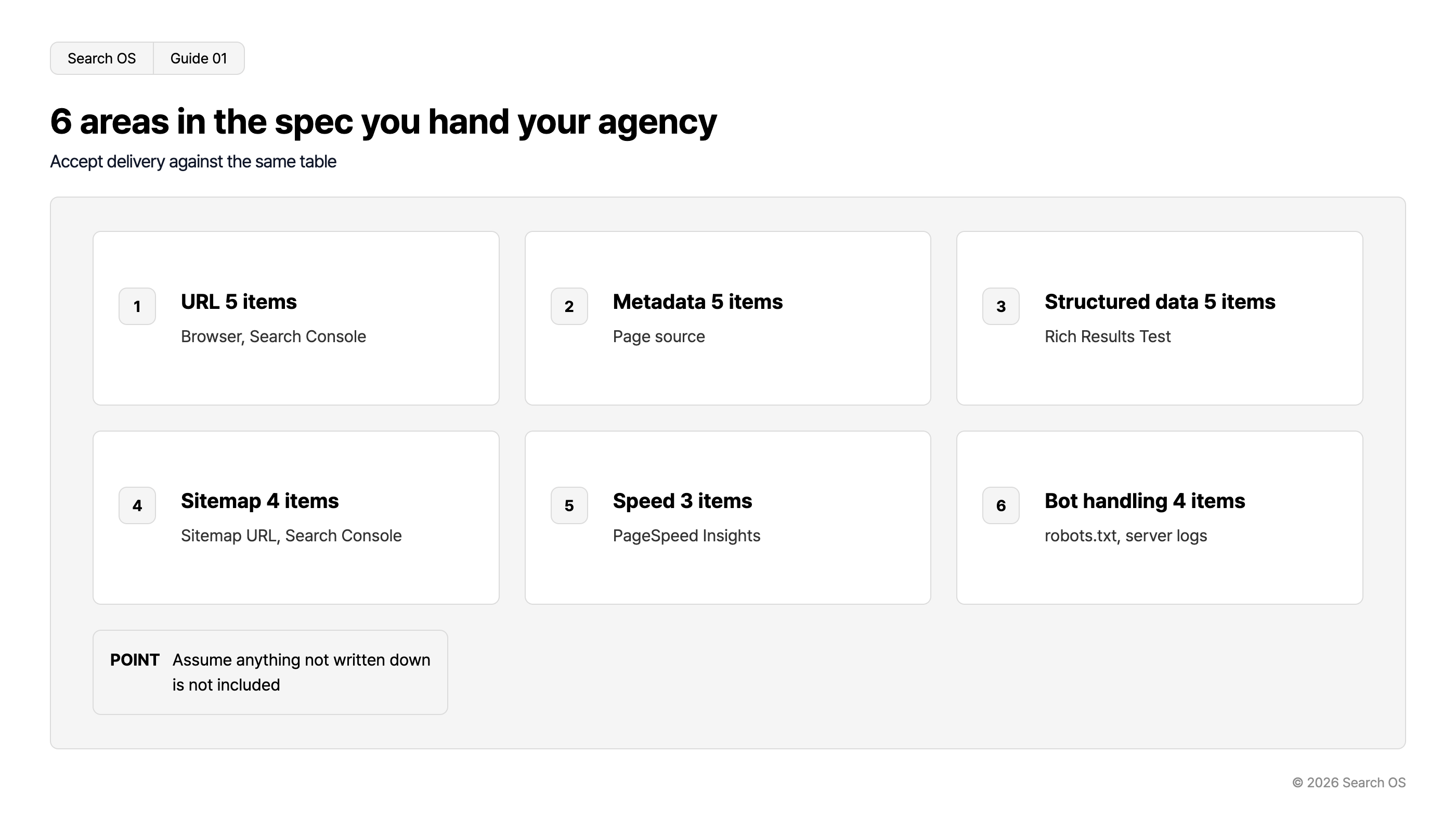
Conclusion: Hand over a six-area requirements sheet with concrete items before the build, and accept delivery against the same table
Area | Number of requirements | Acceptance tool |
|---|---|---|
URLs | 5 | Browser, Search Console |
Metadata | 5 | Page source |
Structured data | 5 | Rich Results Test |
Sitemap | 4 | Sitemap URL, Search Console |
Speed | 3 | PageSpeed Insights |
Bot handling | 4 | robots.txt, server logs |
Navigation
- Search OS
- Guide 01
6 areas in the spec you hand your agency
Accept delivery against the same table
| number | area | details |
|---|---|---|
| 1 | URL 5 items | Browser, Search Console |
| 2 | Metadata 5 items | Page source |
| 3 | Structured data 5 items | Rich Results Test |
| 4 | Sitemap 4 items | Sitemap URL, Search Console |
| 5 | Speed 3 items | PageSpeed Insights |
| 6 | Bot handling 4 items | robots.txt, server logs |
- POINT
- Assume anything not written down is not included
© 2026 Search OS
Key idea: A requirements sheet isn't written to distrust the agency. It is the paper both sides use to agree on what is included. Just as gift wrapping doesn't come with an order unless the order form says "wrapping," the premise is that anything not written down is not included. Start by turning the contents of "we will handle it" into line items.
Area 1: URLs
Item | Requirement | Acceptance |
|---|---|---|
Product URLs | Can include a meaningful string, not only the product ID (or use the product ID consistently and never change it) | Check product page URLs |
Category URLs | Reflect the hierarchy. Redirects on category changes can be set from the admin panel | Category page URLs, whether redirect settings exist |
Parameters | URLs with sort and page-size parameters consolidate to the base URL via canonical | Check canonical in the source of a parameterized URL |
Trailing slash, letter case | Standardize, redirect the other form | Open both and check |
Redirects | If migrating from an old site, set 301s based on an old URL to new URL mapping table | Sample-check against the mapping table |
Area 2: Metadata
Item | Requirement | Acceptance |
|---|---|---|
title | A template per page type, with per-product and per-category overrides | Check in source |
meta description | Same as above | Check in source |
canonical | Self-referencing on every page. Parameterized URLs point to the base URL | Check in source |
OGP | Product image, product name, and description appear | Check in source |
noindex | Can be set per page from the admin panel. Search results, My Page, and cart are noindex | Check in source |
Area 3: Structured data
Item | Requirement | Acceptance |
|---|---|---|
Product | On product pages, output name, image, price, availability, and brand. Values come dynamically from product data | Rich Results Test |
BreadcrumbList | On product and category pages, matching the displayed breadcrumb | Rich Results Test |
Organization | Top page only | Rich Results Test |
Article | Can be output on user-defined pages (content) | Rich Results Test |
No duplicate output | The plugin and the template must not output the same type twice | Count the |
Area 4: Sitemap
Item | Requirement | Acceptance |
|---|---|---|
Generation | Auto-generate the XML sitemap (plugin or custom build). State it explicitly, since EC-CUBE 4 has none by default | Open the sitemap URL |
Scope | Include products, categories, and user-defined pages. Exclude unpublished and discontinued items | Check the contents |
lastmod | Reflects the product's last update time | Check the contents |
Registration | Sitemap line in robots.txt. Registered in Search Console | robots.txt, Search Console |
Area 5: Speed
Item | Requirement | Acceptance |
|---|---|---|
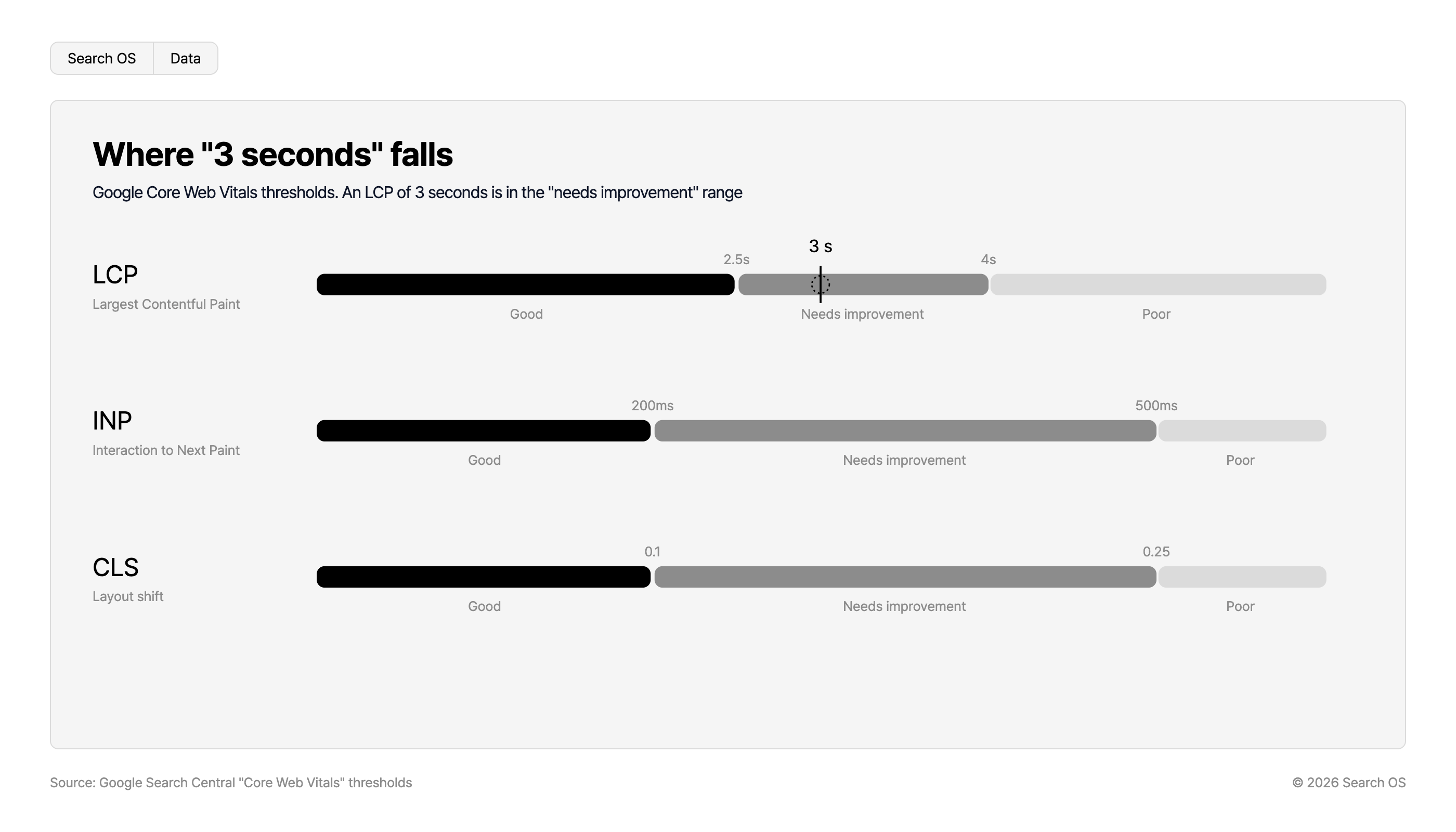
Core Web Vitals | On main product pages, LCP within 2.5 seconds, CLS 0.1 or below, INP 200ms or below | PageSpeed Insights |
Images | Next-gen format support (WebP etc.), size attributes, lazy loading | PageSpeed Insights |
Cache | Page cache or CDN configured. Caching must not break canonical or hreflang | Check in source |
Where "3 seconds" falls
Google Core Web Vitals thresholds. An LCP of 3 seconds is in the "needs improvement" range
| Metric | Description | Good | Threshold 1 | Needs improvement | Threshold 2 | Poor |
|---|---|---|---|---|---|---|
| LCP | Largest Contentful Paint | Good | 2.5s | Needs improvement (3 s falls here) | 4s | Poor |
| INP | Interaction to Next Paint | Good | 200ms | Needs improvement | 500ms | Poor |
| CLS | Layout shift | Good | 0.1 | Needs improvement | 0.25 | Poor |
Source: Google Search Central "Core Web Vitals" thresholds
© 2026 Search OS
Area 6: Bot handling
Item | Requirement | Acceptance |
|---|---|---|
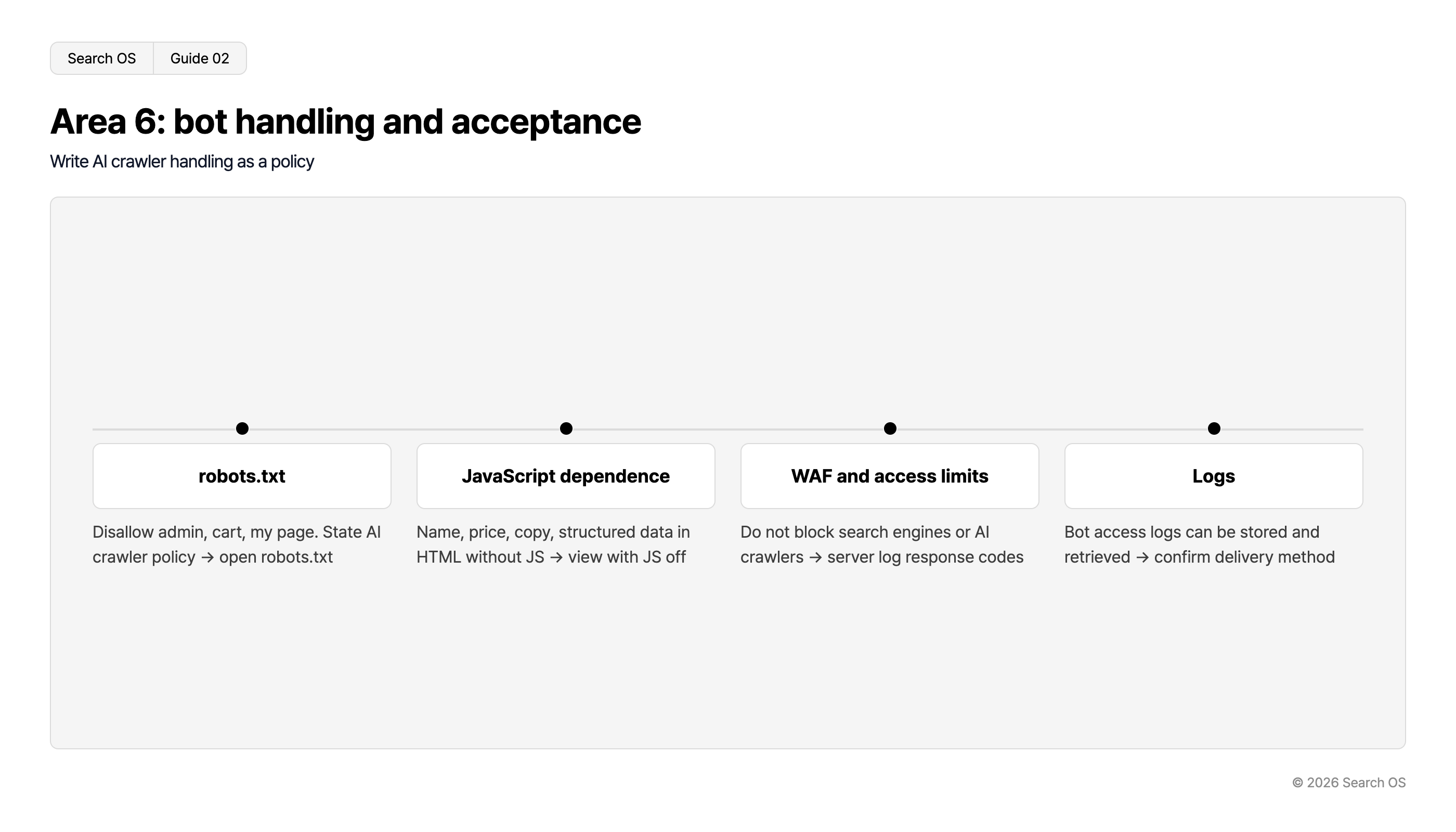
robots.txt | Disallow admin, cart, and My Page. Allow products, categories, and content. Decide a policy for AI crawlers (GPTBot etc.) and write it down | Open robots.txt |
JavaScript dependence | Product name, price, description, and structured data are in the HTML without JavaScript | View with JavaScript disabled |
WAF and access restrictions | Configured not to block search engines and AI crawlers. If blocking, state the policy | Bot response codes in server logs |
Logs | Bot access logs are stored and can be retrieved | Check how logs are provided |
Navigation
- Search OS
- Guide 02
Area 6: bot handling and acceptance
Write AI crawler handling as a policy
| Category | Description |
|---|---|
| robots.txt | Disallow admin, cart, my page. State AI crawler policy → open robots.txt |
| JavaScript dependence | Name, price, copy, structured data in HTML without JS → view with JS off |
| WAF and access limits | Do not block search engines or AI crawlers → server log response codes |
| Logs | Bot access logs can be stored and retrieved → confirm delivery method |
© 2026 Search OS
One sentence to add to the requirements sheet
"Each item above will be accepted at delivery by the method in the right column. If any item will not be handled, state so at the estimate stage." Adding this one sentence at the end of the requirements sheet prevents a vague "we will handle it." It plays the same role as checking the return policy before you buy.
Requirements after delivery
A requirements sheet can only guarantee the state at delivery. After that, every added plugin, core update, and new campaign page erodes the state the sheet described. It is like tidying a store shelf: the arrangement drifts every time you add products. Check whether the maintenance contract with the agency includes maintaining the SEO requirements.
Search OS continuously verifies the state corresponding to the six areas of this sheet on sites built by agencies, including EC-CUBE. Items that have drifted since delivery are organized as fixes to make. It does not replace the agency's work. Who keeps watching after delivery is decided separately from the requirements sheet.
Frequently asked questions
The estimate went up after I handed over the requirements sheet
Going up is normal. If the estimate was based on "taking SEO into account," the items that weren't included have simply become visible. Cut lower-priority items to adjust the amount.
The agency says EC-CUBE's standard features can't handle it
EC-CUBE can be extended with templates and plugins, so most items are feasible. Ask specifically why it can't be done and have them propose an alternative.
Does the maintenance contract include maintaining SEO?
It depends on the contract. If it isn't included, use the acceptance column of the requirements sheet to check it yourself once a quarter.
Related reading
How Far Can You Rely on EC-CUBE SEO Plugins: Criteria for Owning Your Structured Data
EC-CUBE 4 Has No XML Sitemap by Default: Plugin, Custom Build, or External Generation
How to Write SEO and AI Search Requirements into an ecbeing RFP
References
Google Search Central: SEO Starter Guide
Google Search Central: Ecommerce best practices
Google Search Central: Overview of Google crawlers and fetchers
Google Search Central: Understanding Core Web Vitals and Google search results