ecbeing: URL and Redirect Design for a Large-Scale Renewal
Navigation Tags
- Search OS
- ecbeing
ecbeing: URL and Redirect Design for a Large-Scale Renewal
- Category
- Guides
- Reading Time
- 7 min read
- Topic
- Japan EC platform guides for search and AI search
- Source
- Search OS
In a renewal of a large site like one built on ecbeing, tens of thousands of URLs change at once. Redirecting all of them by hand isn't realistic. You combine rule-based conversion with individual handling of exceptions. This article walks through the URL inventory, rule design, exception extraction, cutover-day steps, and post-migration monitoring in order.
- URL
- searchos.io/en/blog
- Copyright
- © 2026 Search OS
In a project that renews an ecbeing-built site together with its back-office integration, every URL changes, at a scale of thirty thousand products, two thousand categories, and five thousand content pages. Setting every redirect by hand is impossible, so you decide the order of the design first.
The answer is to handle them by rule, and handle individually only what falls outside the rules. If thirty thousand product URLs can be converted from old product ID to new product ID, one rule covers the redirects. Only the exceptions the rule can't convert go into an individual mapping table. Merged products, deleted categories, and content with irregular URLs fall here. If this design isn't done early in the renewal, tens of thousands of 404s appear on cutover day.
This article lays out the URL inventory, rule design, exception extraction, cutover-day steps, and post-migration monitoring in chronological order.
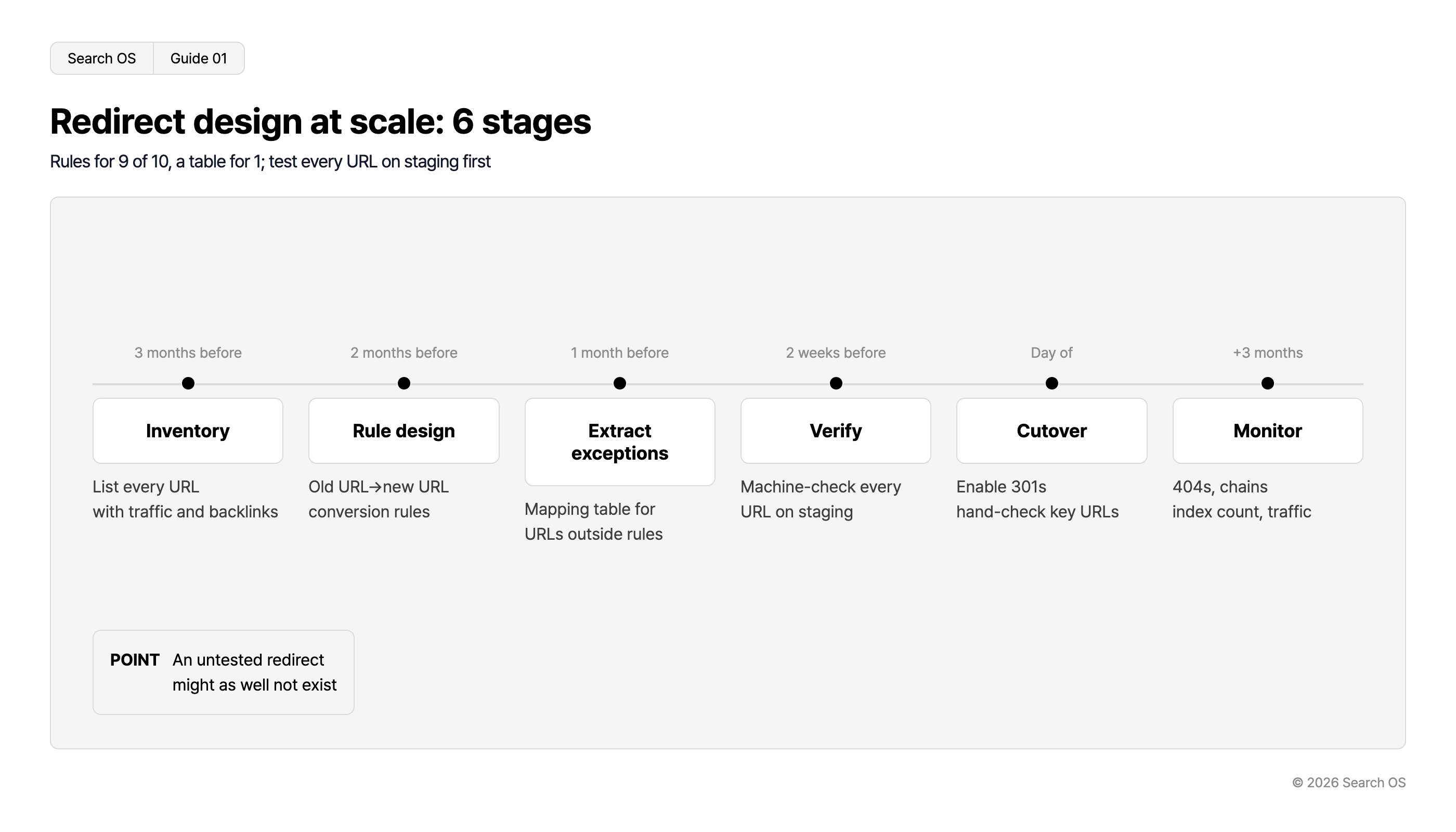
Conclusion: Rules for nine in ten, a mapping table for the rest. Verify every URL on staging before cutover
Stage | Timing | What to do |
|---|---|---|
Inventory | 3 months before | List every URL on the old site by type. Attach search traffic and backlinks |
Rule design | 2 months before | Define old URL to new URL conversion rules per type |
Exception extraction | 1 month before | Extract URLs the rules can't convert and build an individual mapping table |
Verification | 2 weeks before | Mechanically verify redirects for every URL on staging |
Cutover | Day of | Enable redirects. Check main URLs by hand |
Monitoring | 3 months after cutover | Monitor 404s, redirect chains, index count, and traffic |
Metadata
- Search OS
- Guide 01
Redirect design at scale: 6 stages
Rules for 9 of 10, a table for 1; test every URL on staging first
| Timeline | Stage | Description |
|---|---|---|
| 3 months before | Inventory | List every URL with traffic and backlinks |
| 2 months before | Rule design | Old URL→new URL conversion rules |
| 1 month before | Extract exceptions | Mapping table for URLs outside rules |
| 2 weeks before | Verify | Machine-check every URL on staging |
| Day of | Cutover | Enable 301s hand-check key URLs |
| +3 months | Monitor | 404s, chains index count, traffic |
- POINT
- An untested redirect might as well not exist
© 2026 Search OS
Key idea: In a move of tens of thousands of URLs, "checking by hand" applies only to the few dozen main URLs. The rest are covered by rules and mechanical verification. In moving-house terms, you carry the precious dishes yourself and leave the rest to the mover's checklist. A redirect that hasn't been verified is the same as one that doesn't exist. Separate the URLs you check by hand from the ones you check by machine at the start.
Inventory: every URL on the old site, by type
What to collect | Method |
|---|---|
All URLs | The old site's sitemap, a database export, and a crawler tool. Cross-check all three to prevent omissions |
Type | Product, category, content, campaign, static page, other |
Search traffic | Clicks per URL over the past 12 months, from the Search Performance report in Search Console |
Backlinks | The Links report in Search Console |
Index status | The Pages report in Search Console |
URLs with heavy search traffic and many backlinks are the pages where redirects matter most. Flagship product pages are the typical case. Mark the URLs you will check by hand on cutover day.
Breakdown of 37,000 URLs
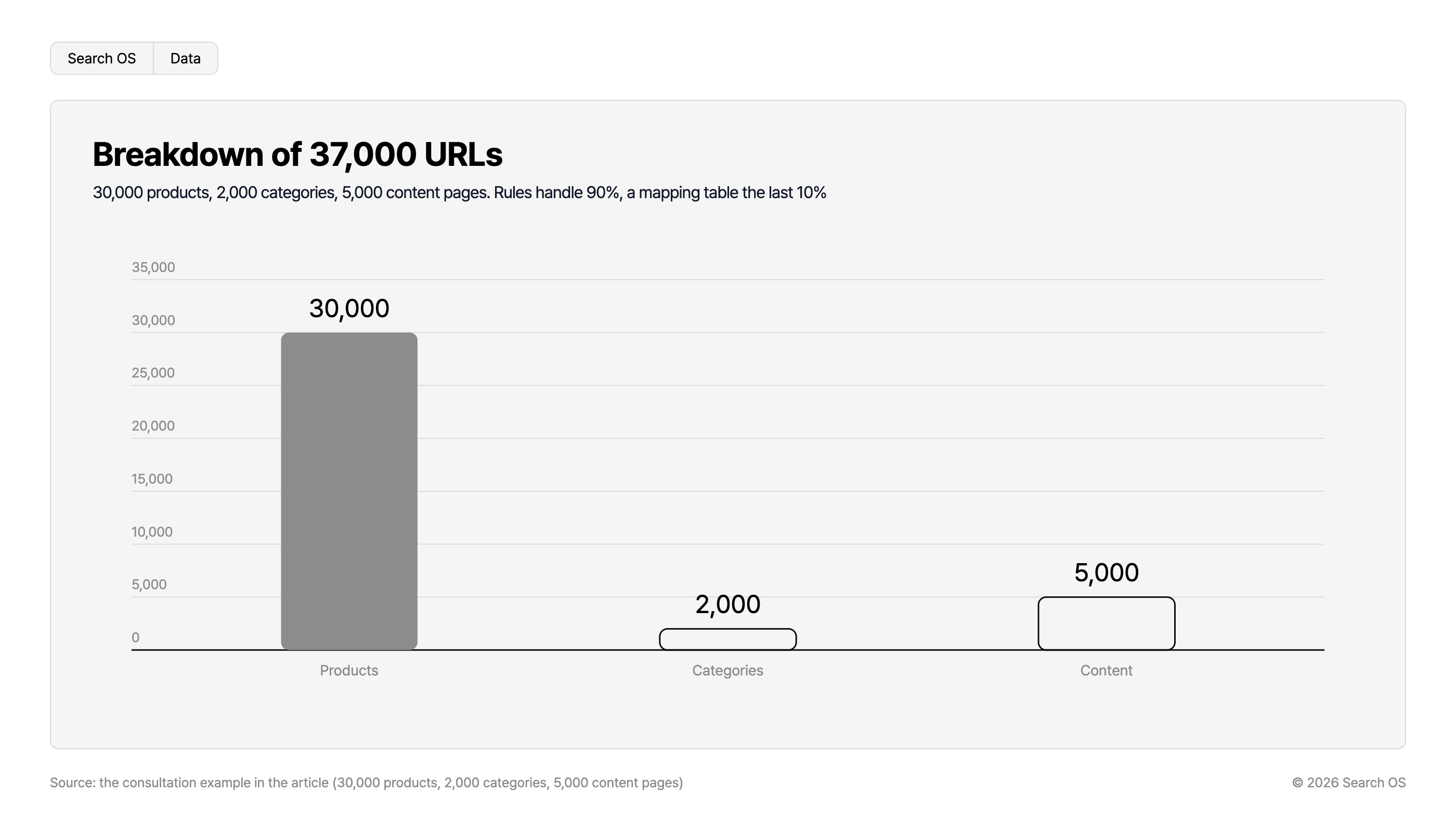
30,000 products, 2,000 categories, 5,000 content pages. Rules handle 90%, a mapping table the last 10%
| Type | Count |
|---|---|
| Products | 30,000 |
| Categories | 2,000 |
| Content | 5,000 |
Source: the consultation example in the article (30,000 products, 2,000 categories, 5,000 content pages)
© 2026 Search OS
Rule design: conversion rules per type
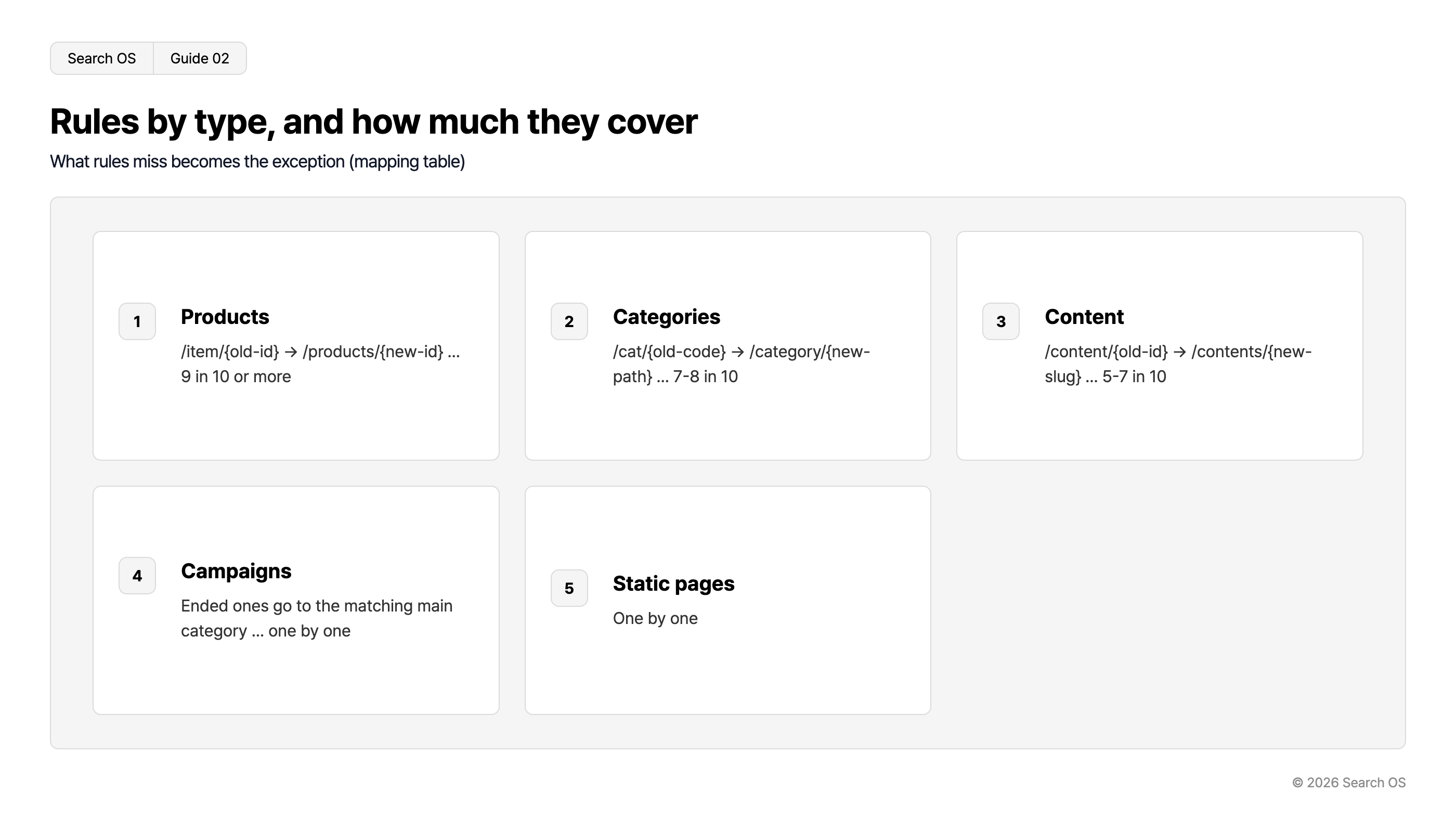
Type | Example rule | Rough share the rule can cover |
|---|---|---|
Product | Old /item/{old ID} → new /products/{new ID}. Hold the old-to-new ID mapping in the database | Nine in ten or more |
Category | Old /cat/{old code} → new /category/{new path}. Needs a mapping table | Seven to eight in ten |
Content | Old /content/{old ID} → new /contents/{new slug} | Five to seven in ten |
Campaign | Ended campaigns go to the matching category on the main site | Individual |
Static page | Individual | Individual |
Navigation
- Search OS
- Guide 02
Rules by type, and how much they cover
What rules miss becomes the exception (mapping table)
| index | title | rule | coverage |
|---|---|---|---|
| 1 | Products | /item/{old-id} → /products/{new-id} ... | 9 in 10 or more |
| 2 | Categories | /cat/{old-code} → /category/{new-path} ... | 7-8 in 10 |
| 3 | Content | /content/{old-id} → /contents/{new-slug} ... | 5-7 in 10 |
| 4 | Campaigns | Ended ones go to the matching main category ... | one by one |
| 5 | Static pages | One by one |
© 2026 Search OS
A rule is built from an "old URL pattern → new URL pattern" plus a mapping table for the variables inside the pattern. If product IDs don't change, the rule alone is enough. If they do, you need a mapping table of (old ID, new ID). It is the difference between a move where only the address format changes and one where the street number changes too. Confirm with the back-office team whether product IDs will change.
How to find the exceptions
URLs the rules can't convert are extracted mechanically. There is no need to hunt for them by eye.
Apply the rules to the list of old URLs and generate the new URLs
Check whether each generated new URL exists on the new site (does staging return 200)
Those that don't exist are the exceptions. For each, decide the merge target, the new location, or deletion (410)
Exceptions tend to cluster in predictable places: merged products (two old products → one new product), discontinued categories, and content whose URLs were hand-made. Sweep these three kinds first.
Verification: every URL on staging
Request the full list of old URLs (tens of thousands) against the new site on staging
Record the response code and redirect target for each URL
Extract everything that isn't a 301 (404, chained 301, 302, 200)
Fix what was extracted and verify again
Repeat until every URL reaches a 200 page in a single 301
Chained redirects (old → intermediate → new) lead to lost signal and wasted crawling. The more transfers a route has, the more people get off partway. Design so that a single 301 reaches the final URL.
What to do on cutover day
Enable the redirects
Open the top 50 URLs by search traffic and backlinks by hand and confirm they redirect correctly
Resubmit the sitemap in Search Console. Delete the old sitemap
Confirm robots.txt matches the new site's intent (no staging Disallow left behind)
Request indexing for main pages via URL Inspection
A noindex or Disallow: / set on staging and left in production is one of the most common failures in a large-scale renewal. Once you cut over, look here first.
What to watch after migration
Timing | Metric | Action |
|---|---|---|
1 week | 404s and redirect errors in Search Console | Add omissions to the mapping table |
1 week | Indexing of main pages | If not indexed, recheck noindex and robots |
1 month | Trend in index count | Old URLs decreasing, new URLs increasing |
3 months | Search traffic | Back to the previous level. If not, re-verify the rules for omissions |
Redirects continue after the migration
Redirects don't end on cutover day. Backlinks to old URLs remain for years, and 404s turn up later. Every time the back-office integration reissues product IDs or categories are reorganized, new redirects are needed. It is like keeping a store relocation notice up for years.
Search OS continuously monitors 404s, redirect chains, canonicals, and changes in index count on large sites such as ecbeing. It also tracks the correspondence between the old and new URLs that bots fetch. Pages lost in the renewal are organized as fixes to make. It does not replace the renewal work itself. Decide in advance who keeps finding the holes after the renewal.
Frequently asked questions
Will setting tens of thousands of redirects slow the site down?
Rule-based redirects aren't affected by volume. If the individual mapping table runs to tens of thousands of entries, handle it with the web server's map feature or the CDN's redirect feature.
Which old URLs can be set to 410 (gone)?
Those with no traffic, no backlinks, and no corresponding new page. Search engines drop a 410 from the index faster than a 404.
How long should redirects be kept after migration?
At least one year. As long as backlinks remain, keep them permanently. Removing them loses the backlink value.
Related reading
References
Google Search Central: Site moves with URL changes
Google Search Central: Redirects and Google Search
Google Search Central: Large site owner's guide to managing your crawl budget