Too Many Shopify Apps: Speed, Search, and AI Citations
Navigation
- Search OS
- Shopify
Too Many Shopify Apps
Speed, Search, and AI Citations
| Category | Read Time | Description | Brand | Summary | URL | Copyright |
|---|---|---|---|---|---|---|
| Guides | 5 min read | Japan EC platform guides for search and AI search | Search OS | Shopify lets you add features through apps, but every app adds JavaScript to your pages, slowing them down and degrading Core Web Vitals. This article covers how slower pages affect search and AI citations, how to measure each app's impact, the criteria for removing, replacing, or lazy-loading apps, and cleaning up code left behind after removal. | searchos.io/en/blog | © 2026 Search OS |
Shopify stores running close to 20 apps often end up with heavy pages and red PageSpeed Insights scores. On top of that, the recurring question is which apps to cut.
Before cutting, measure what each app loads. What determines speed isn't the number of apps. It's the size and execution time of the JavaScript each one loads. One heavy app is often worse than 10 light ones.
This article covers how slower pages affect search and AI citations, how to measure each app's impact, the criteria for cutting back, and cleaning up code left behind after removal.
Conclusion: measure, then cut. Judge on two axes: direct link to sales, and load weight
App category | Link to sales | Load | Decision |
|---|---|---|---|
Payments, shipping, inventory | High | Light to medium | Keep |
Reviews, Q&A | Medium | Medium to heavy | Keep, but lazy-load |
Popups, banners, countdowns | Low to medium | Heavy | Cut, or consolidate into one |
Chat, customer service | Medium | Heavy | Lazy-load, or hide outside business hours |
Analytics, tracking (duplicates) | Low | Medium | Consolidate duplicates |
Unused, or tried and abandoned | None | Yes | Remove |
Navigation
- Search OS
- Guide 01
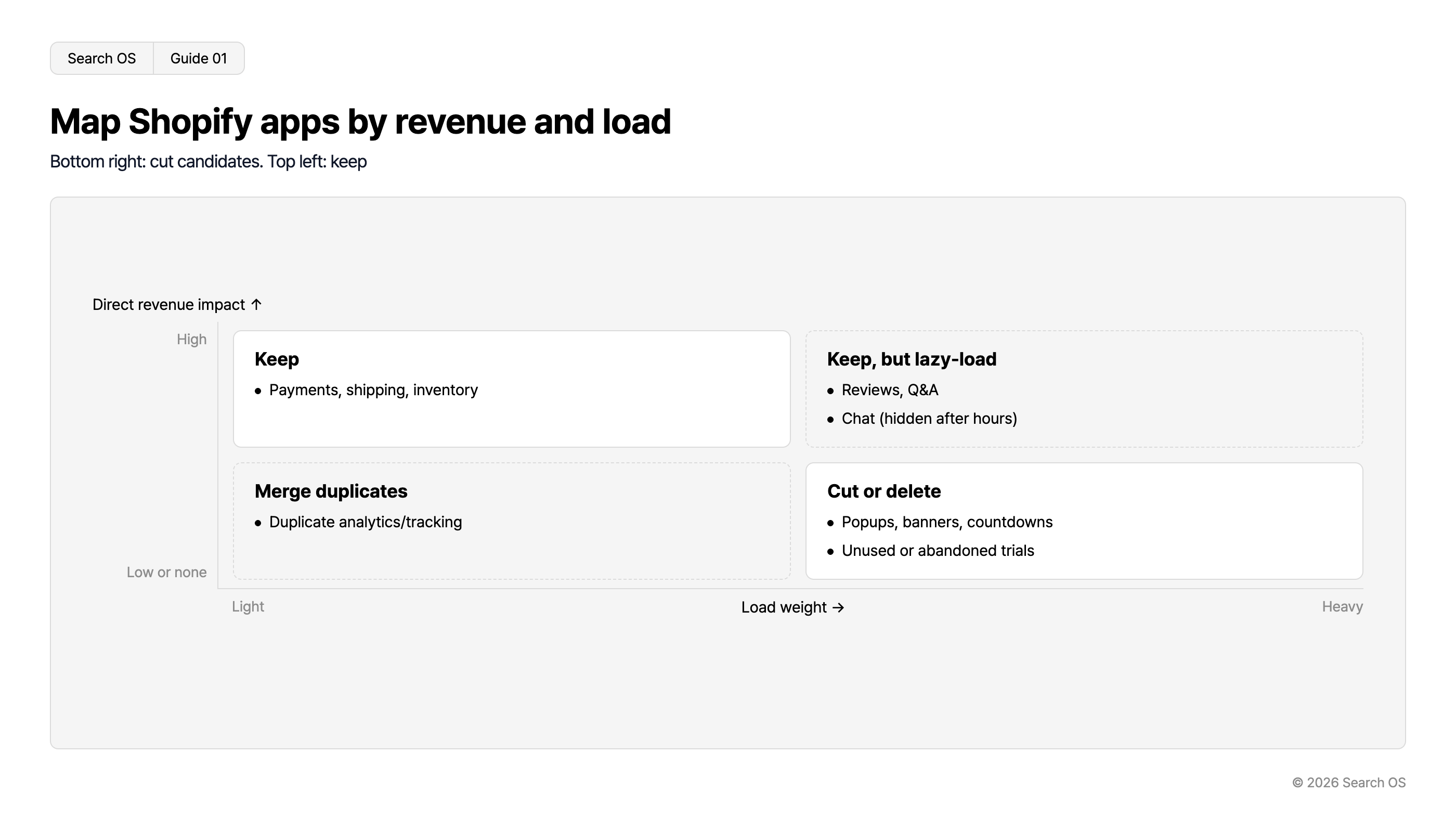
Map Shopify apps by revenue and load
Bottom right: cut candidates. Top left: keep
| Direct revenue impact / Load weight | Light | Heavy |
|---|---|---|
| High | Keep • Payments, shipping, inventory | Keep, but lazy-load • Reviews, Q&A • Chat (hidden after hours) |
| Low or none | Merge duplicates • Duplicate analytics/tracking | Cut or delete • Popups, banners, countdowns • Unused or abandoned trials |
© 2026 Search OS
Key idea: Count apps by what they load, not by what they do. An app that displays nothing on screen still loads its JavaScript. Start by going through the list for apps you aren't using for display.
How slower pages affect search and AI citations
Affected area | What happens |
|---|---|
Search rankings | Core Web Vitals (LCP, INP, CLS) are one ranking factor. With the same content, the faster page has the edge |
Crawling | Heavy pages take longer to fetch, so fewer pages are fetched in the same time |
AI search citations | Many AI crawlers don't execute JavaScript. Content rendered later by JavaScript isn't read |
Conversion rate | The slower the display, the more people leave. This is the most direct loss |
For AI citations, the bigger problem isn't weight but rendering through JavaScript. If an app injects reviews or FAQs with JavaScript after load, AI crawlers see a page where that content doesn't exist. Check whether your reviews and FAQs depend on an app for display.
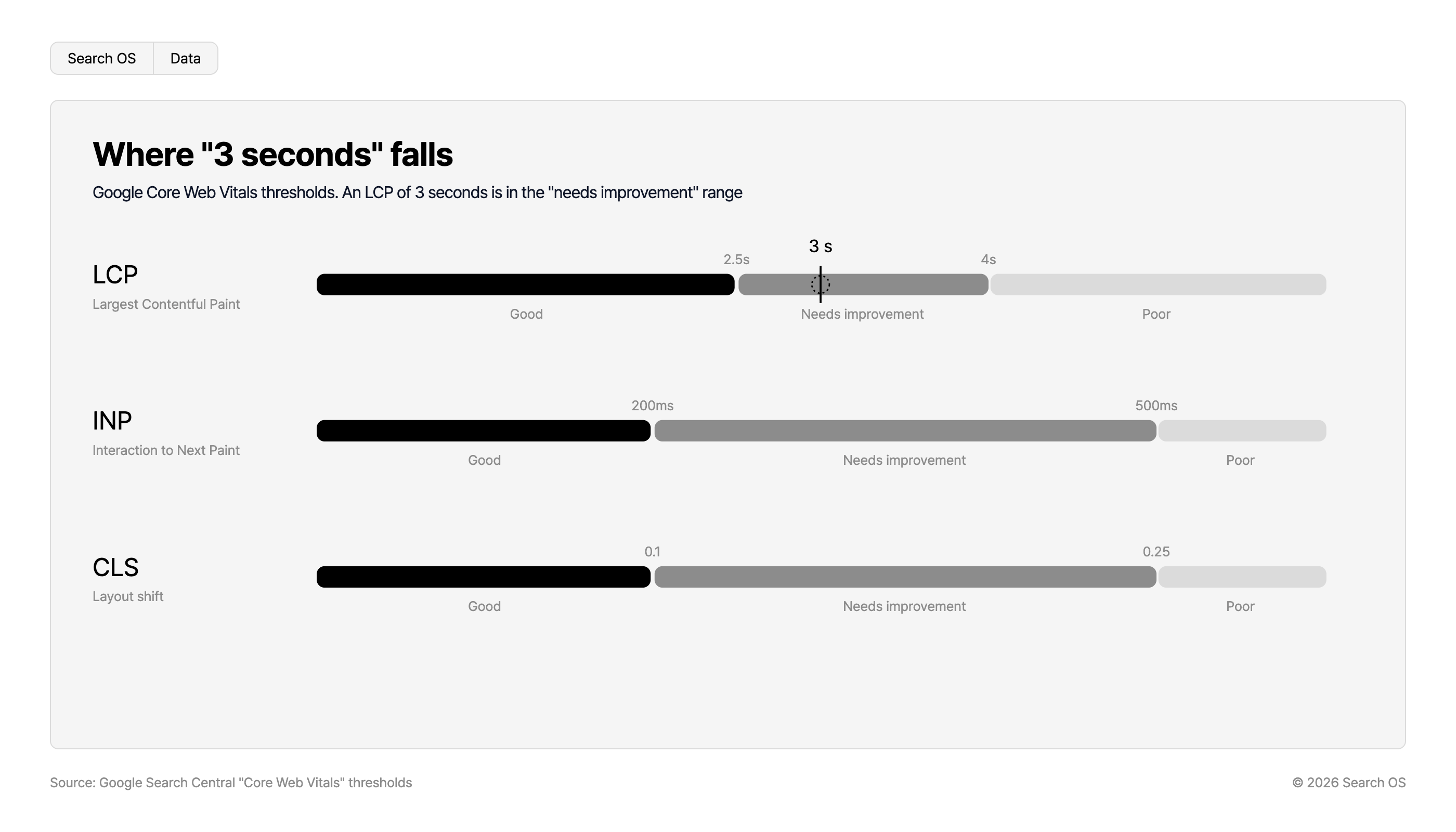
Where "3 seconds" falls
Google Core Web Vitals thresholds. An LCP of 3 seconds is in the "needs improvement" range
| Metric | Description | Good | Threshold 1 | Needs improvement | Threshold 2 | Poor |
|---|---|---|---|---|---|---|
| LCP | Largest Contentful Paint | Good | 2.5s | Needs improvement (3 s falls here) | 4s | Poor |
| INP | Interaction to Next Paint | Good | 200ms | Needs improvement | 500ms | Poor |
| CLS | Layout shift | Good | 0.1 | Needs improvement | 0.25 | Poor |
Source: Google Search Central "Core Web Vitals" thresholds
© 2026 Search OS
How to measure each app's impact
Run your main product page through PageSpeed Insights and open the "Reduce the impact of third-party code" and "Reduce unused JavaScript" items
The list shows the serving domains. Sort them by size and execution time, largest first
Map each domain to the app it belongs to
The "Online store speed" report in the Shopify admin is also useful
The top three apps often account for more than half of the total. Start by looking at just those three.
Three options for cutting back
Option | When to use it |
|---|---|
Remove | Not in use. The same function is duplicated by another app |
Replace | The function is needed but a lighter app or a built-in theme feature can replace it |
Lazy-load | The function is needed with no alternative, but isn't required for first paint (chat, reviews, recommendations) |
Navigation
- Search OS
- Guide 02
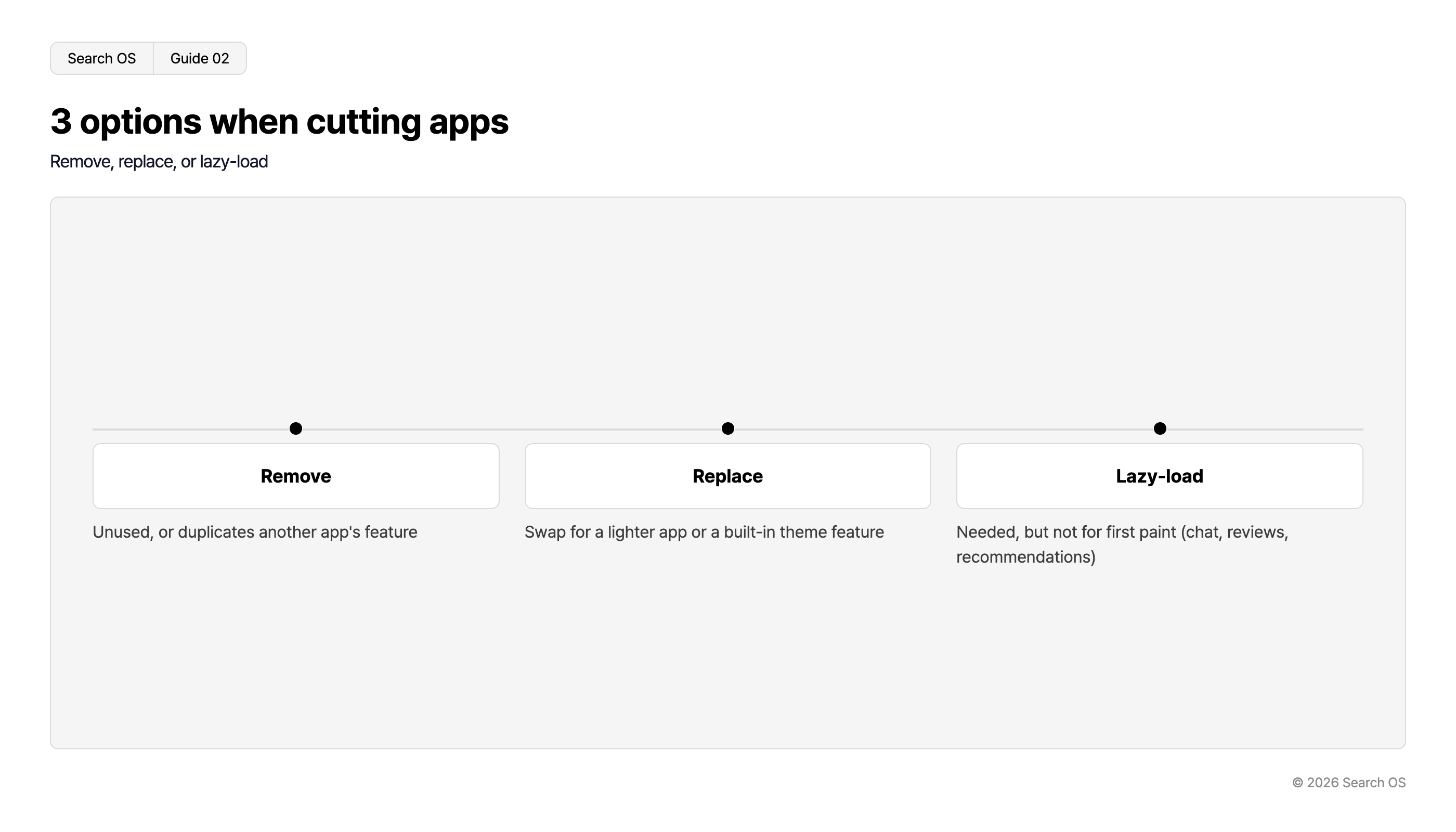
3 options when cutting apps
Remove, replace, or lazy-load
| Option | Description |
|---|---|
| Remove | Unused, or duplicates another app's feature |
| Replace | Swap for a lighter app or a built-in theme feature |
| Lazy-load | Needed, but not for first paint (chat, reviews, recommendations) |
© 2026 Search OS
Some apps have a lazy-loading setting. If not, implement loading after scroll or interaction on the theme side. Check the settings of each app you keep for a lazy-loading option.
Code left in the theme after removal
Removing an app can leave code behind in the theme. Removal isn't done until this cleanup is included.
Snippets manually inserted into the theme code when the app was installed
Script tags added to the head of theme.liquid
CSS from the removed app
Anything added through app embeds ("App embeds" in theme settings) is removed with the app. Anything added manually isn't. After removal, search the theme code for the removed app's name and domain and delete the remaining references.
What to check after cutting back
Re-measure in PageSpeed Insights and confirm LCP, INP, and CLS improved
Confirm that content the removed app used to display (reviews or FAQs, for example) remains on the page as text
If you replaced an app that rendered reviews or FAQs with JavaScript, confirm the replacement outputs them as HTML
Apps will keep coming back
Even after cutting back, apps creep in with every new campaign. Add a countdown or popup for every sale, and in six months you're back where you started. Keep watching speed and how much content is rendered by JavaScript.
Search OS continuously checks page speed metrics on existing stores, including Shopify. It also looks at the text and structured data that remain when a page is fetched without JavaScript, and at what bots actually fetch. Degradation caused by added apps is organized as fix targets. It doesn't replace the work of choosing apps. It is the layer that keeps watching how the result of those choices looks to bots.
Frequently asked questions
How many apps is too many?
It isn't decided by count. It's decided by total JavaScript size and the processing needed for first paint. 10 apps can be light, and three can be heavy.
If I remove my review app, the reviews disappear. What should I do?
One approach is to export the review data and re-place it as theme metafields or HTML. For search and AI, HTML output beats an app that renders with JavaScript.
Is Shopify's "Online store speed" score enough to watch?
It's a useful reference. For per-page metrics, though, use PageSpeed Insights and the Core Web Vitals report in Search Console. Start by running your main product page through PageSpeed Insights.
Related reading
When ShopServe Pages Take More Than 3 Seconds: SEO Impact and Improvement Priorities
Duplicate URLs from Shopify Collections and Tags and Crawl Efficiency
References
Google Search Central: Understanding Core Web Vitals and Google search results
Google Search Central: JavaScript SEO basics
Shopify Help Center: Improving your online store speed
Google: PageSpeed Insights