ShopServe: SEO Self-Check After Consulting
Navigation
- Search OS
- ShopServe
ShopServe: SEO Self-Check After Consulting
| Category | Read Time | Description | Summary | Source | Copyright |
|---|---|---|---|---|---|
| Tips | 5 min read | Japan EC platform guides for search and AI search | ShopServe is known for its consulting-style support. Maintaining what was proposed afterward, though, is the store's job. This article lays out a checklist for confirming, once a month in 15 minutes, that the state you set up still holds six months later, across four areas: indexing, speed, structured data, and content. | searchos.io/en/blog | © 2026 Search OS |
After ShopServe consulting set up the initial SEO configuration, the store doesn't know what to watch from here on its own. Shops that have finished the support engagement raise this question.
What consulting put in order is the state on one particular day. As you add products and touch templates, that state erodes. Without a way to notice the erosion, none of the initial setup's effect remains six months later. What you need isn't specialist knowledge. It's a fixed procedure that checks once a month, in 15 minutes, whether anything has come apart.
This article lays out a checklist the store can run on its own, across four areas: indexing, speed, structured data, and content.
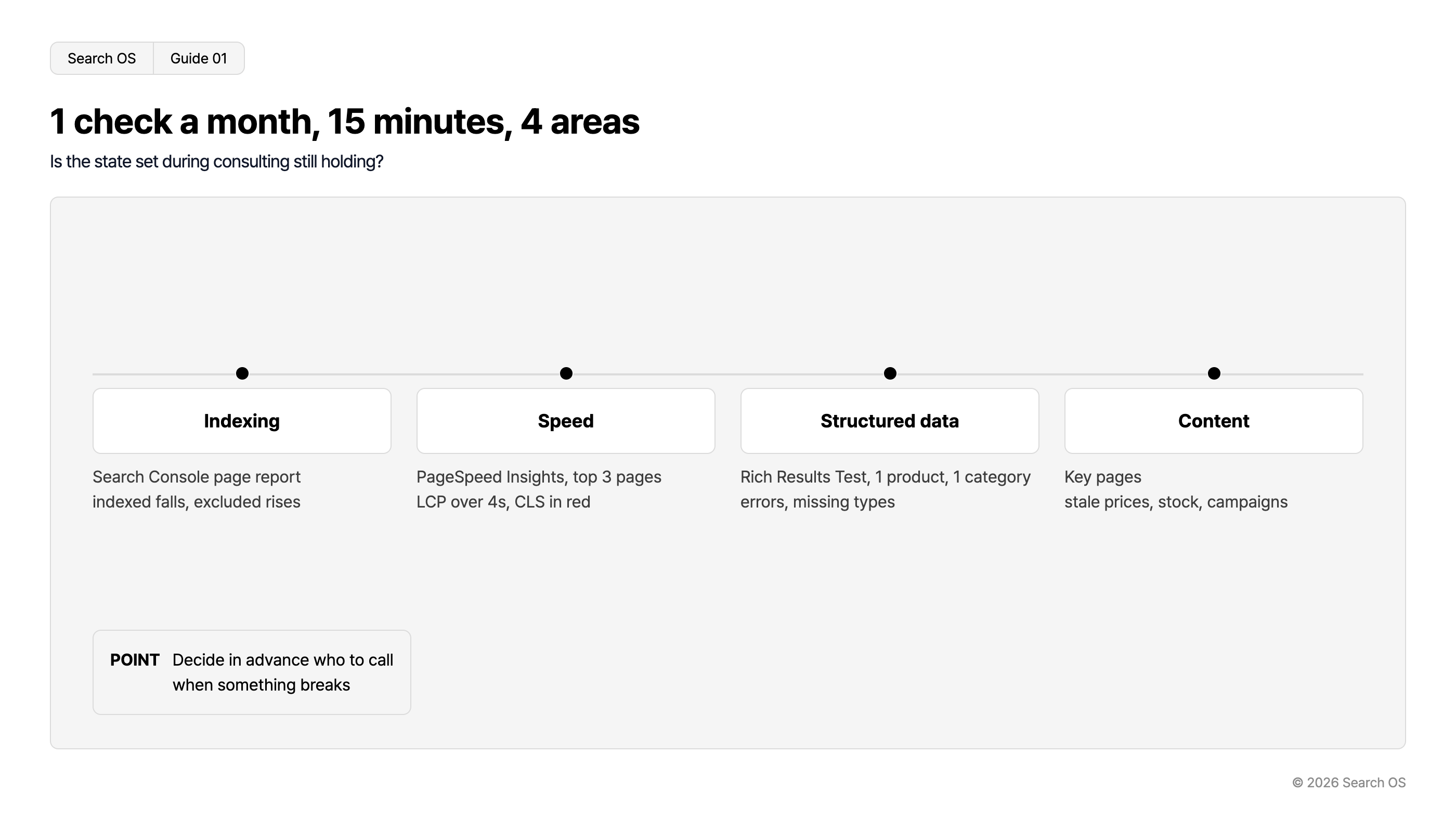
Conclusion: Once a month, check four areas with three items each, and decide in advance who to ask when something breaks
Area | Where to look | Signs of erosion |
|---|---|---|
Indexing | Search Console Pages report | Indexed count drops, exclusion reasons grow |
Speed | PageSpeed Insights (3 core pages) | LCP over 4 seconds, CLS in red |
Structured data | Rich Results Test (1 product, 1 category) | Errors, types disappearing |
Content | Your shop's core pages | Old prices, stock, or campaigns left in place |
Navigation
- Search OS
- Guide 01
1 check a month, 15 minutes, 4 areas
Is the state set during consulting still holding?
| Area | Checklist |
|---|---|
| Indexing | Search Console page report indexed falls, excluded rises |
| Speed | PageSpeed Insights, top 3 pages LCP over 4s, CLS in red |
| Structured data | Rich Results Test, 1 product, 1 category errors, missing types |
| Content | Key pages stale prices, stock, campaigns |
- POINT
- Decide in advance who to call when something breaks
© 2026 Search OS
Key idea: The value of consulting is that it decided what should be done. Only the store can see whether what was decided is still being followed today. Write the agreed policy down somewhere you can revisit at any time.
Area 1: Indexing (Search Console)
Check | Steps | Judgment |
|---|---|---|
Indexed page count | "Indexed" in the Pages report | Has it dropped sharply since last month |
Exclusion reasons | The list of "Not indexed" reasons | Are "Crawled - currently not indexed" and "Duplicate" growing |
Sitemap | Sitemaps report | Is the status still "Success", and is the discovered count close to the product count |
If a number has dropped or grown, look back at what changed in between. Product deletions, template changes, URL changes. Compare whether the timing of the change lines up with when the number moved.
Area 2: Speed (PageSpeed Insights)
Run the URLs of your three core pages (top page, main category, main product) through PageSpeed Insights. Measuring the same pages every month makes the change visible.
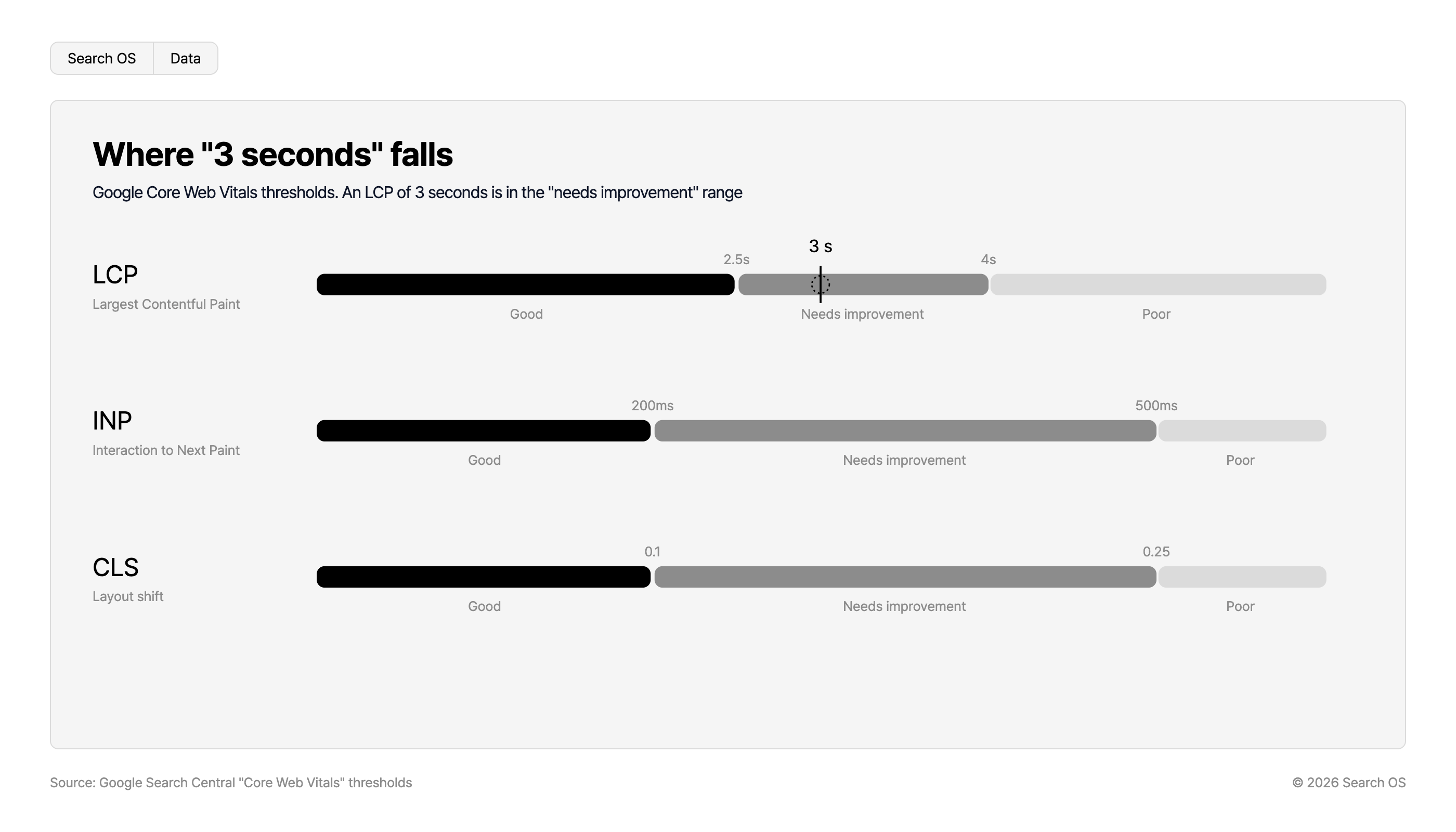
Where "3 seconds" falls
Google Core Web Vitals thresholds. An LCP of 3 seconds is in the "needs improvement" range
| Metric | Description | Good | Threshold 1 | Needs improvement | Threshold 2 | Poor |
|---|---|---|---|---|---|---|
| LCP | Largest Contentful Paint | Good | 2.5s | Needs improvement (3 s falls here) | 4s | Poor |
| INP | Interaction to Next Paint | Good | 200ms | Needs improvement | 500ms | Poor |
| CLS | Layout shift | Good | 0.1 | Needs improvement | 0.25 | Poor |
Source: Google Search Central "Core Web Vitals" thresholds
© 2026 Search OS
Metric | Target | What breaks it |
|---|---|---|
LCP | Within 2.5 seconds (over 4 seconds needs action) | Large images added, external tags added |
CLS | 0.1 or below | Images or banners added without size attributes |
INP | 200ms or below | More JavaScript (external tools such as chat and reviews) |
If it's worse than last month, suspect the images, banners, and external tools added that month.
Area 3: Structured data (Rich Results Test)
Run one product page and one category page through the Rich Results Test.
Are the types detected last month (Product, BreadcrumbList, and so on) still detected this month
Have any new errors or warnings appeared
Do the product price and stock match what's shown on screen
When a type disappears or an error appears, a template change is usually the cause. Think back over recent work and whether the product page layout was changed in any month.
Area 4: Content
Check | Pages to look at |
|---|---|
Any ended campaigns or old prices still showing | Top page, main categories |
Any out-of-stock products still shown as "In stock" | Main products |
Do buying guides and how-to articles point to current products | Content pages |
Company profile, Specified Commercial Transactions Act notice, and shipping information up to date | Pages reachable from the footer |
AI search doesn't cite stale information. If the shop contains contradictory information (free shipping on one page, paid on another), it's less likely to be chosen as a source. Compare whether the shipping statement is the same on every page.
Who to ask when something breaks
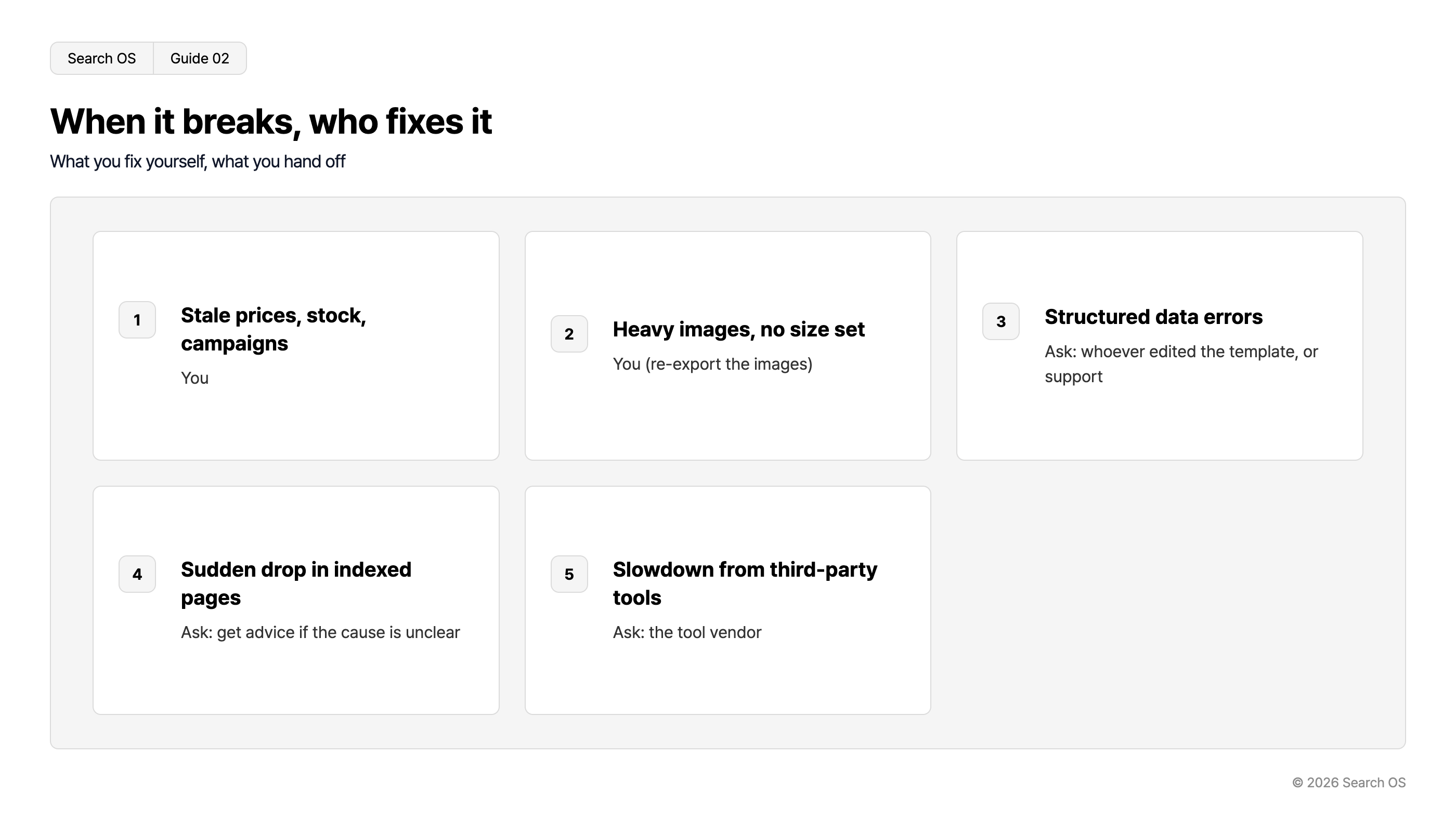
Type of breakage | Fixable yourself | Who to ask |
|---|---|---|
Old prices, stock, campaigns | Yes | You |
Heavy images, missing size attributes | Yes (re-export the images) | You |
Structured data errors | Limited | Whoever touched the template, or ShopServe support |
Sharp drop in indexed count | Limited | Consult someone if the cause isn't clear |
Slowdown from an external tool | Limited | The tool's vendor |
Navigation
- Search OS
- Guide 02
When it breaks, who fixes it
What you fix yourself, what you hand off
| number | issue | action |
|---|---|---|
| 1 | Stale prices, stock, campaigns | You |
| 2 | Heavy images, no size set | You (re-export the images) |
| 3 | Structured data errors | Ask: whoever edited the template, or support |
| 4 | Sudden drop in indexed pages | Ask: get advice if the cause is unclear |
| 5 | Slowdown from third-party tools | Ask: the tool vendor |
© 2026 Search OS
Even when the checklist tells you something broke, it tends to sit untouched if no one has been chosen to fix it. Alongside the monthly check, write down who to ask, one line per item.
Keeping the monthly check going
Looking at the four areas above for 15 minutes a month keeps the initial setup largely intact. The check, though, only goes as far as finding the problem. Fixing it is separate work. And whether AI search bots (GPTBot and others) are fetching your shop doesn't show up in Search Console or PageSpeed Insights.
Search OS continuously checks existing shops, including ShopServe stores, on the state corresponding to the four areas above: indexing, metadata, structured data, and bot access. It detects erosion and organizes it into items to fix. It doesn't replace the policy decided in consulting. It's a layer that keeps watching, on the store's behalf, whether that policy is still being followed today.
Frequently asked questions
Do I need to set up Search Console myself?
It's often set up during consulting. Check, though, that the store holds an account that can log in. If not, ask for ownership to be added.
Is once a month enough?
Up to a few hundred products, once a month is enough. Right after a large campaign or template change, add a check that week.
If the check finds no problems, do I need to do anything?
Record the absence of problems too. When a problem does appear next time, knowing when it started is the shortest path to the cause. Note the date you checked and the result.
Related reading
ShopServe page speed over 3 seconds: SEO impact and where to fix first
SEO and AI search on an SI-built site: how to proceed without a development cycle
References
Google Search Central: Page Indexing report
Google: PageSpeed Insights
Google Search Central: Understanding Core Web Vitals and Google search results
Google: Rich Results Test