Three Options for an EC-CUBE 4 XML Sitemap
Navigation
- Search OS
- EC-CUBE
Three Options for an EC-CUBE 4 XML Sitemap
- Category
- Guides
- Reading Time
- 5 min read
- Topic
- Japan EC platform guides for search and AI search
- Source
- Search OS
The EC-CUBE 4 series doesn't generate an XML sitemap by default. This article compares three options (a plugin, a custom build generated by a command or controller, and generation with an external tool) on update tracking, splitting, lastmod, and operational load. It also covers how to choose based on product count and development capacity.
- URL
- searchos.io/en/blog
- Copyright
- © 2026 Search OS
A common question from stores built on EC-CUBE 4 is that /sitemap.xml returns a 404 when they try to submit a sitemap to Search Console. A sitemap is the list of page URLs you hand to search engines.
The EC-CUBE 4 series doesn't create an XML sitemap by default. Most Japanese hosted carts generate one automatically, but on EC-CUBE you provide it yourself. There are three options: install a plugin, build your own, or generate it with an external tool. Which one to choose depends on product count, update frequency, and development capacity.
This article compares the three options on update tracking, splitting, lastmod, and operational load. It also covers how to pick the one that fits your shop and what to check after choosing.
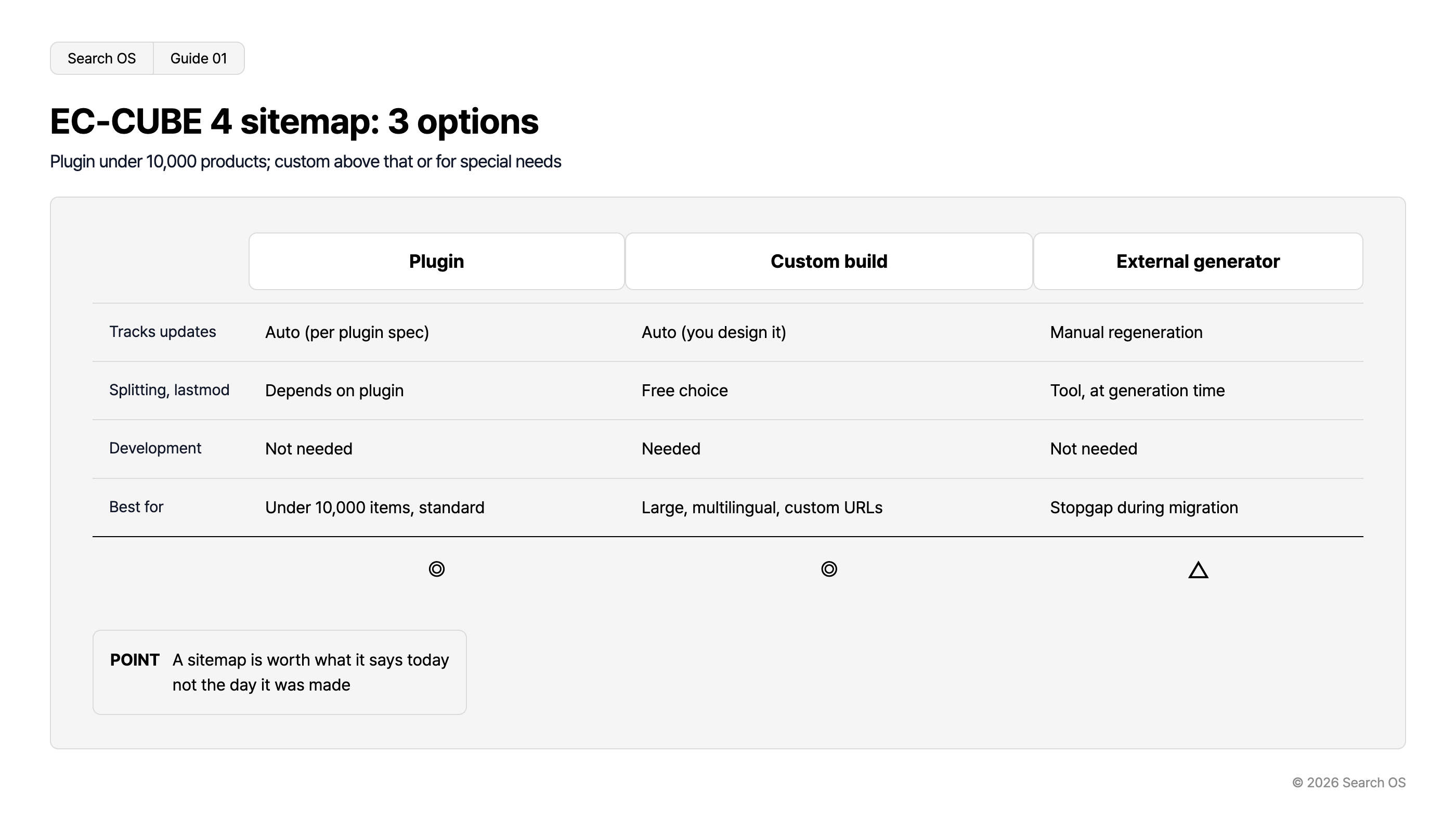
Conclusion: Under ten thousand products, use a plugin. Above that or with special requirements, build your own. External generation is a stopgap
Option | Update tracking | Splitting (over fifty thousand URLs) | lastmod | Development | Verdict |
|---|---|---|---|---|---|
Plugin | Automatic (depends on the plugin's spec) | Depends on the plugin | Depends on the plugin | Not needed | Under ten thousand products, standard setup: best fit |
Custom build | Automatic (designed yourself) | Free | Free | Needed | Large scale, multilingual, custom URL structure: best fit |
Generate with an external tool and host statically | Manual (regeneration required) | Depends on the tool | Value at generation time | Not needed | Temporary measure during migration: limited |
Navigation
- Search OS
- Guide 01
EC-CUBE 4 sitemap: 3 options
Plugin under 10,000 products; custom above that or for special needs
| Feature | Plugin | Custom build | External generator |
|---|---|---|---|
| Tracks updates | Auto (per plugin spec) | Auto (you design it) | Manual regeneration |
| Splitting, lastmod | Depends on plugin | Free choice | Tool, at generation time |
| Development | Not needed | Needed | Not needed |
| Best for | Under 10,000 items, standard | Large, multilingual, custom URLs | Stopgap during migration |
| Rating | ◎ | ◎ | △ |
- POINT
- A sitemap is worth what it says today not the day it was made
© 2026 Search OS
Key idea: A sitemap's value is decided by whether it is still correct today, not by the day it was made. A sitemap that doesn't follow product additions and removals keeps handing stale URLs to search engines.
Option 1: Plugin
The EC-CUBE Owners Store has sitemap generation plugins. When choosing one, confirm the following.
Supports the EC-CUBE version you use (4.0/4.1/4.2/4.3)
Which of products, categories, feature pages, and user-defined pages it includes
Whether it outputs lastmod, and if so, whether it reflects the product's update time
Whether it splits into a sitemap index above fifty thousand URLs
Whether you can configure handling of unpublished and out-of-stock products
Whether the plugin is still maintained (last update date)
A plugin whose supported version is old can stop working after an EC-CUBE core update. Check the plugin's last update date before installing.
Option 2: Custom build
If you have development capacity, a custom build is the most flexible. There are two implementation forms.
Form | How it works | Suited to |
|---|---|---|
Dynamic generation (controller) | Generates URLs from the DB on every request | Up to a few thousand products. Always current |
Batch generation (console command) | Generates a file on a schedule and serves it statically | Tens of thousands of products or more. Isolates generation load |
Requirements for a custom build:
Exclude products by publication status (public/private) and products no longer for sale
Put the product's update time in lastmod. Don't give every URL the same date
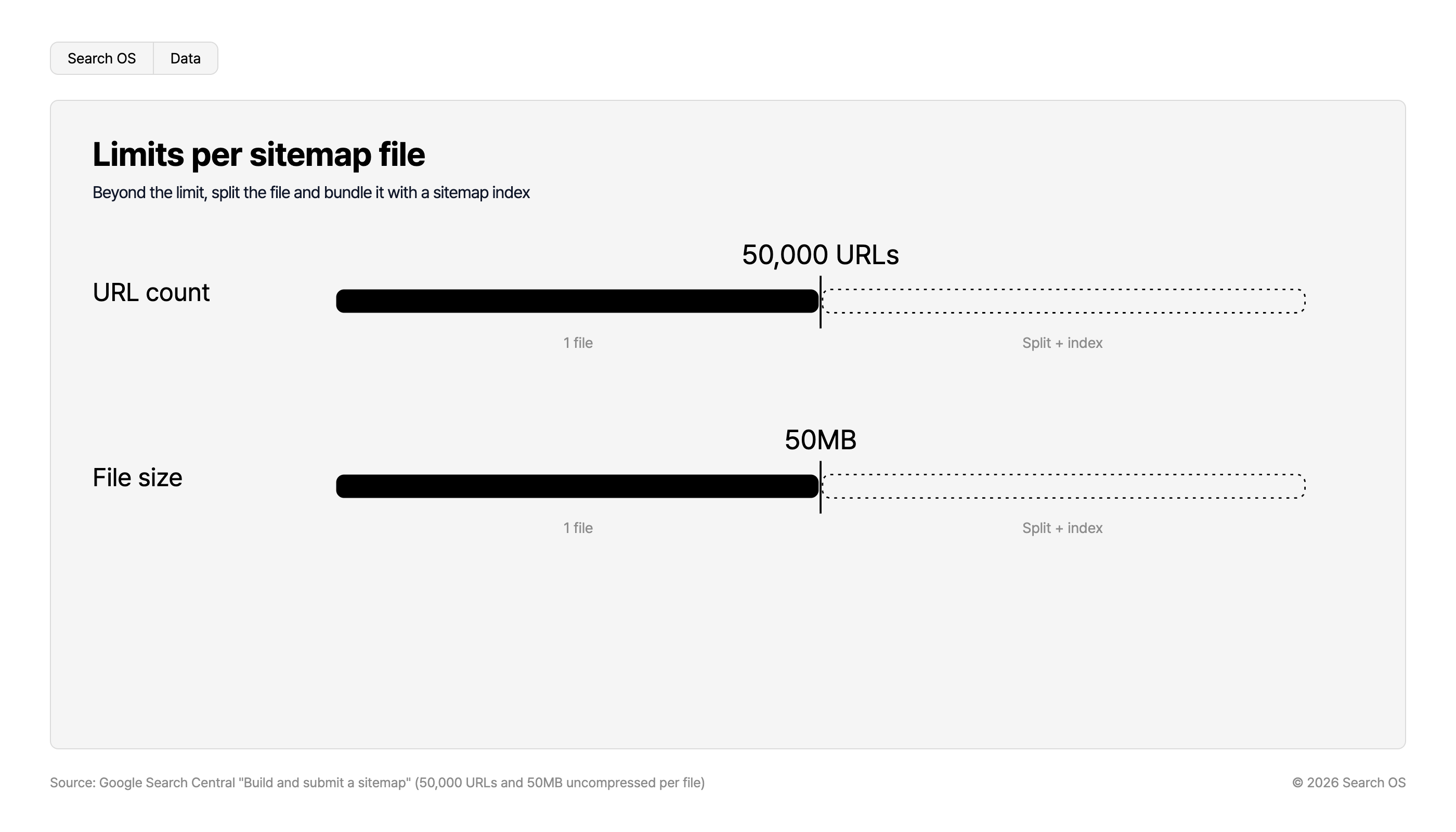
Split above fifty thousand URLs or 50MB, and output a sitemap index
Include categories, feature pages, and user-defined pages too
If you have multilingual or mobile-only URLs, decide how to handle them
Option 3: Generate with an external tool
A crawler-type sitemap generator walks the public site and builds a URL list. You then host it as a static file. No development and no plugin needed. It doesn't follow product additions and removals, though. The moment you forget to regenerate, it goes stale. Keep it as a temporary measure during migration or until a plugin is in place, not a permanent solution.
What to check after choosing
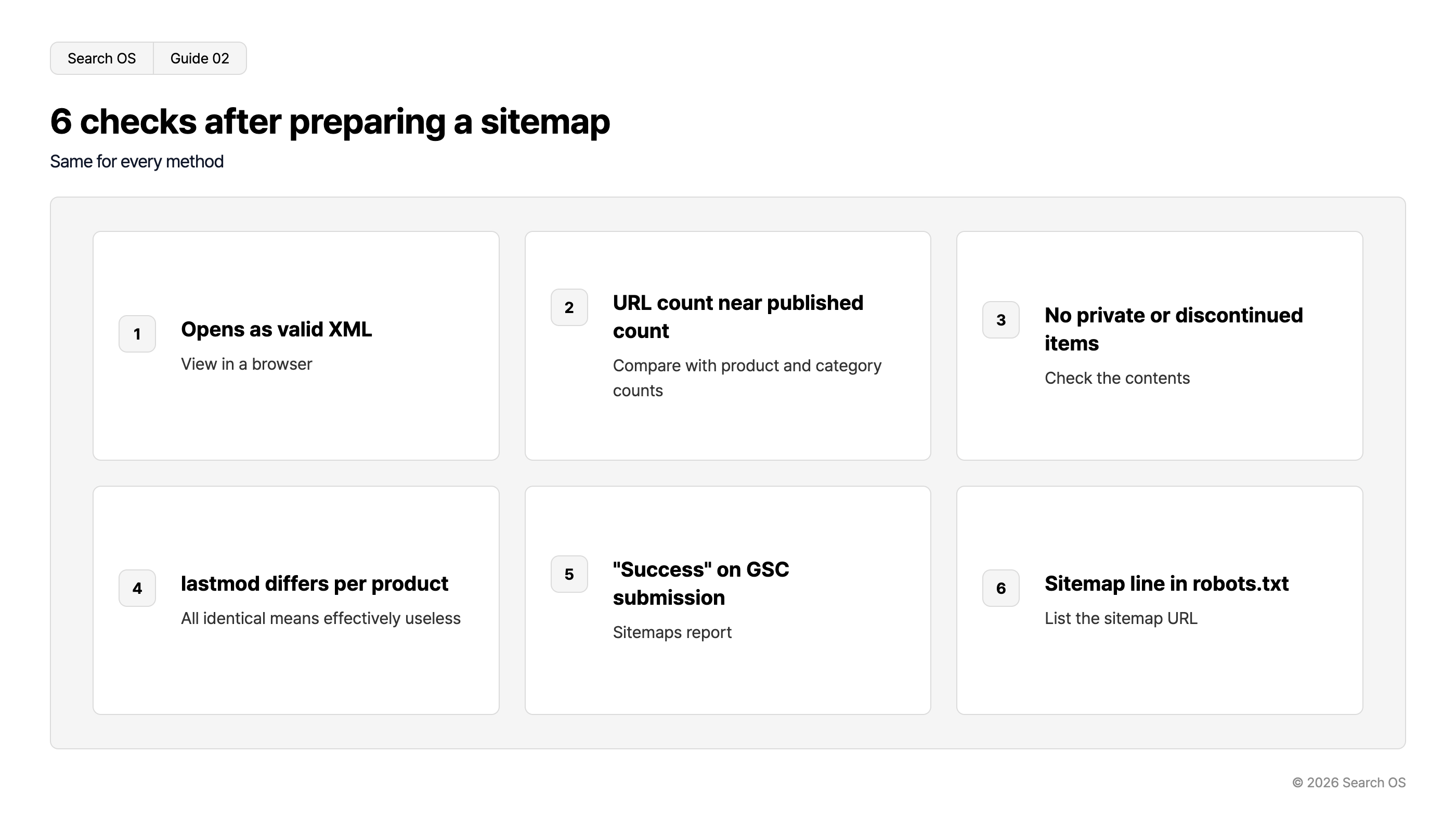
Open the generated sitemap in a browser and confirm it displays as valid XML
The URL count is close to the number of published products and categories
Unpublished and discontinued products aren't included
lastmod differs per product (if all the same, it's effectively meaningless)
Submit in Search Console and confirm the status shows "Success"
Add a
Sitemap:line to robots.txt with the sitemap URL
Navigation
- Search OS
- Guide 02
6 checks after preparing a sitemap
Same for every method
| number | check_item | description |
|---|---|---|
| 1 | Opens as valid XML | View in a browser |
| 2 | URL count near published count | Compare with product and category counts |
| 3 | No private or discontinued items | Check the contents |
| 4 | lastmod differs per product | All identical means effectively useless |
| 5 | "Success" on GSC submission | Sitemaps report |
| 6 | Sitemap line in robots.txt | List the sitemap URL |
© 2026 Search OS
It breaks after you set it up
A sitemap breaks even after you set it up. An EC-CUBE core update stops the plugin. The scheduled batch stops running. You add a new page type but don't include it in the sitemap. These things happen in ways that are hard to notice.
Limits per sitemap file
Beyond the limit, split the file and bundle it with a sitemap index
| Metric | Limit (1 file) | Beyond Limit |
|---|---|---|
| URL count | 50,000 URLs | Split + index |
| File size | 50MB | Split + index |
Source: Google Search Central "Build and submit a sitemap" (50,000 URLs and 50MB uncompressed per file)
© 2026 Search OS
Search OS continuously checks sitemap generation status, URL count, and the validity of lastmod on existing shops, including those on EC-CUBE. It also looks at which URLs search engines and AI crawlers actually fetch. Gaps between the sitemap and reality are sorted into fix targets. It doesn't replace the work of building the sitemap.
Frequently asked questions
Will my pages be indexed without a sitemap?
Yes, if internal links can be followed. Discovery is slower, though, and updates take longer to be reflected. The more products you have, the bigger the gap.
Did the EC-CUBE 2 series have a sitemap?
The 2 series had a built-in sitemap generation feature. That is why it feels like it "went away" after migrating to the 4 series.
Can I use a plugin and a custom build together?
Two sitemaps that report the same URL with different information (lastmod and so on) contradict each other. Narrow it down to one.
Related reading
How Far Can You Trust EC-CUBE SEO Plugins: Criteria for Owning Your Structured Data
A Requirements Template for Communicating SEO and AI Search Needs to Your EC-CUBE Agency
Sitemap Operations for Large Sites: lastmod, Splitting, and Submission
References
Google Search Central: Build and submit a sitemap
Google Search Central: Manage your sitemaps using sitemap index files
EC-CUBE: Owners Store
sitemaps.org: Sitemaps XML format