STORES Not in Search: Settings Problem or Waiting for Indexing
Navigation
- Search OS
- STORES
STORES Not in Search
Settings Problem or Waiting for Indexing
| Category | Read Time | Topic | Source | Content | URL | Copyright |
|---|---|---|---|---|---|---|
| Tips | 6 min read | Japan EC platform guides for search and AI search | Search OS | When a STORES shop doesn't show up in search, the dividing line is whether it's a settings mistake or a wait for indexing. If two weeks or more have passed since launch, the sitemap is submitted, and nothing has changed, it's a settings problem. Earlier than that, it may be a wait for indexing. This article lays out the criteria for telling them apart, the signs of a settings problem, and what to do while waiting. | searchos.io/en/blog | © 2026 Search OS |
A STORES shop can be 10 days past launch and still not appear when you search its name. The question is whether a setting is wrong or whether waiting will fix it.
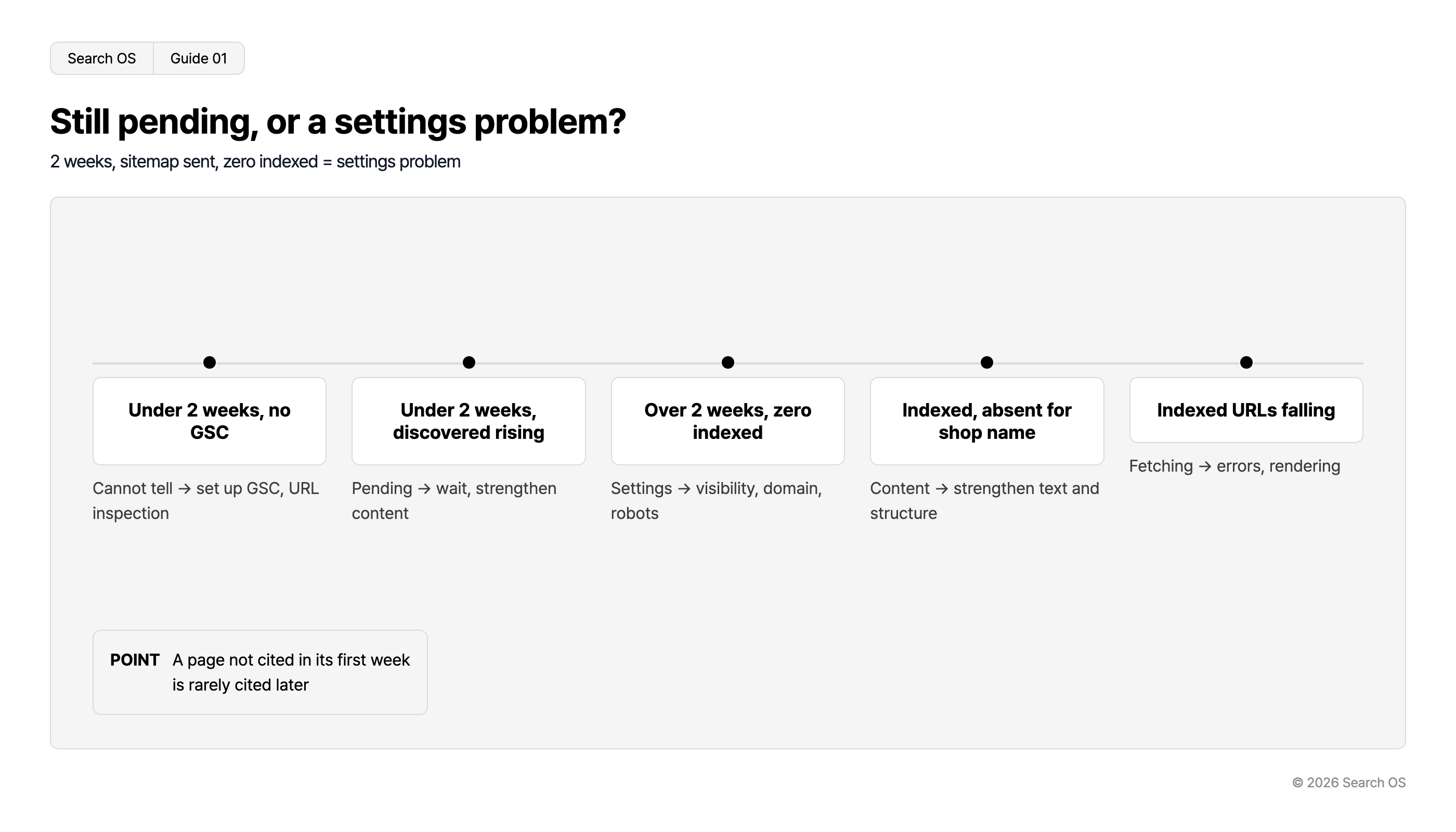
The answer narrows to one of two. You only need to look at two things: how many days since launch, and what Search Console shows. A sitemap is the list of page URLs handed to search engines. If two weeks or more have passed, the sitemap is submitted, and Search Console shows zero indexed URLs, it's a settings problem. If it's earlier than that and Search Console shows a growing number of "Discovered" or "Crawled" URLs, you're in the queue.
This article lays out how long counts as waiting for indexing, the signs of a settings problem, the order for telling them apart, and what to do while you wait.
Conclusion: Two weeks, sitemap submitted, zero indexed means a settings problem
Situation | Verdict | Next step |
|---|---|---|
Under two weeks since launch, Search Console not set up | Can't judge | Set up Search Console and run URL Inspection |
Under two weeks, "Discovered" and "Crawled" growing in Search Console | Waiting for indexing | Wait. Strengthen content in parallel |
Two weeks or more, sitemap submitted, zero indexed URLs | Settings problem | Check visibility setting, domain, and robots |
Two weeks or more, indexed but not appearing for the shop name | Content problem | Strengthen page text and structure |
Previously indexed URLs are decreasing | Fetch problem | Check errors and rendering |
Navigation
- Search OS
- Guide 01
Still pending, or a settings problem?
2 weeks, sitemap sent, zero indexed = settings problem
| Status | Action/Diagnosis |
|---|---|
| Under 2 weeks, no GSC | Cannot tell → set up GSC, URL inspection |
| Under 2 weeks, discovered rising | Pending → wait, strengthen content |
| Over 2 weeks, zero indexed | Settings → visibility, domain, robots |
| Indexed, absent for shop name | Content → strengthen text and structure |
| Indexed URLs falling | Fetching → errors, rendering |
- POINT
- A page not cited in its first week is rarely cited later
© 2026 Search OS
The longer you do nothing on the grounds that you're waiting for indexing, the harder recovery becomes later. Even when waiting, there are things you can do in parallel.
Data point: In an experiment tracking 81 pages for 30 days, Google AI Mode cited 59% in the first week, and pages not cited in the first week were rarely cited afterward. In search and AI search alike, the state of the first few weeks shapes what follows. Even if you decide to wait, put the page content in order starting now.
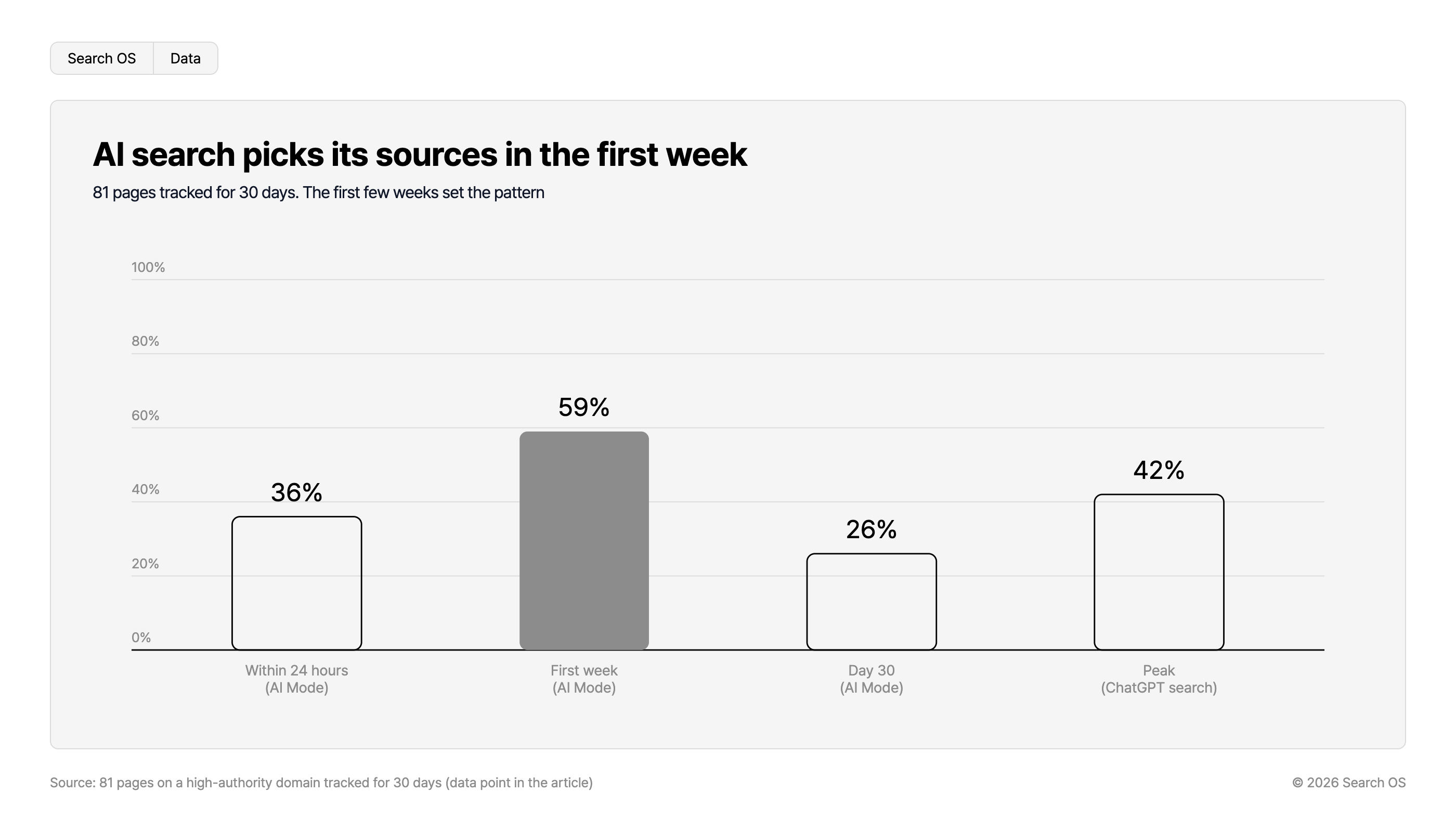
AI search picks its sources in the first week
81 pages tracked for 30 days. The first few weeks set the pattern
| Timeframe / Mode | Percentage |
|---|---|
| Within 24 hours (AI Mode) | 36% |
| First week (AI Mode) | 59% |
| Day 30 (AI Mode) | 26% |
| Peak (ChatGPT search) | 42% |
Source: 81 pages on a high-authority domain tracked for 30 days (data point in the article)
© 2026 Search OS
How long counts as waiting for indexing
Google's indexing takes from a few days to a few weeks depending on the site's size and trust. For a new shop with almost no external links yet, about two weeks is within the range of waiting.
You may decide to wait, though, only when all of the following are in place.
Shop ownership verified in Search Console
Sitemap submitted
URL Inspection shows at least the top page as "Crawled" or "Indexed"
If these aren't in place, review the settings regardless of how many days have passed. Finish ownership verification in Search Console and sitemap submission first.
Signs that it's a settings problem
If any of the following applies, suspect a problem on the settings side.
URL Inspection in Search Console keeps saying "URL is not on Google". If requesting indexing changes nothing, the problem is the visibility setting or robots.
The STORES search engine visibility setting is off. Check the setting's name and location in the admin panel. Many cases are shops that turned it off while preparing to open and left it.
Pages open on both the custom domain and the shared domain, with no signal of which is canonical. Performance splits, and neither is likely to appear.
The sitemap isn't submitted, or is returning an error. Check its status in the Sitemaps section of Search Console.
Order of checks
Set up Search Console (if not set up, this comes first)
Run URL Inspection on the top page and one product page
Check the sitemap's submission status
Check the STORES search engine visibility setting
If you use a custom domain, check how the shared-domain URL behaves
Weigh the two-week mark against the results above and decide
In this order, about 30 minutes settles whether to wait or to fix. Start by running the top page through URL Inspection.
What to do while you wait
Even once you know you're waiting for indexing, doing nothing costs you. What happens afterward depends on whether the page holds information that can be assessed the moment it's indexed.
Task | Reason |
|---|---|
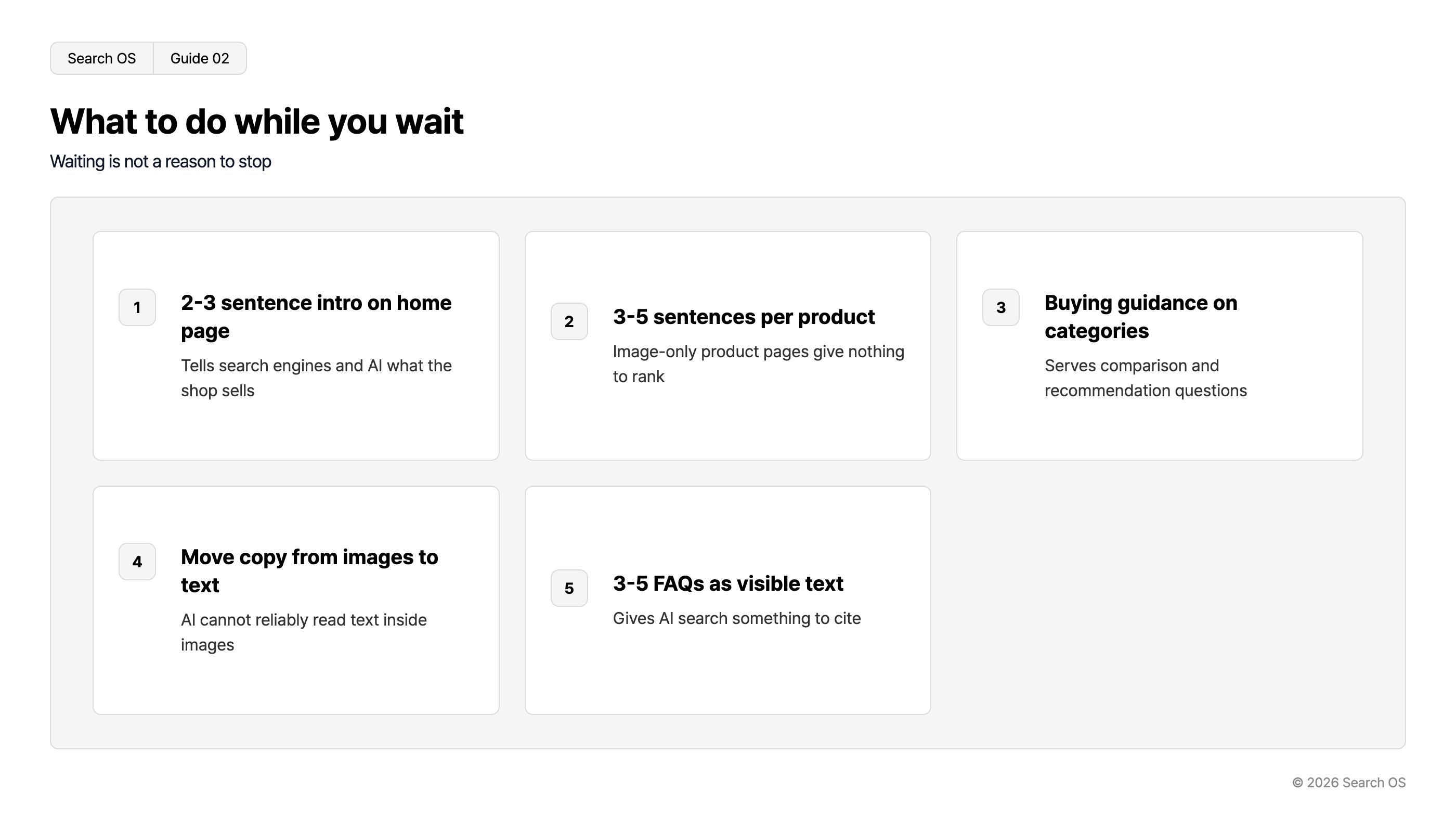
Put a 2 to 3 sentence shop introduction on the top page | Tells search engines and AI what the shop sells |
Write a 3 to 5 sentence text description for each product | Image-only product pages hold nothing to assess |
Put buying guidance on category pages | Answers comparison and recommendation questions |
Move product descriptions from images to text | AI can't reliably read text inside images |
Place 3 to 5 FAQs as visible text | Material for AI search citations |
Navigation
- Search OS
- Guide 02
What to do while you wait
Waiting is not a reason to stop
| step_number | title | description |
|---|---|---|
| 1 | 2-3 sentence intro on home page | Tells search engines and AI what the shop sells |
| 2 | 3-5 sentences per product | Image-only product pages give nothing to rank |
| 3 | Buying guidance on categories | Serves comparison and recommendation questions |
| 4 | Move copy from images to text | AI cannot reliably read text inside images |
| 5 | 3-5 FAQs as visible text | Gives AI search something to cite |
© 2026 Search OS
These take effect after indexing. They also prevent the state where the shop is indexed but never reaches the top. Start with the shop introduction on the top page.
What remains after the shop appears
Once the shop shows up for its name, the next issues arrive: whether it appears for anything other than the shop name, and whether AI search recommends it. From here on it's operations, not settings. Keep descriptions and structure in place each time you add a product, and keep confirming that bots can fetch the pages.
Search OS is a layer that supports this operation. It gives existing sites, including STORES shops, a structure that search engines and AI crawlers read easily. It also prepares metadata, structured data, and sitemaps. Which pages Googlebot, GPTBot, PerplexityBot, and others actually fetched is confirmed from bot logs. On that basis, it organizes index gaps and rendering problems into items to fix. It handles the part that continues after the settings have been sorted out.
Frequently asked questions
Will requesting indexing make it appear faster?
Sometimes it's faster. There's no guarantee, though. If a request changes nothing, suspect the visibility setting or robots.
Is a shop with few products harder to index?
Content matters more than count. Even with 10 products, pages with text descriptions get indexed.
Does it take as long to appear in AI search as in search?
No. Google AI Mode cites relatively soon after indexing, but turnover is high. ChatGPT search takes 1 to 2 weeks or more. In return, once it cites a page, it tends to stay stable.
Related reading
Why a BASE shop doesn't show up in web search and how to fix it
Sitemap operations for large sites: lastmod, splitting, and submission
References
Google Search Central: URL Inspection Tool
Google Search Central: Page Indexing report
Google Search Central: Sitemaps report