B-Cart: Winning New Customers from AI Search with Industry Guides
Navigation
- Search OS
- B-Cart
B-Cart: Winning New Customers from AI Search with Industry Guides
| Category | Read Time | Tags | Source |
|---|---|---|---|
| Insights | 5 min read | Japan EC platform guides for search and AI search | Search OS |
If your B-Cart ordering site publishes nothing but the company name and contact details, AI can't find you as a supplier. This article lays out how to use sourcing guides by industry and use as the entry point, conveying standards and terms without showing prices.
- URL
- searchos.io/en/blog
- Copyright
- © 2026 Search OS
A B-Cart ordering site is built for existing customers who log in and order. So once operations settle, the question of how to win new customers from AI search comes up.
With only the company name and contact details public, AI learns nothing about your products. The site may be convenient for existing customers, but from outside there's no way to read what the company handles. Start by preparing public pages that describe your product lines concretely.
This article covers how to make industry-specific pages the entry point from AI search. It also handles writing without prices, connecting to the ordering site, and operations after publishing.
Conclusion: Put sourcing guides by industry and use in the public area, and write concretely with facts other than price
Page type | Question it answers | Example |
|---|---|---|
Sourcing guide by industry | "Where to source [X] for the [Y] industry" | "Sourcing guide: commercial [X] for restaurants" |
Buying guide by use | "How to choose [X] for [Y]" | "How to choose takeout containers: use, size, material" |
Trade terms guide | "Minimum lot", "Lead time", "Opening an account" | "New customer onboarding and terms" |
Product range list | "Do you carry [X]" | "Product categories handled" (no prices) |
Case studies | "How do peers use it" | "Deployment example at [X] store" |
Navigation
- Search OS
- Guide 01
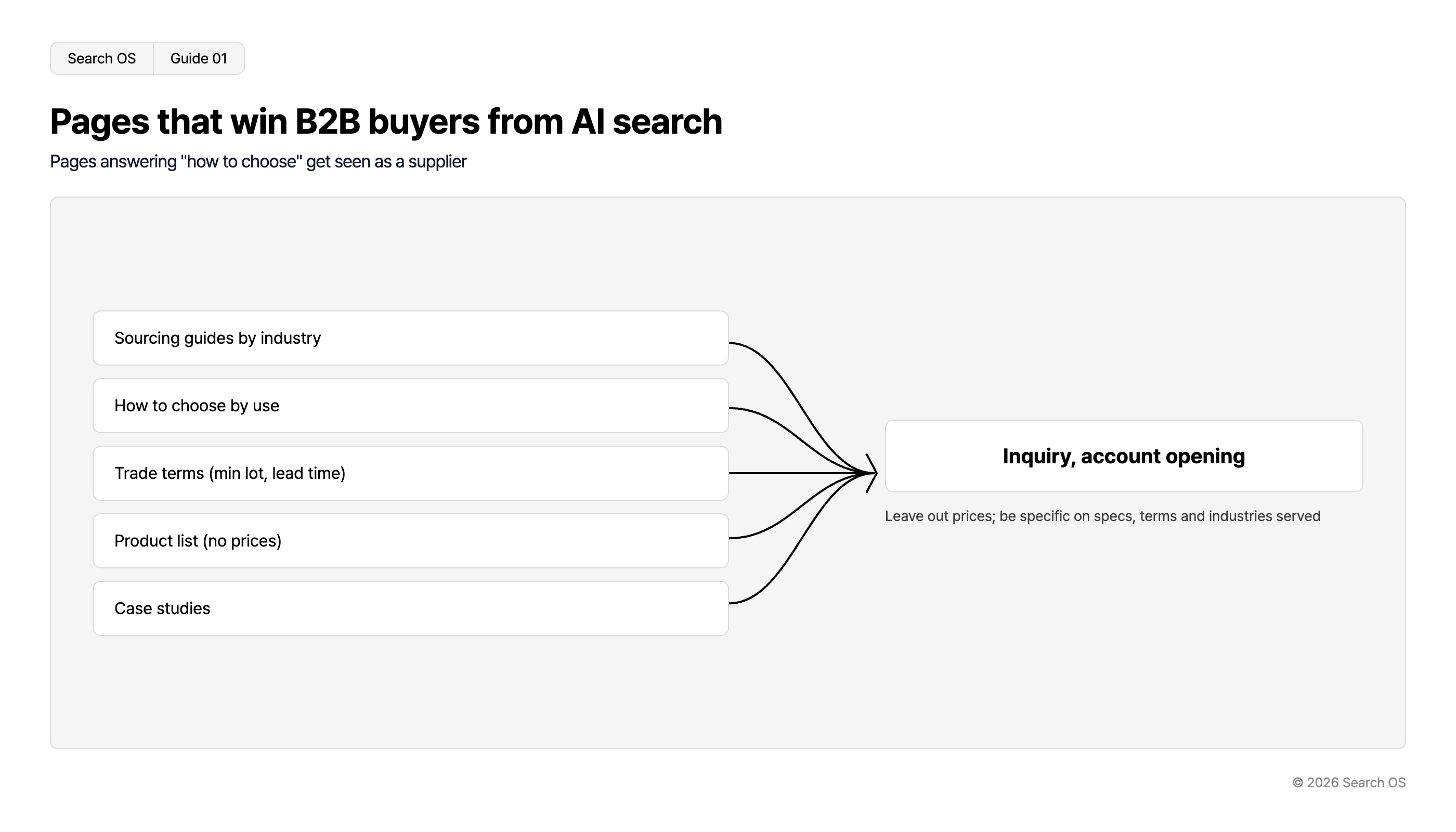
Pages that win B2B buyers from AI search
Pages answering "how to choose" get seen as a supplier
Content Types Leading to Conversion
- Sourcing guides by industry
- How to choose by use
- Trade terms (min lot, lead time)
- Product list (no prices)
- Case studies
Inquiry, account opening
Leave out prices; be specific on specs, terms and industries served
© 2026 Search OS
Key idea: New customers want to know how to choose before they look for a supplier. How to choose takeout containers, for instance. A page that answers that becomes the entry point through which they learn of the supplier.
Order for writing an industry page
Position | Content |
|---|---|
Opening | The key points of sourcing for this industry, in 2 to 3 sentences |
Heading "Items the [X] industry needs" | List of items, as a table. No prices |
Heading "Selection criteria" | Size, material, standards, lot, lead time |
Heading "Common challenges and responses" | Storage, disposal, seasonal fluctuation, and so on |
Heading "Trade terms" | Minimum lot, lead time, outline of payment terms, delivery areas |
Heading "How trading works" | Inquiry → account opening → order |
FAQ | 3 to 5 questions |
Contact path | Link to the form |
For a restaurant guide, start from the items that industry needs. Check the specifications for what B-Cart's free pages and similar can build, and for the URL structure. If that's not possible, one option is a public site on a separate CMS. Decide where the guides live and where they link into the ordering site before you start.
You can be concrete without prices
In B2B, there are reasons prices can't simply be published. Facts like size and material can still be conveyed. Look for what you can put in a table.
Can't publish | Can publish |
|---|---|
Unit price | Standards (size, capacity, quantity per pack), material, origin, certifications |
Customer-specific terms | Standard minimum lot, standard lead time, delivery areas |
Stock quantity | Whether carried, year-round or seasonal |
Quotes | Quote process, information required, typical days to reply |
Navigation
- Search OS
- Guide 02
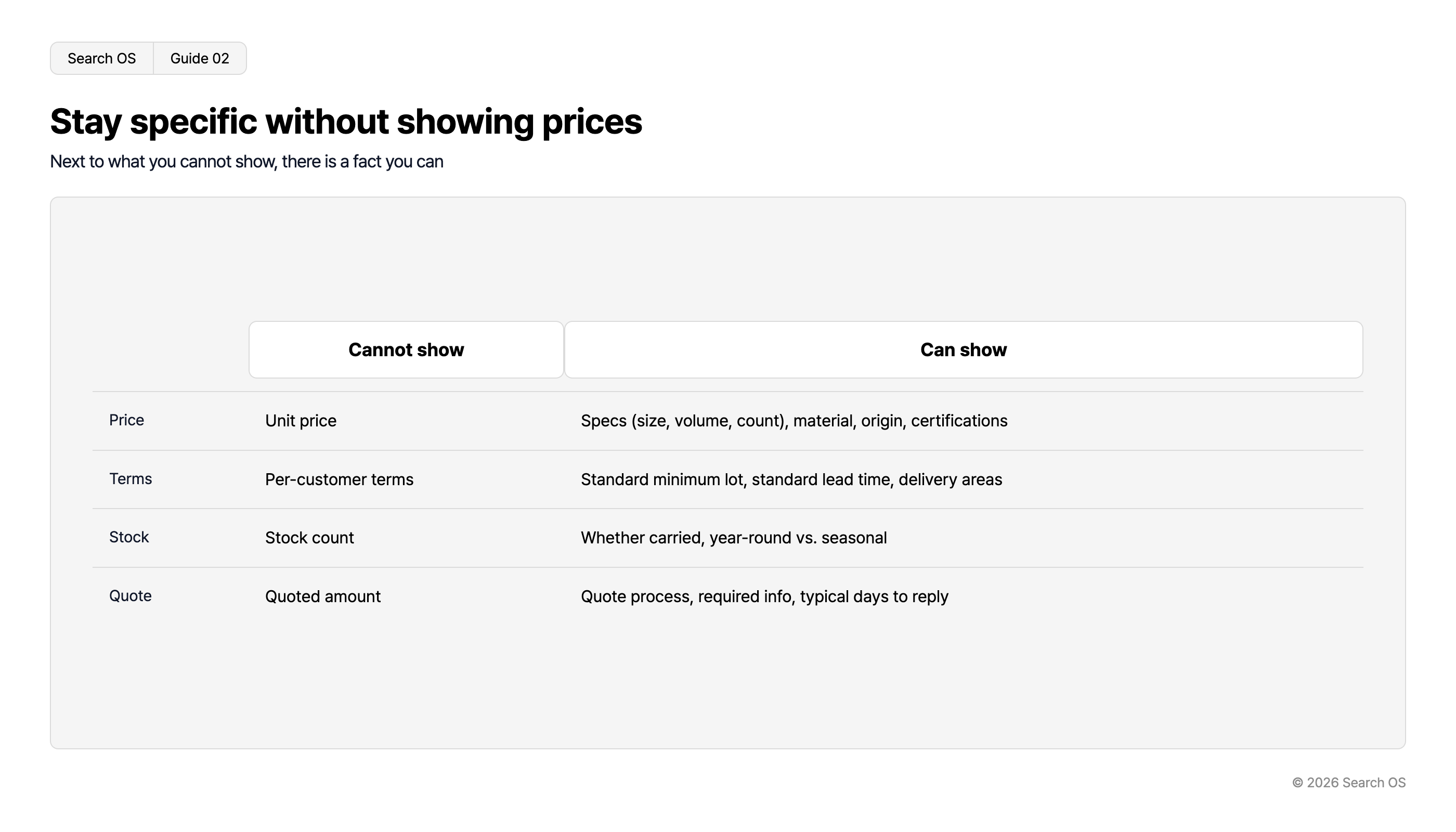
Stay specific without showing prices
Next to what you cannot show, there is a fact you can
| Category | Cannot show | Can show |
|---|---|---|
| Price | Unit price | Specs (size, volume, count), material, origin, certifications |
| Terms | Per-customer terms | Standard minimum lot, standard lead time, delivery areas |
| Stock | Stock count | Whether carried, year-round vs. seasonal |
| Quote | Quoted amount | Quote process, required info, typical days to reply |
© 2026 Search OS
Knowing a container's size and material lets the reader judge whether it fits their use. In AI search too, standards and terms are what make a page concrete. Even without prices, you get listed as a candidate supplier.
Add signposts to the ordering site
From public pages to the ordering site (login): "Existing customers, log in here"
From public pages to the contact form: "New customers, inquire here"
From the ordering site's login screen to public pages: "New customers, start here"
Include the business description and industries served in Organization structured data
Point existing customers to the login link. If you run both on the same domain, the ordering site and public pages share performance. On separate domains, performance accumulates on the public page side. Check that new and existing customers are routed to different destinations.
How many guides to start with
Pick three industries first and write one sourcing guide for each. Choose based on the industries of your current customers. See how the three perform, then add buying guides by use. Past 10 guides, create a guide index page that collects the links.
Don't let published guides go stale
When items, standards, or trade terms change, revise the guides too. If a discontinued item stays in a guide, AI detects the contradiction and drops the citation. That's a container you stopped carrying surviving only inside the guide. Also check that a settings change hasn't hidden public pages behind login.
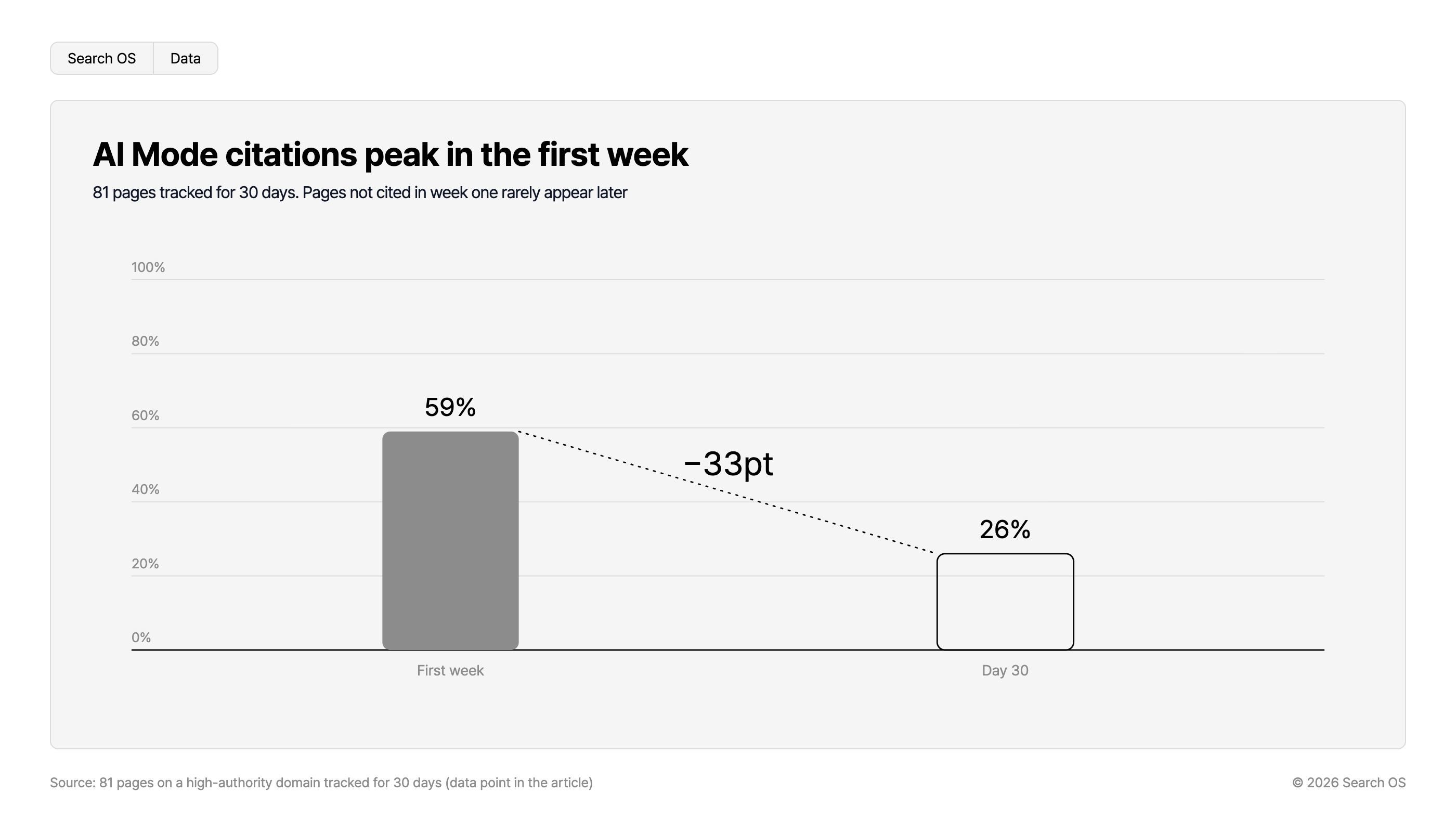
Data point: In an experiment tracking 81 pages on a high-authority domain for 30 days, Google AI Mode cited 59% of them in the first week, falling to 26% by day 30. Pages not cited in the first week were rarely cited afterward. Whether a page is readable in the first weeks after publication shapes what follows.
Navigation
- Search OS
- Data
AI Mode citations peak in the first week
81 pages tracked for 30 days. Pages not cited in week one rarely appear later
| Time Period | Citation Percentage |
|---|---|
| First week | 59% |
| Day 30 | 26% |
- Change
- -33pt
Source: 81 pages on a high-authority domain tracked for 30 days (data point in the article)
© 2026 Search OS
Search OS supports the operation of B2B ordering sites, B-Cart included. It checks the index status and metadata of public pages, with structured data in scope too. It also tracks which pages AI crawlers are fetching. Stale content and pages that became private unintentionally are organized as items to fix.
Frequently asked questions
What if I don't want competitors to know which products I carry?
If you don't show the items, new customers can't learn about them either. Hide prices and customer information, publish items and standards. That's the usual line.
Won't existing customers get confused by the public pages?
Put the "Existing customers, log in here" link somewhere prominent. As long as they can get to their usual ordering page, confusion is avoided.
What if I can't handle more inquiries?
State the minimum lot and service areas clearly on the public pages. That reduces inquiries that don't fit your terms. Check on the actual page that your trading conditions can be read before someone inquires.
Related reading
Designing noindex for B-Cart Members-Only URLs While Keeping the Pages That Should Stay Public
How to Design the Index Boundary for ebisumart B2C and B2B Sites
References
Google Search Central: Creating helpful, reliable, people-first content
Google Search Central: Organization structured data
Google Search Central: AI features and your website