The Index Boundary on ebisumart BtoC and BtoB Sites
Navigation
- Search OS
- ebisumart
The Index Boundary on ebisumart BtoC and BtoB Sites
- Category
- Insights
- Reading Time
- 5 min read
- Topic
- Japan EC platform guides for search and AI search
When BtoC and BtoB run on a single ebisumart platform, the boundary between pages that should be public and pages that should be member-only tends to blur. BtoB prices end up public, or product information that should be public sits behind the login wall. This article covers the index boundary design that prevents these problems, when to use noindex versus login control, and how to present the BtoB side to AI search.
- URL
- searchos.io/en/blog
- Copyright
- © 2026 Search OS
On ebisumart, a BtoC shop and a BtoB wholesale site can run on the same platform. The flip side is boundary accidents, such as a wholesale price page showing up on Google.
The line is drawn by whether you want search engines to see the page, not by whether it requires a login. The two don't always match. A page behind the login wall can still get indexed through links or leftovers from an earlier configuration. Conversely, product information that should be public can sit behind the login wall and never get indexed. Running BtoC and BtoB together without designing the boundary produces both problems at once.
This article covers the index boundary for each page type and when to use noindex versus login control. noindex is the directive that keeps a page out of search results. It also covers how to present the BtoB side to AI search and how to check that the boundary hasn't broken.
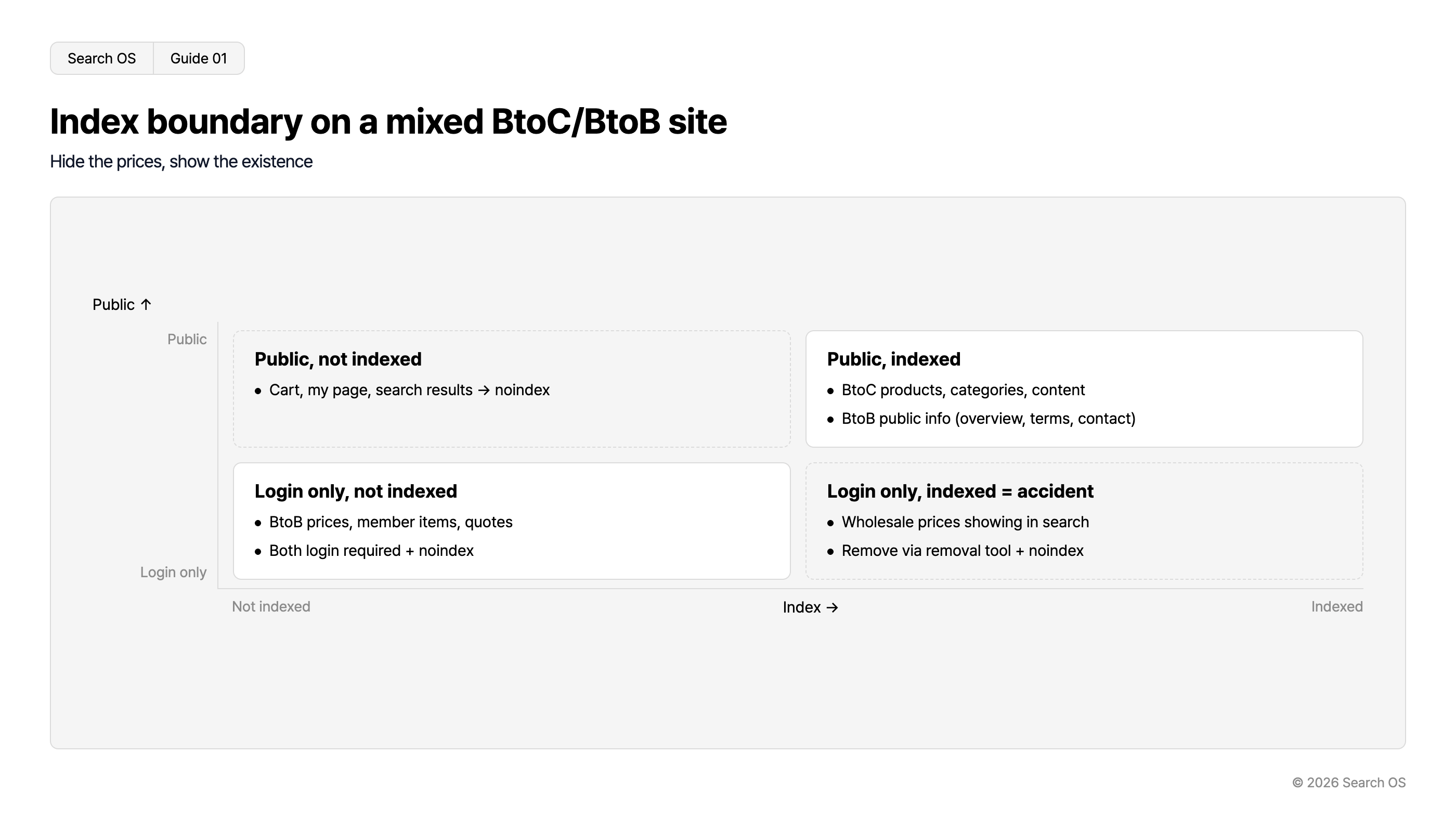
Conclusion: Split pages into four types and set "public and indexed", "public and not indexed", and "restricted and not indexed" explicitly
Page type | Public | Indexed | Setting |
|---|---|---|---|
BtoC products, categories, content | Yes | Yes | Normal |
Public BtoB information (product overview, trade terms, contact) | Yes | Yes | Normal. Let it be indexed as the BtoB entry point |
BtoB prices, member-only products, quotes | No | No | Login required + noindex (both) |
Cart, my page, search results | Yes/No | No | noindex |
Breadcrumbs
- Search OS
- Guide 01
Index boundary on a mixed BtoC/BtoB site
Hide the prices, show the existence
| Access / Indexing | Not indexed | Indexed |
|---|---|---|
| Public | Public, not indexed • Cart, my page, search results → noindex | Public, indexed • BtoC products, categories, content • BtoB public info (overview, terms, contact) |
| Login only | Login only, not indexed • BtoB prices, member items, quotes • Both login required + noindex | Login only, indexed = accident • Wholesale prices showing in search • Remove via removal tool + noindex |
© 2026 Search OS
Key idea: Hide all of BtoB and new trading partners can't find you in search. Hide the prices, show the existence. Make this the foundation of your index design.
When to use noindex versus login control
Means | What it prevents | What it doesn't prevent |
|---|---|---|
Login required | People seeing the content | Search engines recognizing the URL (the title alone may get indexed) |
noindex | Search engines indexing the page | People opening the URL directly |
robots.txt Disallow | Being crawled | Removal of what is already indexed. With external links, the URL alone gets indexed |
Set both login required and noindex on member-only pages. With login alone, the result of being bounced to the login page can get indexed, or the URL alone can get indexed. With noindex alone, anyone who knows the URL can see the content. Every time you add a page, confirm that member-only pages have both settings.
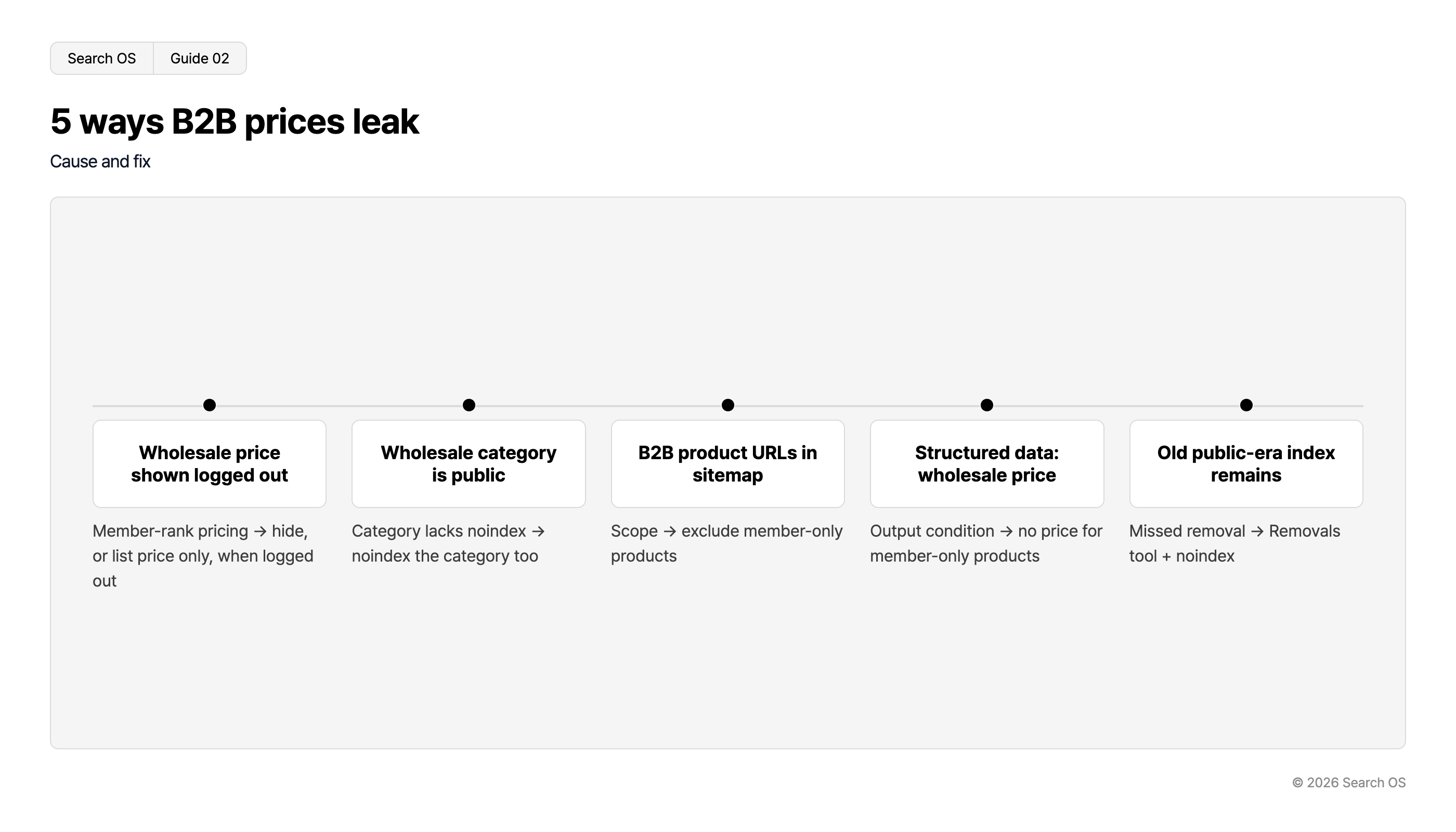
How BtoB prices leak
Pattern | Cause | Fix |
|---|---|---|
Wholesale price shown as "member price" when logged out | Display setting for price by member rank | When logged out, hide the price or show the regular price only |
Wholesale site category pages are public | Member-only product categories aren't noindex | noindex on categories too |
Sitemap includes BtoB product URLs | Sitemap scope | Exclude member-only products |
BtoB product structured data includes a price | Structured data output conditions | Don't output price for member-only products |
Index entries remain from a period when the page was public | Removal missed after the setting change | Search Console removal tool + noindex |
Navigation
- Search OS
- Guide 02
5 ways B2B prices leak
Cause and fix
| Cause | Fix |
|---|---|
| Wholesale price shown logged out | Member-rank pricing → hide, or list price only, when logged out |
| Wholesale category is public | Category lacks noindex → noindex the category too |
| B2B product URLs in sitemap | Scope → exclude member-only products |
| Structured data: wholesale price | Output condition → no price for member-only products |
| Old public-era index remains | Missed removal → Removals tool + noindex |
© 2026 Search OS
How to present the BtoB side to AI search
New trading partners ask AI things like "companies that wholesale X" or "commercial suppliers for X". For AI to answer, you need public pages outside the login wall. A wholesaler of commercial food ingredients, for example, publishes items and origins and withholds only the wholesale price.
Product overview (items, origins, specifications; no prices)
Trade terms (minimum lot, lead time, outline of payment terms)
Industries and regions served
Contact and account opening flow
"How to choose" and case studies by industry
Let these be indexed, and include the BtoB line of business in the Organization structured data. Prices and stock stay behind the login wall.
How to check that the boundary hasn't broken
Check | Method | Frequency |
|---|---|---|
BtoB prices not indexed | Search Google for | Monthly |
Member-only pages are noindex | Check the source of the page | On setting changes |
No member-only URLs in the sitemap | Check the sitemap contents | Monthly |
Display when logged out | Open a member-only product in an incognito window | On setting changes |
Public BtoB pages are indexed | URL inspection in Search Console | Monthly |
The boundary keeps breaking after you set it
Every time you add a product, add a member rank, or change a template, the boundary can break. When the person in charge of BtoB products and the person in charge of SEO are different, missed noindex settings happen routinely. The boundary isn't finished when you decide it. Patrolling it afterward takes effort.
Search OS continuously checks the list of indexed URLs, noindex and canonical settings, prices contained in structured data, and the pages bots actually fetch on sites where BtoC and BtoB coexist, including those on ebisumart. It detects boundary breaks and sorts them into fix targets. It isn't the work of deciding the boundary itself. The dividing line in operations is whether a layer keeps watching that the boundary you decided is still holding today.
Frequently asked questions
How do I quickly remove a wholesale price page that is already indexed?
Use the Search Console removal tool to hide it temporarily. At the same time, set noindex and login required. With the removal tool alone, the page reappears once the removal expires.
Should I split BtoB and BtoC into separate domains?
If you can design the boundary explicitly, a single domain is fine. Splitting makes the performance of public BtoB pages independent from BtoC performance. If you rely on search for new BtoB customers, sharing performance on a single domain is the stronger position.
Can AI crawlers get into member-only pages?
They can't get past the login wall. If login required is working correctly, no extra robots.txt configuration is needed.
Related reading
References
Google Search Central: Block Search indexing with noindex
Google Search Central: Remove a page hosted on your site from Google
Google Search Central: Organization structured data