Content SEO with Color Me Shop Free Pages
Content SEO with Color Me Shop Free Pages
| Category | Read Time | Description | Summary | Source | Copyright |
|---|---|---|---|---|---|
| Guides | 6 min read | Japan EC platform guides for search and AI search | On Color Me Shop, the place to write buying guides and how-to articles is the free page. It becomes the entry point for people arriving from searches other than your product names, and from AI search. This article covers article types, page structure, links to product pages, and the limits of managing them. | searchos.io/en/blog | © 2026 Search OS |
Color Me Shop has no blog feature of the kind other services offer. So shop owners ask where they should write buying guides and how-to articles.
The place for articles is the free page. It's a static page where you can place HTML freely, and it can serve as an entry point from search. There's no post list, but you can grow one buying guide page at a time. For this kind of content, a static page suits better than a blog that flows chronologically.
This article covers the article types to build on free pages, how to structure a single page, internal links to products, and the limits you hit with continued use.
Conclusion: Start with one buying guide per product category, and link it to product pages in both directions
Article type | Question it answers | Example |
|---|---|---|
Buying guide | "How do I choose [X]" | "How to choose a leather wallet: leather type, size, and storage" |
Comparison | "A or B, which is better" | "Bifold or long wallet: which to choose" |
Use and care | "How to use", "How to maintain" | "Leather wallet care: five minutes once a month" |
By use case | "Which one for [this kind of] person" | "Mini wallets for the cashless crowd" |
Frequently asked questions | "Can I [X]" | "Questions about personalization, gift wrapping, and returns" |
Search OS Guide 01
- Search OS
- Guide 01
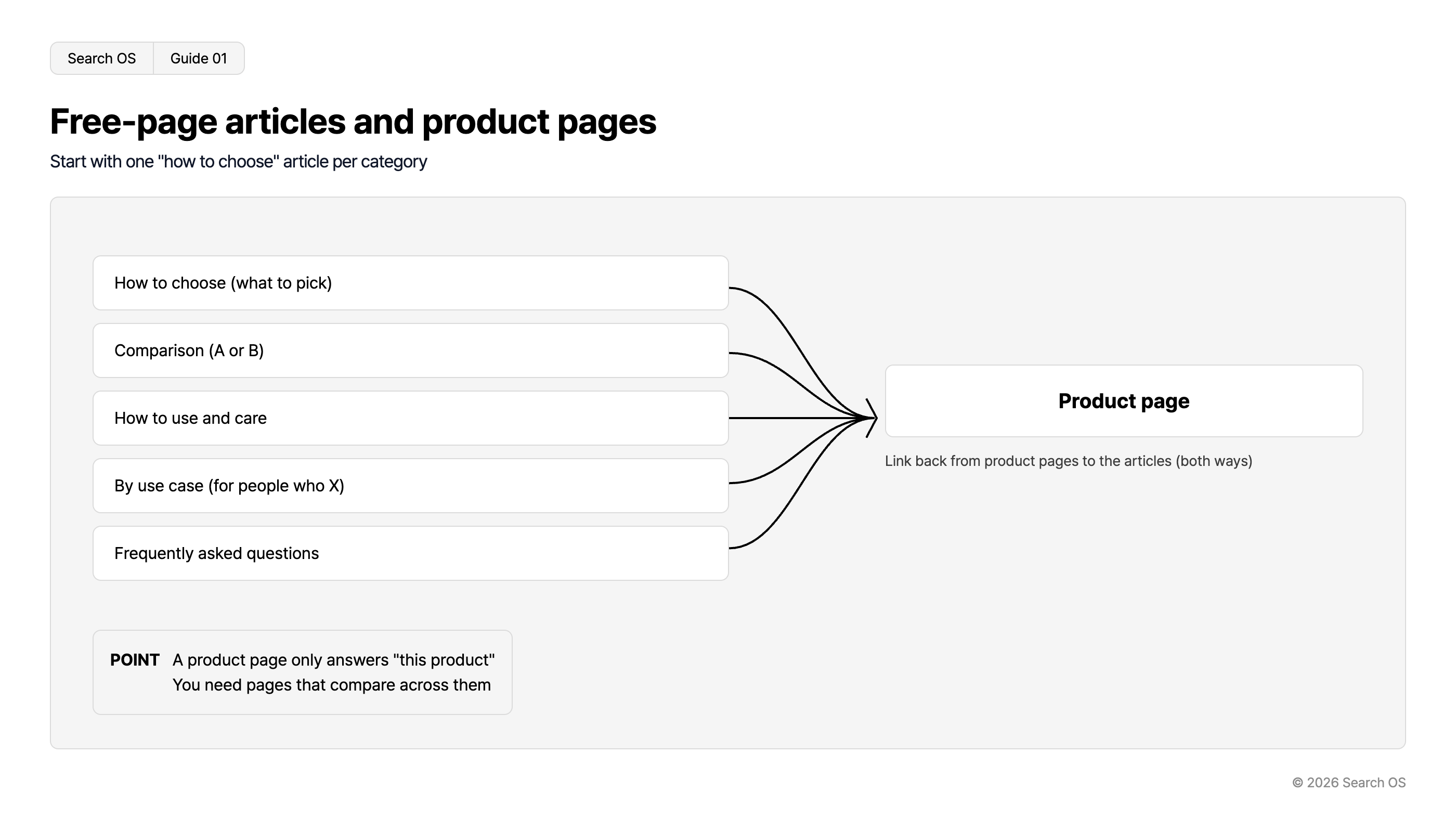
Free-page articles and product pages
Start with one "how to choose" article per category
| Article Types | Direction | Destination |
|---|---|---|
| How to choose (what to pick) | → | Product page |
| Comparison (A or B) | → | Product page |
| How to use and care | → | Product page |
| By use case (for people who X) | → | Product page |
| Frequently asked questions | → | Product page |
Link back from product pages to the articles (both ways)
- POINT
- A product page only answers "this product". You need pages that compare across them
© 2026 Search OS
Start by writing one buying guide per product category. For leather wallets, that's an article comparing leather types and storage. Link from there to the product pages.
Key idea: A product page is where you describe that product. The question of which one to choose is answered on a page that compares products.
The structure of a single free page
Position | Content | Purpose |
|---|---|---|
Opening | A direct answer to the question, in 2 to 3 sentences | Citation block for AI search |
Heading 1 | Selection criteria, 3 to 5 items | Structural understanding for search engines |
Table | Comparison table by criterion (as an HTML table) | Handles comparison-type questions |
Heading 2 onward | Explanation of each criterion | Body |
Product links | 2 to 4 links to the relevant products | Purchase path |
FAQ | 3 to 5 short Q&As | Material for citations |
Navigation
- Search OS
- Guide 02
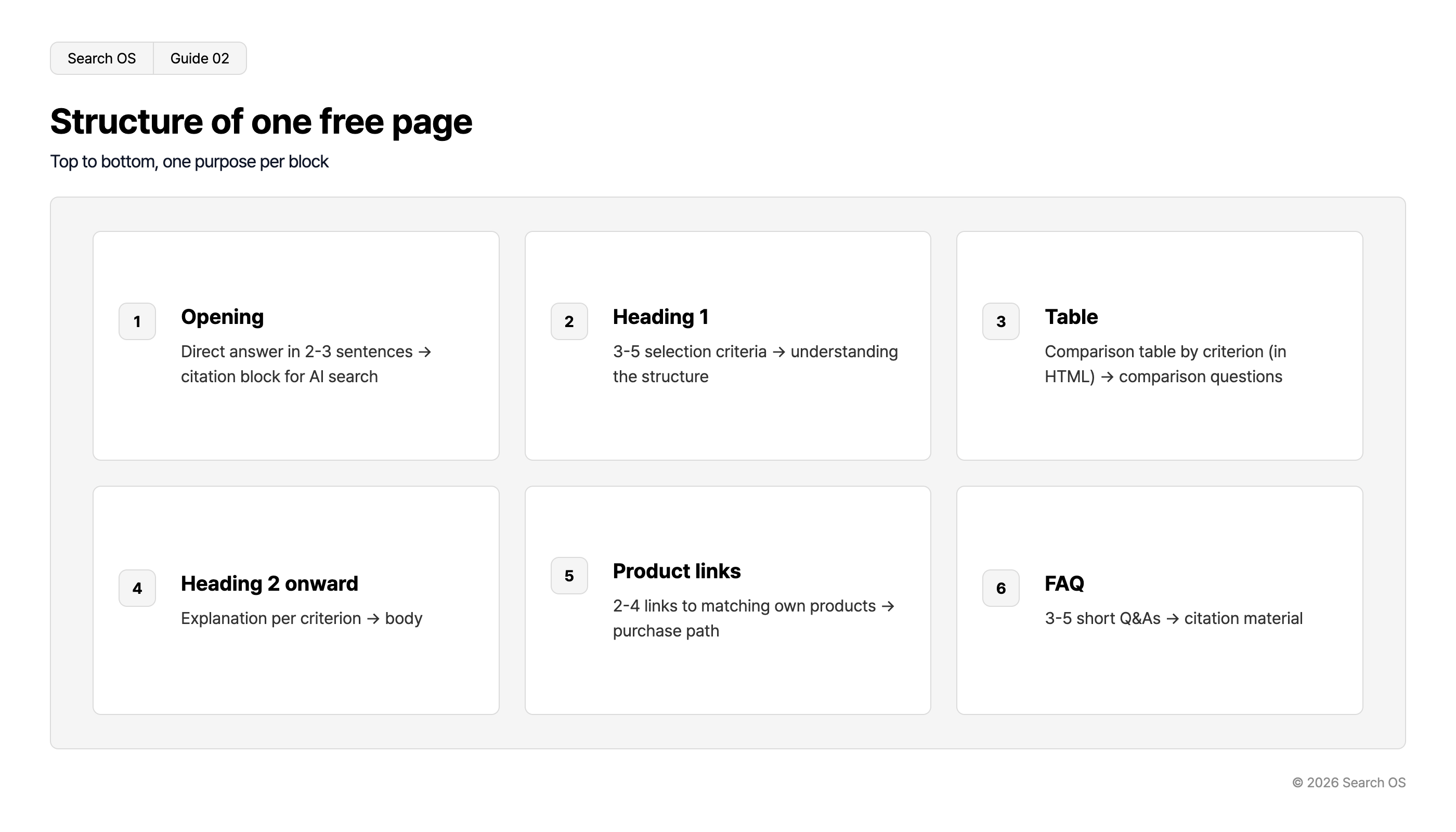
Structure of one free page
Top to bottom, one purpose per block
| Step Number | Section Title | Description |
|---|---|---|
| 1 | Opening | Direct answer in 2-3 sentences → citation block for AI search |
| 2 | Heading 1 | 3-5 selection criteria → understanding the structure |
| 3 | Table | Comparison table by criterion (in HTML) → comparison questions |
| 4 | Heading 2 onward | Explanation per criterion → body |
| 5 | Product links | 2-4 links to matching own products → purchase path |
| 6 | FAQ | 3-5 short Q&As → citation material |
© 2026 Search OS
Write the wallet comparison as an HTML table, not an image. That's so machines can read the content. Check first that your template supports headings and tables.
Make articles and products reachable from each other
Guiding readers from the article to the product isn't enough. Someone who looked at a wallet and hesitated needs a way back to the buying guide. Internal links are the signposts connecting pages within the site.
Free page → product page: place links at the relevant spot in the body and at the end
Product page → free page: put a "See the buying guide" link at the end of the product description
Top page and footer → free pages: keep the main articles reachable from navigation
If you can place a shared link in the product description field, that cuts the manual work. Check that product pages lead back to the buying guide too.
What to check in free page settings
Item | Check |
|---|---|
title and meta description | Can they be set per page |
URL | Can it be a meaningful URL (number-only URLs are best avoided) |
Sitemap | Are free pages included in the sitemap. If not, compensate with internal links |
Structured data | Can Article be added via the template |
What happens as articles pile up
There's no article list. Once articles multiply, create one free page as an "article index" and link from there
There may be a cap on the number of pages. Check the limit for your plan, and consolidate articles as you approach it
No date or author display. Write the updated date as text at the top of the body. AI search looks at freshness
Once you pass 20 articles and the cap or management becomes a concern, an external blog is an option. Consider integrating with WordPress or similar. Even then, keep the buying guides findable from the article index. Check the links between the shop and the blog as well.
Reviewing articles after swapping products
With free pages, continuing to update matters more than the date you wrote them. When you swap out wallets, reflect that in the comparison table. The same goes when prices or selection criteria change. Past 10 articles, tracking which products each article maps to gets hard to do by hand.
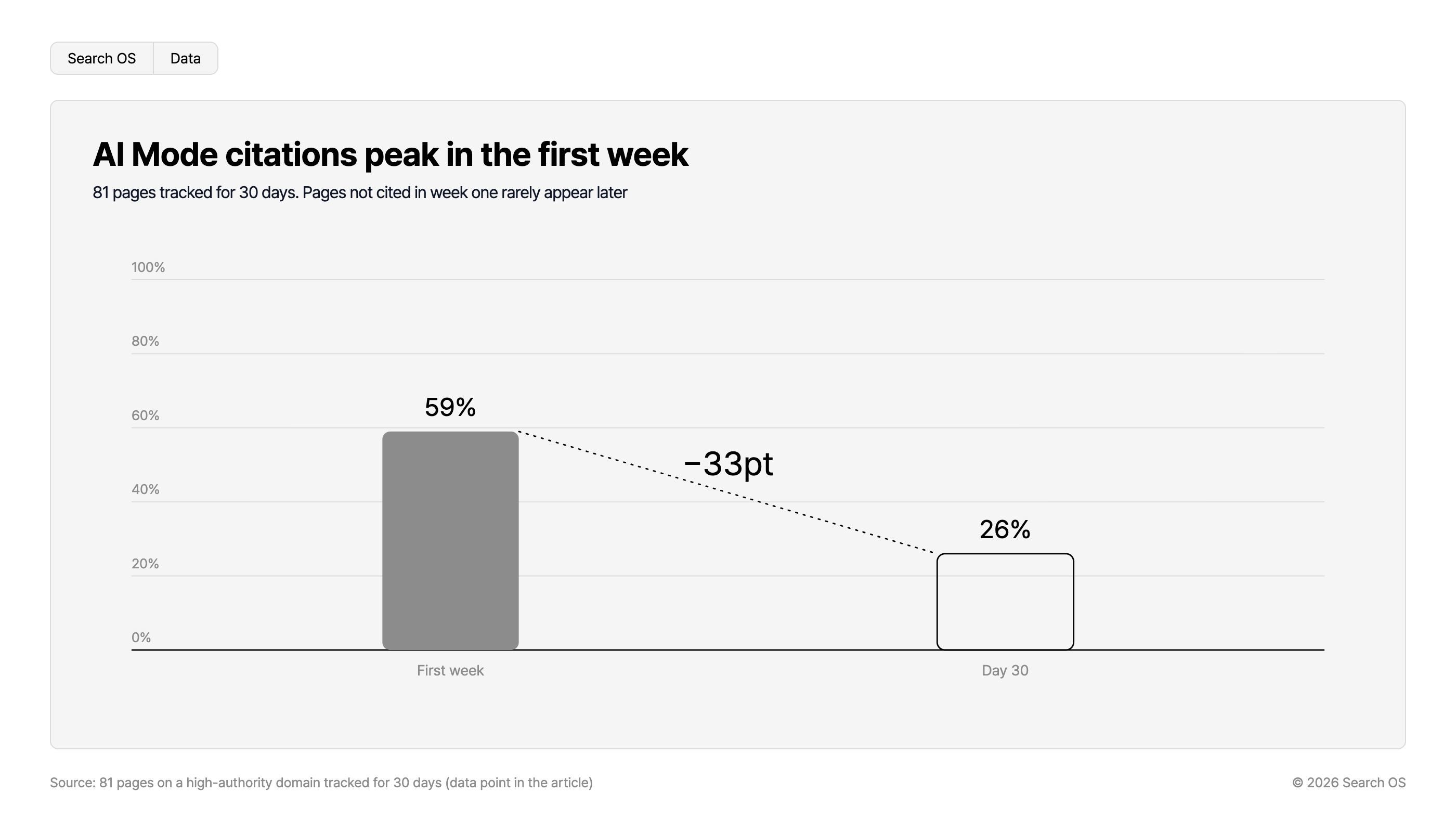
Data point: In an experiment tracking 81 pages on a high-authority domain for 30 days, Google AI Mode cited 59% of them in the first week, falling to 26% by day 30. Pages not cited in the first week were rarely cited afterward. Whether a page is readable in the first weeks after publication shapes what follows.
Navigation
- Search OS
- Data
AI Mode citations peak in the first week
81 pages tracked for 30 days. Pages not cited in week one rarely appear later
| Time Period | Citation Percentage |
|---|---|
| First week | 59% |
| Day 30 | 26% |
- Change
- -33pt
Source: 81 pages on a high-authority domain tracked for 30 days (data point in the article)
© 2026 Search OS
Search OS supports the operation of shops on Color Me Shop and similar platforms. It checks internal links between articles and products, metadata, and structured data. It sorts out stale articles, broken links, and pages bots can't fetch. Articles affected by product changes are kept in a state search and AI can read after they're written.
Frequently asked questions
Free pages or a blog: which is better for SEO?
For growing buying guides and comparisons, free pages are enough. Chronological posts such as news and events suit a blog. Use each according to the content.
How many articles do I need?
Write one buying guide per product category. With three categories, starting from three articles is fine. Add comparison and use-case articles as you see the results.
How long should an article be?
Long enough to answer the question fully. As a guide, 1,500 to 3,000 characters, 1 to 2 tables, and 3 FAQ questions. Reread it to check no reader question is left unanswered.
Related reading
How to Add Structured Data Through Color Me Shop Template Editing, and Where Not to Put It
Color Me Shop XML Sitemaps: What's Auto-Generated and How to Register in Search Console
What Keywords Alone Miss in AI Search: A Query Fan-Out Research Guide
References
Google Search Central: Creating helpful, reliable, people-first content
Google Search Central: Article structured data
Google Search Central: AI features and your website