makeshop and WordPress: Where to Put the Blog
Navigation
- Search OS
- makeshop
makeshop and WordPress
Where to Put the Blog
| Category | Read Time | Topic | Summary | Source | Copyright |
|---|---|---|---|---|---|
| Insights | 6 min read | Japan EC platform guides for search and AI search | When makeshop's built-in blog isn't enough and you write posts in WordPress, whether the blog sits under the shop or on a separate domain changes how search performance accumulates. This article covers three placement patterns, how each looks to search and AI search, and how to handle internal links and sitemaps. | searchos.io/en/blog | © 2026 Search OS |
Because makeshop's built-in blog doesn't give enough freedom over posts, some shops want to write in WordPress. The first decision is whether the blog goes under the shop or on a separate domain.
The short answer: a setup that puts it under the shop is the most advantageous. Search engines accumulate performance per domain. Even when a good post on a separate-domain blog gets cited, the credit builds up on the blog's domain and doesn't flow easily to the shop's. Under the shop, the performance of posts and product pages accumulates on the same domain.
This article covers three placement patterns and how each looks to search and AI search. A sitemap is the list of page URLs handed to search engines. It also covers internal links, sitemaps, and how to operate after choosing a placement.
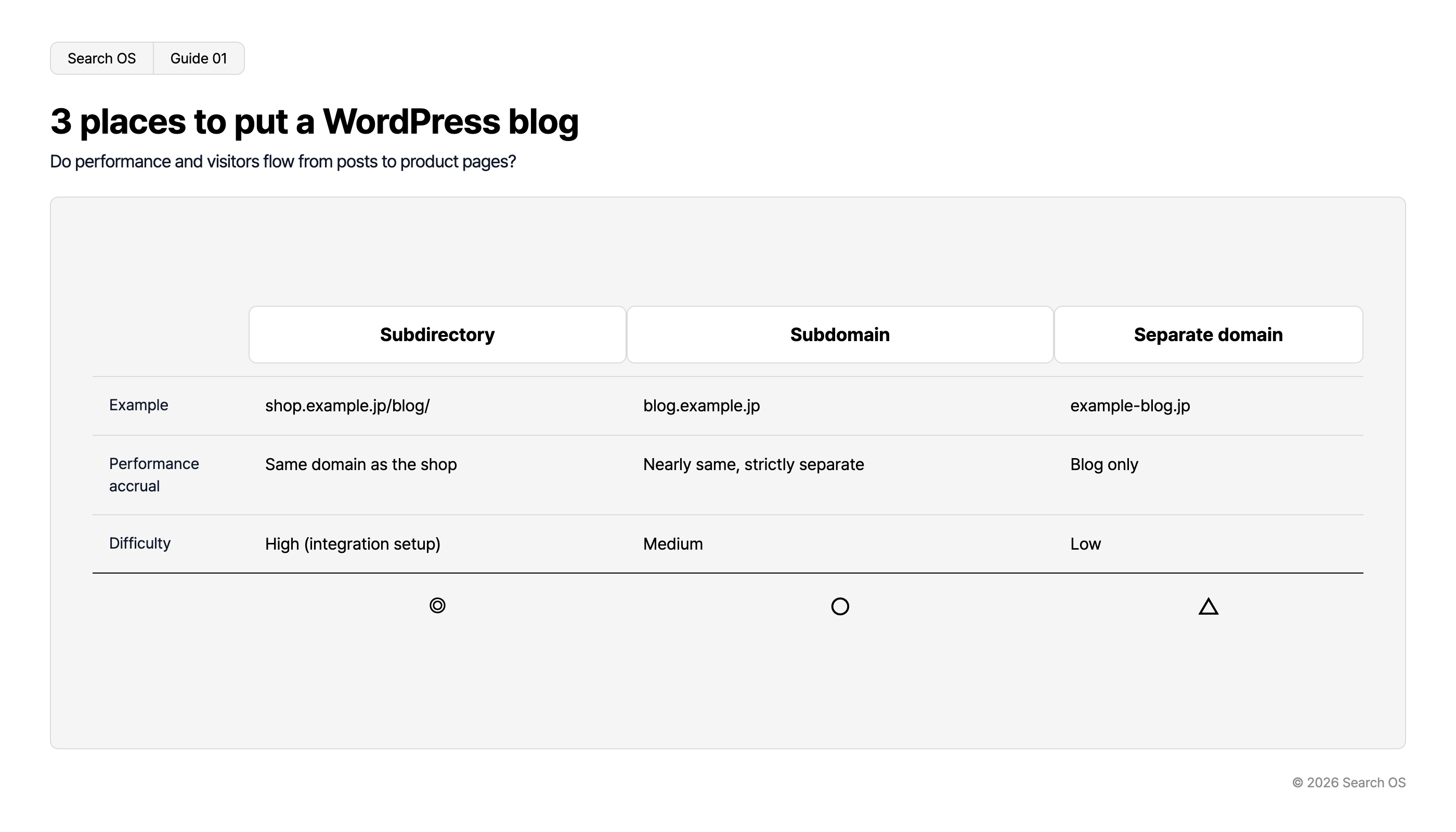
Conclusion: A subdirectory on the same domain is best. A subdomain is second. A separate domain is last
Placement | Example | Where performance accumulates | Difficulty | Verdict |
|---|---|---|---|---|
Subdirectory | shop.example.jp/blog/ | On the same domain as the shop | High (integration setup required) | Best fit |
Subdomain | blog.example.jp | Treated as nearly the same domain, but strictly separate | Medium | Yes |
Separate domain | example-blog.jp | Only on the blog; doesn't flow easily to the shop | Low | Limited |
Navigation
- Search OS
- Guide 01
3 places to put a WordPress blog
Do performance and visitors flow from posts to product pages?
| Category | Subdirectory | Subdomain | Separate domain |
|---|---|---|---|
| Example | shop.example.jp/blog/ | blog.example.jp | example-blog.jp |
| Performance accrual | Same domain as the shop | Nearly same, strictly separate | Blog only |
| Difficulty | High (integration setup) | Medium | Low |
| Rating | ◎ | ○ | △ |
© 2026 Search OS
Check the official specification for which placements makeshop's WordPress integration option allows. Among those available, choose the one closest to the shop.
Key idea: The purpose of a blog isn't for posts to be read. It's for performance and people to flow from posts to product pages. Choose the placement by how easily that flow happens.
How the three placements look to search
Subdirectory (under the shop)
Search engines treat the blog posts as part of the shop. When a post is cited, the whole shop's topical relevance rises. The domain comes to be seen as knowledgeable about leather goods. AI search also finds it easier to associate posts and products on the same domain.
The difficulty is the setup. Running makeshop and WordPress under the same domain needs the integration option or a configuration such as a reverse proxy.
Subdomain
Setup is relatively easy. In recent years, search engines have tended to treat subdomains as part of the same site. Strictly, though, it's a different hostname. With dense internal links, you can aim for an effect close to a subdirectory.
Separate domain
The easiest, but performance is split. Even if the blog becomes well known, it has no direct effect on the shop's search rankings. If you already run one on a separate domain, weigh the cost of moving against the drawbacks of separation.
What to do regardless of placement
Item | What to do |
|---|---|
Internal links from posts to products | Links to the relevant products and categories in the body and at the end |
Internal links from products to posts | A "How to choose" link at the end of the product description |
Shared header and footer | Same navigation, so blog and shop look like one site |
Sitemap | Register the WordPress sitemap separately in Search Console (not included in makeshop's sitemap) |
canonical | Each blog post's canonical points to itself; no pages that duplicate the shop side |
Structured data | Output Article on the WordPress side; Organization only on the shop's top page |
Whether WordPress posts are included in makeshop's sitemap depends on the integration's specification. Assume they aren't, and register separately. Check as well that links from posts to products are present in the body and at the end.
Dividing roles between the built-in blog and WordPress
Use | Built-in blog | WordPress |
|---|---|---|
News and announcements | Best fit | Yes |
Buying guides, comparisons, how-tos (search entry points) | Limited (little structural freedom) | Best fit |
Control over structured data | Limited | Best fit |
Ease of operation | Best fit | Limited (updates, security) |
Navigation
- Search OS
- Guide 02
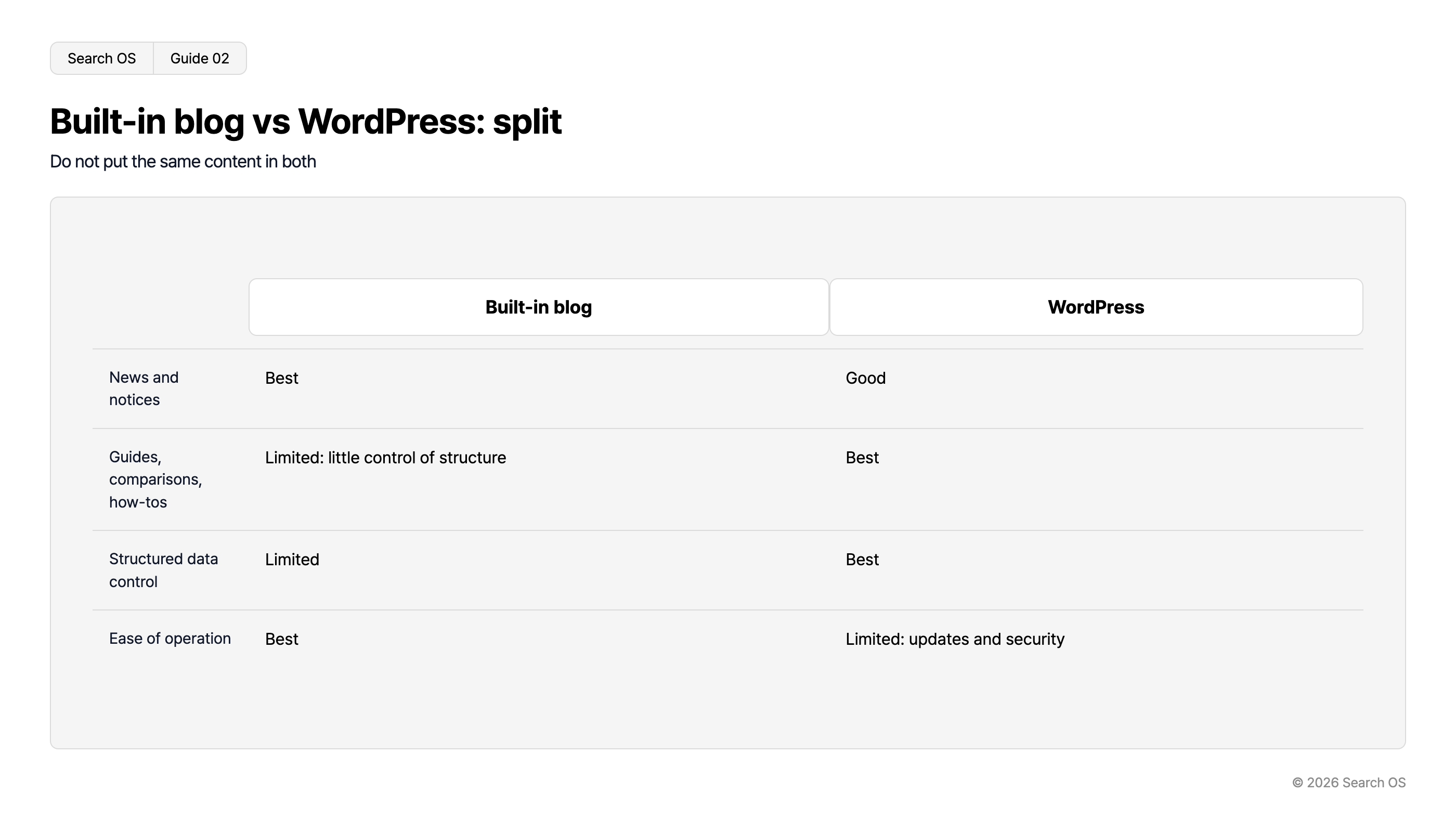
Built-in blog vs WordPress: split
Do not put the same content in both
| Feature | Built-in blog | WordPress |
|---|---|---|
| News and notices | Best | Good |
| Guides, comparisons, how-tos | Limited: little control of structure | Best |
| Structured data control | Limited | Best |
| Ease of operation | Best | Limited: updates and security |
© 2026 Search OS
If you use both, don't put the same content in both. Duplication splits performance. Decide the roles: announcements on the built-in blog, buying guides on WordPress, and so on.
What to keep watching after choosing a placement
Even with the blog under the shop, internal links between posts and products break. WordPress updates can change the Article output, and the blog's sitemap can go stale. Keeping the shop and blog systems as one site becomes a bigger job than the placement itself.
Data point: In an experiment tracking 81 pages on a high-authority domain for 30 days, ChatGPT search's citation coverage peaked at 42%. Google AI Mode fell from 59% in the first week to 26% on day 30. With quality equal, structure separates the pages that get cited from those that don't.
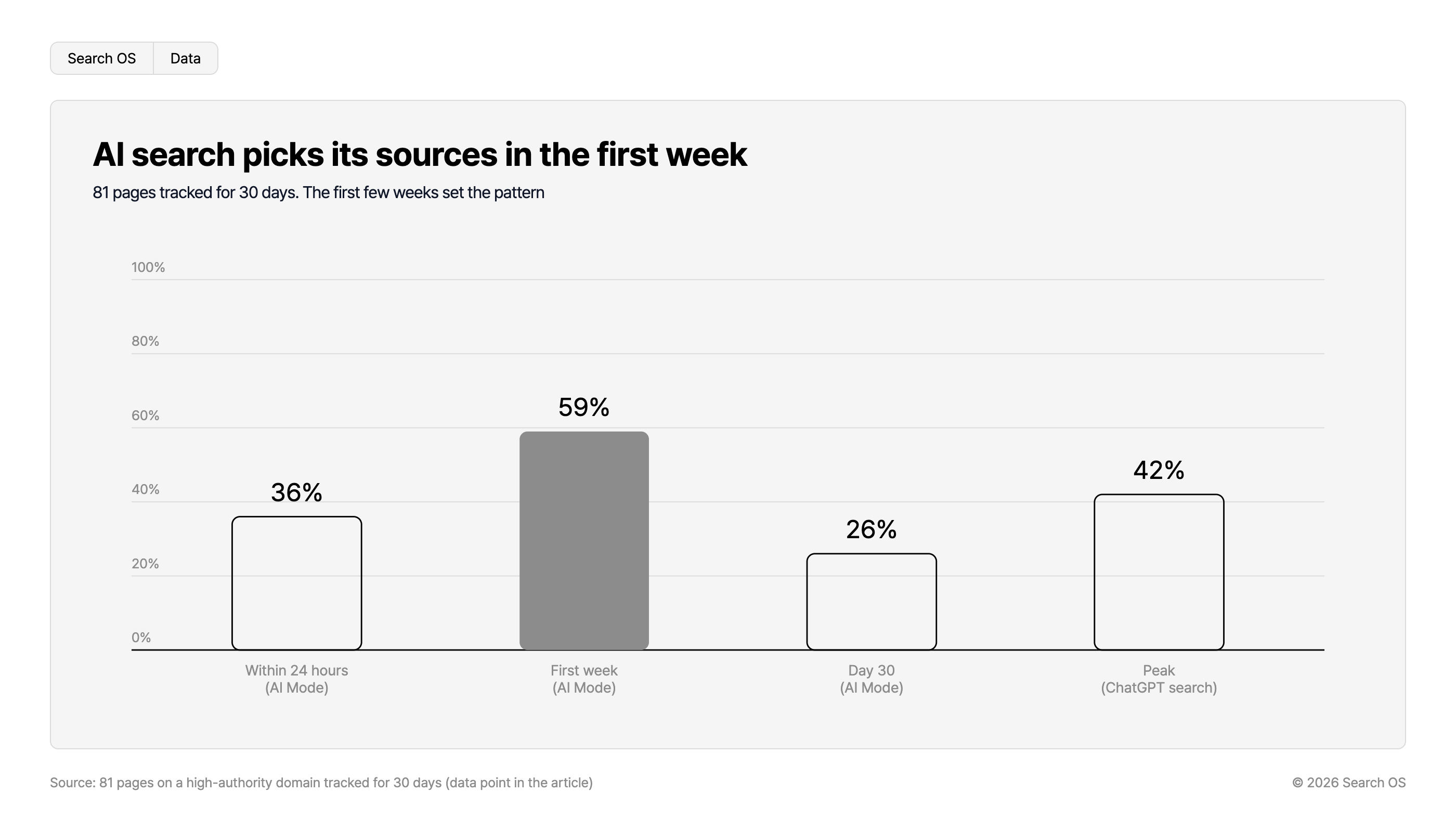
AI search picks its sources in the first week
81 pages tracked for 30 days. The first few weeks set the pattern
| Timeframe / Mode | Percentage |
|---|---|
| Within 24 hours (AI Mode) | 36% |
| First week (AI Mode) | 59% |
| Day 30 (AI Mode) | 26% |
| Peak (ChatGPT search) | 42% |
Source: 81 pages on a high-authority domain tracked for 30 days (data point in the article)
© 2026 Search OS
Search OS supports sites built from several systems, such as makeshop and WordPress. It provides metadata, structured data, sitemaps, and canonical for search engines and AI crawlers together, as a separate layer. Bot logs confirm whether both are actually being fetched. On that basis, broken internal links and duplicates are compiled as fix candidates. It doesn't change the placement; it operates the consistency after placement. Review broken links between posts and products at least once a month.
Frequently asked questions
I already run a blog on a separate domain. Should I move it?
With many posts and backlinks, moving requires URL redirects. It also takes effort. Start by making internal links dense, and consider moving if the effect isn't enough.
Should WordPress posts also carry product structured data?
Put Article on posts. Product structured data belongs on the product page, so don't put it on posts. Linking from the post to the product page is enough.
Can I drop the built-in blog and consolidate on WordPress?
Posts that serve as search entry points on WordPress, announcements on the built-in blog: that division is the easier one to operate. If you consolidate, redirect the built-in blog's post URLs to the WordPress side.
Related reading
Can makeshop's Built-In Blog Alone Get Picked Up by AI Search: What's Missing and What to Add
Diagnosing and Fixing Double Structured Data Output When Adding It in makeshop Creator Mode
References
Google Search Central: Build and submit a sitemap
Google Search Central: Consolidate duplicate URLs
Google Search Central: Article structured data