W2 Multi-Brand Setup: How to Split Domains
Navigation
- Search OS
- W2
W2 Multi-Brand Setup
How to Split Domains
- Category
- Insights
- Reading Time
- 6 min read
- Topic
- Japan EC platform guides for search and AI search
When you run several brands or stores on one W2 platform, one decision you have to make is how to split domains. Separate domains, subdomains, or subdirectories. The choice changes where search performance accumulates. This article lays out brand independence, duplication of shared products, the design of Organization structured data, and the steps when adding a store.
- URL
- searchos.io/en/blog
- Copyright
- © 2026 Search OS
A company runs three brands on W2, gave each its own domain, and every brand is weak in search. They ask whether they should have consolidated into one. This comes up often.
Brand independence and consolidation of search performance are a trade-off. Separate domains make each brand independent, but performance is split three ways. Consolidating into subdirectories of one domain gathers performance. In return, the brands look like product lines of one company. The right answer depends on whether the brands should truly be known as independent entities. If it's fine for them to be seen as one company's product range, consolidate.
This article compares the three setups. It also lays out the decision criteria, duplication of shared products, Organization design, and the steps for adding a store.
Conclusion: Separate domains if the brands have independent recognition. Subdirectories if not. Subdomains if undecided
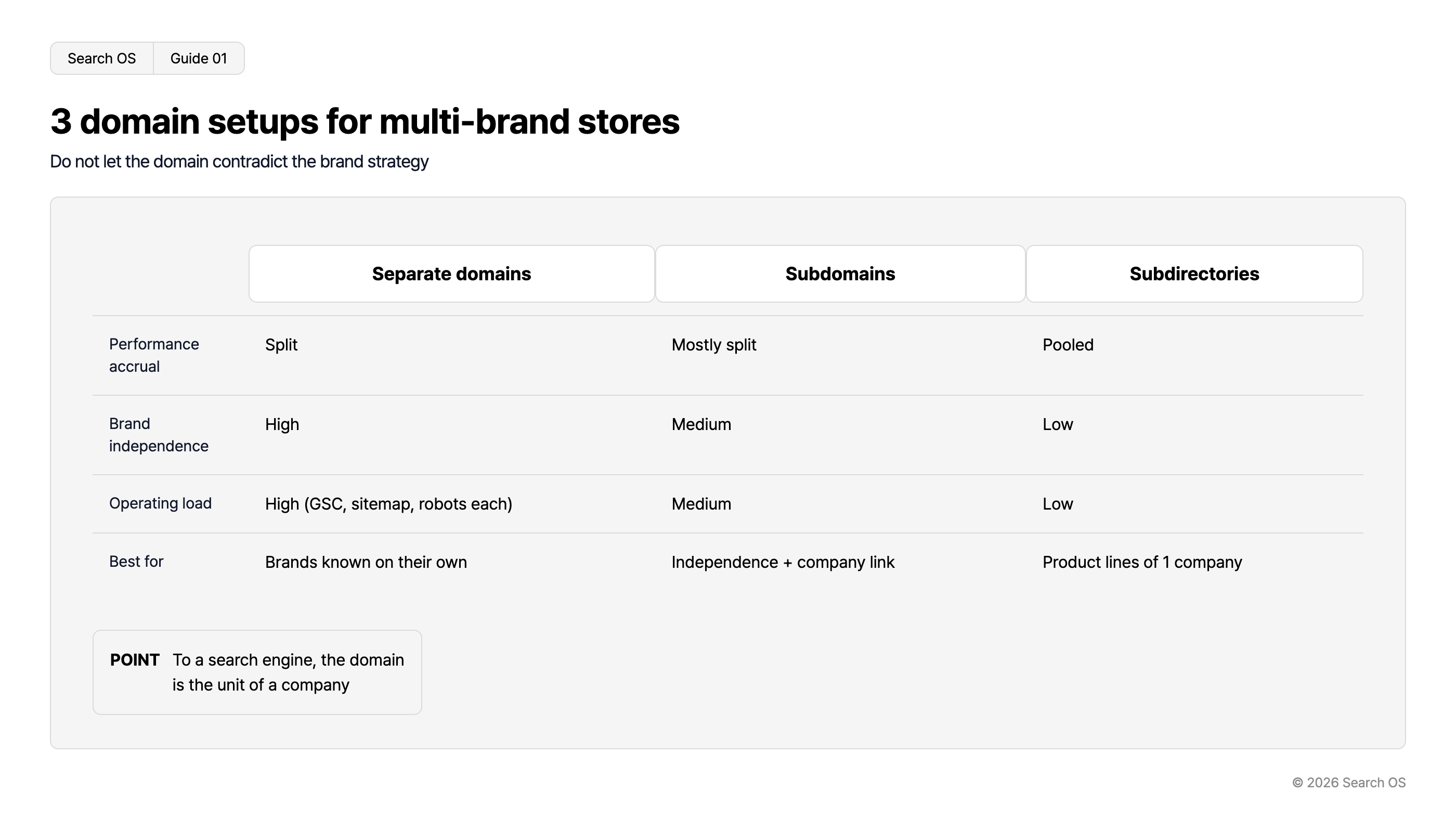
Setup | Performance accumulation | Brand independence | Operational load | Best for |
|---|---|---|---|---|
Separate domains | Split | High | High (Search Console, sitemap, and robots for each) | Brands recognized individually and not to be associated with each other |
Subdomains | Mostly split (lately tending to be treated as one site) | Medium | Medium | Keep brand independence while also showing the corporate connection |
Subdirectories | Consolidated | Low | Low | Fine to be treated as one company's product lines. Consolidation comes first |
Navigation
- Search OS
- Guide 01
3 domain setups for multi-brand stores
Do not let the domain contradict the brand strategy
| Feature | Separate domains | Subdomains | Subdirectories |
|---|---|---|---|
| Performance accrual | Split | Mostly split | Pooled |
| Brand independence | High | Medium | Low |
| Operating load | High (GSC, sitemap, robots each) | Medium | Low |
| Best for | Brands known on their own | Independence + company link | Product lines of 1 company |
- POINT
- To a search engine, the domain is the unit of a company
© 2026 Search OS
Key idea: A domain is the unit of a company as search engines see it. Split and you're separate companies; consolidate and you're one. Don't let the domain contradict what brand strategy decided.
Decision criteria
Question | Yes → | No → |
|---|---|---|
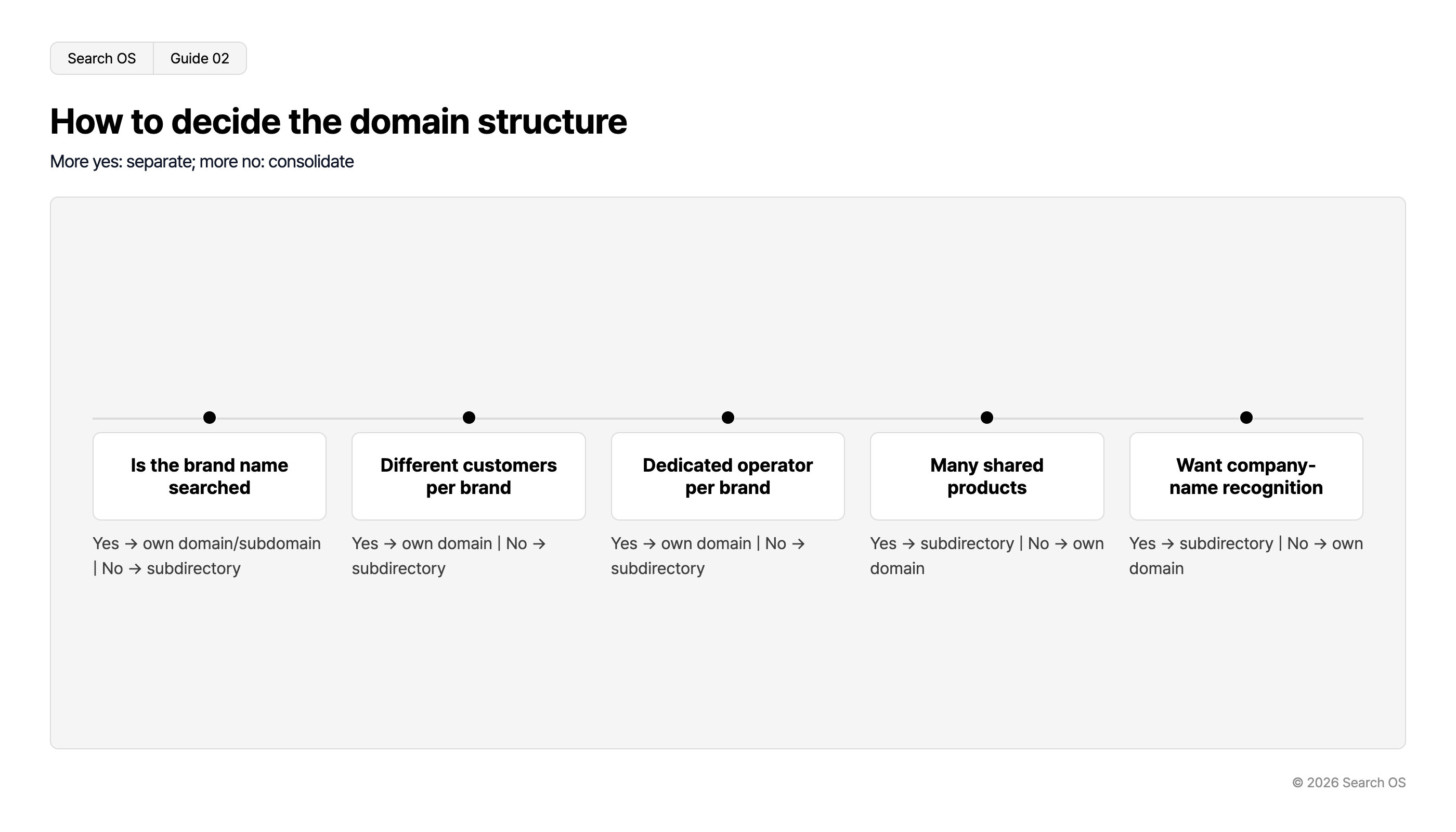
Is the brand name searched for (branded search exists) | Separate domain or subdomain | Subdirectory |
Do the brands have different customer bases | Separate domain | Subdirectory |
Does each brand have a dedicated operations owner | Separate domain | Subdirectory |
Are there many shared products | Subdirectory | Separate domain |
Do you want to raise recognition of the company name | Subdirectory | Separate domain |
Navigation
- Search OS
- Guide 02
How to decide the domain structure
More yes: separate; more no: consolidate
| Question | Decision Logic |
|---|---|
| Is the brand name searched | Yes → own domain/subdomain | No → subdirectory |
| Different customers per brand | Yes → own domain | No → subdirectory |
| Dedicated operator per brand | Yes → own domain | No → subdirectory |
| Many shared products | Yes → subdirectory | No → own domain |
| Want company-name recognition | Yes → subdirectory | No → own domain |
© 2026 Search OS
The more yes answers, the more you lean toward splitting; the more no answers, the more toward consolidating.
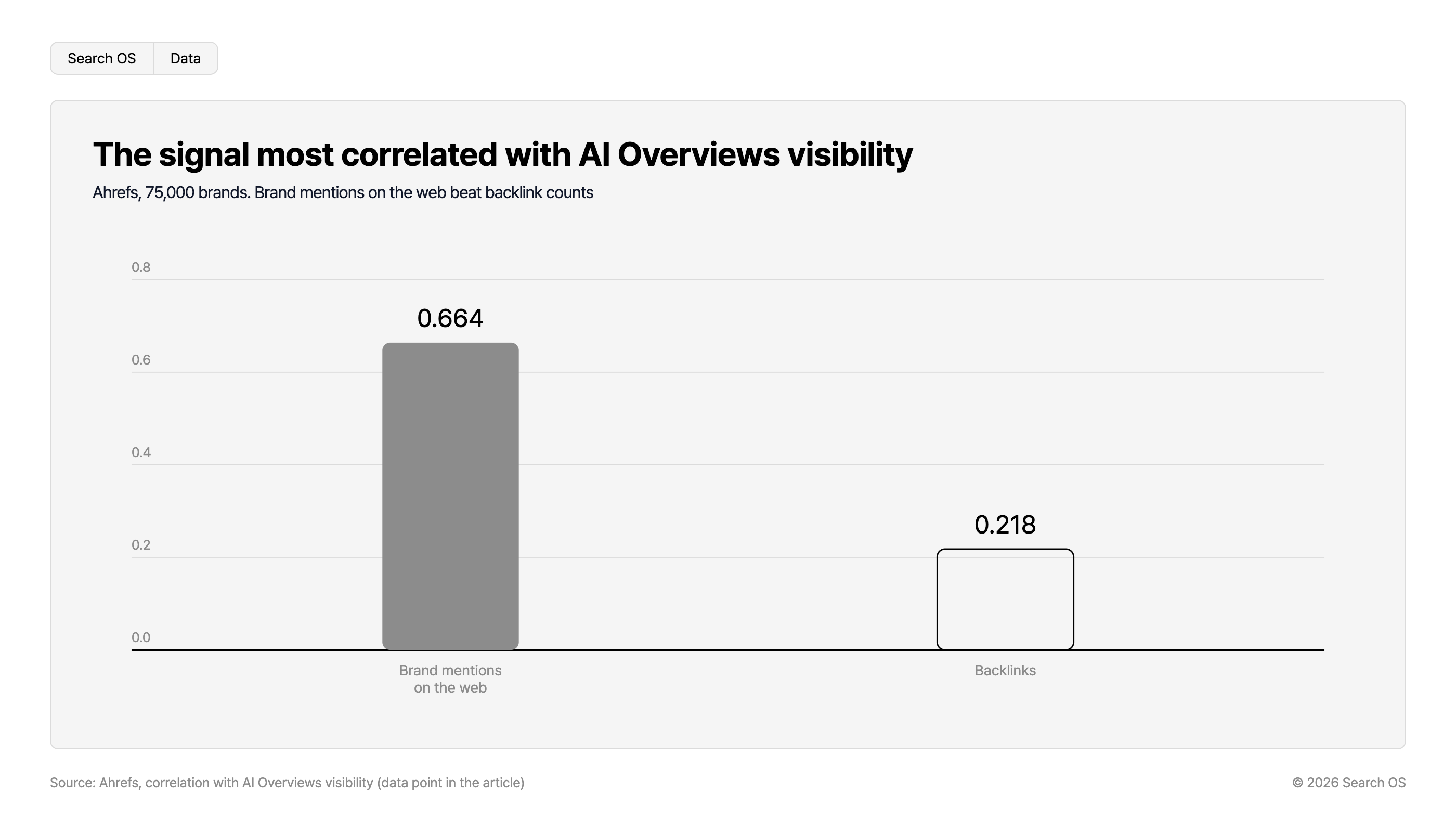
Data point: In an Ahrefs study of 75,000 brands, the signal most strongly correlated with exposure in AI Overviews was not backlink count (0.218) but brand mentions on the web (0.664).
Navigation
- Search OS
- Data
The signal most correlated with AI Overviews visibility
Ahrefs, 75,000 brands. Brand mentions on the web beat backlink counts
| Signal | Correlation Value |
|---|---|
| Brand mentions on the web | 0.664 |
| Backlinks | 0.218 |
Source: Ahrefs, correlation with AI Overviews visibility (data point in the article)
© 2026 Search OS
Handling duplicated shared products
When several stores carry the same product, you get as many copies of the product page as there are stores. The same T-shirt page lines up once per brand.
Setup | How duplication is handled |
|---|---|
Separate domains | Each domain is indexed as independent pages. If the content is identical, one may be excluded as a duplicate |
Subdomains and subdirectories | Duplication within one site. Consolidate to one with canonical |
What to do:
Decide a primary store and point the other stores' shared product pages to it with canonical
Or write distinct product descriptions per store so they're no longer duplicates (high operational load)
If shared products are the majority, reconsider whether splitting stores makes sense at all
Canonical is the marker that tells search engines which URL is the primary one. Check the specification for how W2's multi-store feature outputs canonical for shared products. At the same time, decide which store is primary.
Designing Organization structured data
Setup | Where Organization goes |
|---|---|
Separate domains | Each domain's top page carries its brand as an Organization. The relationship to the parent company via parentOrganization |
Subdomains | Each subdomain's top page carries the brand's Organization. The main domain's top page carries the company's Organization |
Subdirectories | The main domain's top page carries the company's Organization. Each brand is tied to products as a Brand |
Making the relationship between brands and the company explicit in structured data lets AI search understand that this brand belongs to this company. Structured data is a description of page content written in a form machines can read. Brands become easier to reference in questions about the company, and the company in questions about a brand. Tie each brand to the Organization on the company's top page.
Steps when adding a store
Match the setup (separate domain, subdomain, or subdirectory) to the existing stores
Add a Search Console property (with a domain property, subdomains and subdirectories don't need adding)
Prepare and register a sitemap
Check robots.txt (independent for separate domains and subdomains, shared for subdirectories)
Set canonical for shared products
Add Organization and Brand structured data
Place internal links between stores (from the company top page to each brand, and from each brand to the company top page)
Operation after the setup is decided
In multi-store operation, a change in one store diverging from the others is an everyday occurrence. Template updates, product additions, canonical settings. The more stores, the more effort it takes to confirm that every store follows the same policy.
Search OS is a layer that supports multi-store sites such as W2. Across stores, it continuously checks that canonical, structured data, sitemaps, and metadata are consistent. It organizes duplicated shared products, Organization contradictions, and differences in bot fetch status between stores into items to fix. It isn't the work of deciding the setup. It's a layer that keeps watching whether the decided setup holds across every store.
Frequently asked questions
I want to merge separate domains into subdirectories. Is that possible?
Yes. It's work on the scale of a site move, though. You need redirects from every URL on the old domains to the new URLs, a change of address in Search Console, and rebuilt structured data.
Are subdomains really treated as almost the same site?
Google has said in recent years that it doesn't draw a strong distinction between subdomains and subdirectories. That's not a firm guarantee, though. If you want certain consolidation, choose subdirectories.
How do I separate Search Console by brand?
With separate domains, it's separated automatically. With subdomains or subdirectories, you can separate it too. Add a URL-prefix property and you can view each individually.
Related reading
How to check whether W2's WAF and bot protection are blocking crawlers
hreflang and splitting Japanese and English pages when starting cross-border ecommerce on Shopify
References
Google Search Central: Consolidate duplicate URLs
Google Search Central: Organization structured data
Google Search Central: Site moves with URL changes