B-Cart: noindex Design for Members-Only URLs
Navigation
- Search OS
- B-Cart
B-Cart: noindex Design for Members-Only URLs
- Category
- Guides
- Reading Time
- 6 min read
- Topic
- Japan EC platform guides for search and AI search
When B-Cart members-only URLs show up in search, the worry is whether customer-specific prices are exposed too. But noindex everything and the entry point for new customers disappears as well. This article lays out login protection, index exclusion, and how to keep public pages.
- Source
- searchos.io/en/blog
- Copyright
- © 2026 Search OS
B-Cart product URLs sometimes appear in Google search results. Opening one shows a login screen, but the product name is displayed. Shop owners often ask whether customer-specific prices are showing too.
If the URL redirects to a login screen, prices aren't leaking. Indexing of the URL and product name, though, is a separate matter. They can get registered through links or previously public information. noindex is the directive that keeps a page out of search results. So in addition to login protection, check the noindex setting.
This article covers how to remove members-only pages from the index, redirects to login, and how to decide which public pages to keep.
Conclusion: Members-only pages get login protection + noindex. Public pages are kept explicitly
Page | Index | Setting |
|---|---|---|
Products, categories, prices, stock (members only) | No | Login protection + noindex. Exclude from the sitemap |
Login screen | No | noindex |
My page, order history, cart | No | Login protection + noindex |
Company profile, product range overview, trade terms, contact | Yes | Public. Include in the sitemap |
Sourcing guides by industry | Yes | Public. Include in the sitemap |
Navigation
- Search OS
- Guide 01
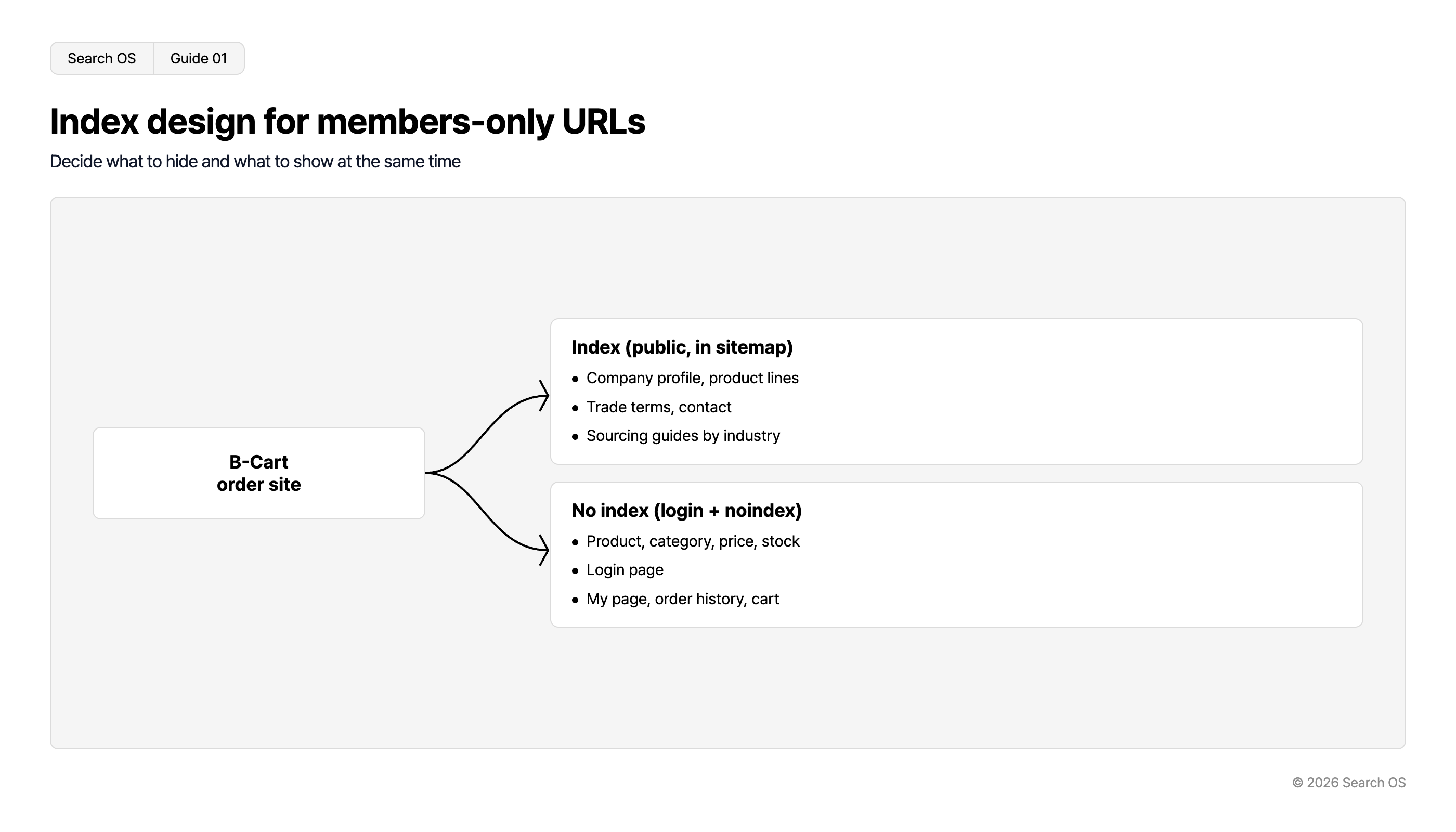
Index design for members-only URLs
Decide what to hide and what to show at the same time
| Source | Category | Items |
|---|---|---|
| B-Cart order site | Index (public, in sitemap) | Company profile, product lines; Trade terms, contact; Sourcing guides by industry |
| B-Cart order site | No index (login + noindex) | Product, category, price, stock; Login page; My page, order history, cart |
© 2026 Search OS
Key idea: Decide only what to hide and the entry point from search disappears. The product range overview, for example, is what you want new customers to see. Decide the pages to show as well, and keep them indexable.
Why login-required pages show up in search
Route | What happens |
|---|---|
Links from customers' sites or documents | The URL is discovered and only the URL is indexed |
Previously public | Content from when it was public remains in the index |
Redirect to the login screen | Indexed with the content of the redirect target (the login screen) |
Included in the sitemap | You're handing members-only URLs to search engines yourself |
Search OS Guide 02
- Search OS
- Guide 02
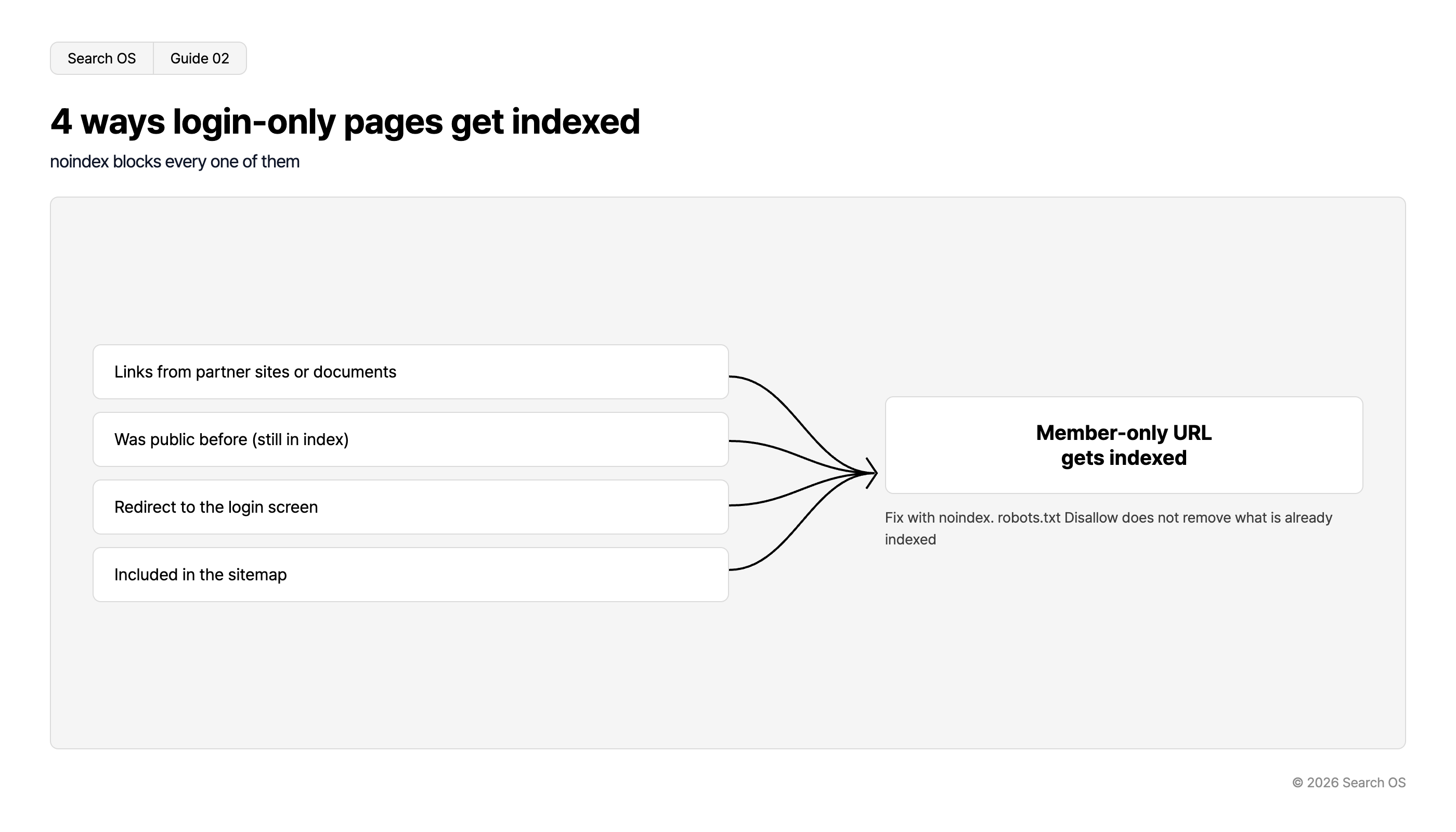
4 ways login-only pages get indexed
noindex blocks every one of them
Causes for indexing
- Links from partner sites or documents
- Was public before (still in index)
- Redirect to the login screen
- Included in the sitemap
Member-only URL gets indexed
Fix with noindex. robots.txt Disallow does not remove what is already indexed
© 2026 Search OS
For example, information on products that used to be public can remain in the index. Find out which route in the table applies, and check the noindex directive. noindex is the directive for removing a page from the index.
Where to set noindex
Check B-Cart's specifications for where noindex can be set. If it can, apply it to members-only page types such as products, categories, and my page. If it can't, work through the following in order.
Exclude members-only URLs from the sitemap (check what's auto-generated)
Disallow the members-only paths in robots.txt. Note that already-indexed URLs won't disappear
For URLs already indexed, request removal with the Search Console removal tool
Ask support how to set noindex
robots.txt is the file that controls bot crawling. Disallow means "don't fetch", which is different from "don't index". With external links, the URL alone can remain in the index. Confirm the noindex method with support.
Check the redirect to the login screen too
Open a product URL while logged out. If it redirects to the login screen, add noindex to the redirect target as well. This prevents search results filling up with "Login | [Company] Ordering Site".
If the setting shows only the product name, that view is indexed as a public page. Open a product URL logged out, and if the display isn't what you intended, change it to login-required or noindex.
Keep the pages new customers should see
Hide members-only information, keep the entry point for new customers. The company profile and product range overview fall here. Check the following pages.
Company profile (business description, address, product categories handled)
Product range overview (items and standards, no prices)
Trade terms (minimum lot, lead time, outline of payment terms)
New customer onboarding flow and contact form
Sourcing guides by industry
Leave these without noindex and list them in the sitemap. Also provide links from the top page and the login screen. A "New customers start here" link lets new customers reach the public pages. Check the guidance from the login screen as well.
How to confirm the settings hold
Check | Method |
|---|---|
Are members-only URLs indexed | Search Google for |
Is noindex present | Open a product URL while logged out and view the source. Search for |
Is the login screen noindex | Check the login screen's source |
Are public pages indexed | URL Inspection in Search Console |
Sitemap contents | Check that no members-only URLs are included |
Check that product URLs aren't lingering in search. Once a month, run a site: search and URL Inspection on the public pages.
Keep watching the boundary after setup
When products are added, check noindex and exclusion from the sitemap. B-Cart settings can also change what's displayed when logged out. Check that pages meant for new customers haven't become members-only.
Search OS keeps checking the state of B2B ordering sites, B-Cart included. In scope are indexed URLs, noindex, robots, and sitemap settings, and the index status of public pages. It also watches which pages bots actually fetch. Leaks of members-only information and disappearing public pages are detected and put into an operation that holds the boundary you decided.
Frequently asked questions
If members-only URLs are indexed but prices aren't visible, is that a problem?
Even if prices aren't leaking, the product names and what you carry are visible. Whether that can be public depends on the shop's policy. If it's visible unintentionally, redraw the public scope.
What about noindexing every page and building a separate public site?
If public pages are hard to build on B-Cart, that setup is an option. Build a public site on another CMS and link to the ordering site. In that case, the ordering site can be noindex on every page.
Why does a URL come back after I remove it with the removal tool?
The removal tool hides a URL temporarily. Without noindex, it gets indexed again once the period expires. Set noindex first, then use the removal tool.
Related reading
Winning New Customers from AI Search on B-Cart: How to Build Industry-Specific Buying Guide Pages
How to Design the Index Boundary for ebisumart B2C and B2B Sites
References
Google Search Central: Block Search indexing with noindex
Google Search Central: Robots.txt introduction
Google Search Central: Remove a page hosted on your site from Google