SEO Checks After an ebisumart Automatic Version Upgrade
Navigation
- Search OS
- ebisumart
SEO Checks After an ebisumart Automatic Version Upgrade
- Category
- Tips
- Reading Time
- 5 min read
- Topic
- Japan EC platform guides for search and AI search
ebisumart upgrades its platform automatically. Security and features stay current, but templates and SEO-related output can change unintentionally. This article groups the items to check after an upgrade into five areas (metadata, structured data, URLs, sitemap, and speed) as a checklist you can finish in 30 minutes.
- Source
- searchos.io/en/blog
- Copyright
- © 2026 Search OS
ebisumart is upgraded automatically on the platform side. That is why stores report that their rich results seem to have disappeared after last month's upgrade.
An automatic upgrade is a platform-side change, and it is normally designed not to break templates or customizations. The canonical tag is the marker that tells search engines which URL is the primary one. Even so, the generation rules for default output such as structured data, canonical, and meta tags can change. The change doesn't look like breakage. It looks like a quiet shift, so you won't notice by looking at the screen. By the time a change in search results tips you off, weeks have passed since the upgrade.
This article covers a five-area checklist you can run in 30 minutes after an upgrade, what to do when you find a change, and a mechanism for keeping the checks going.
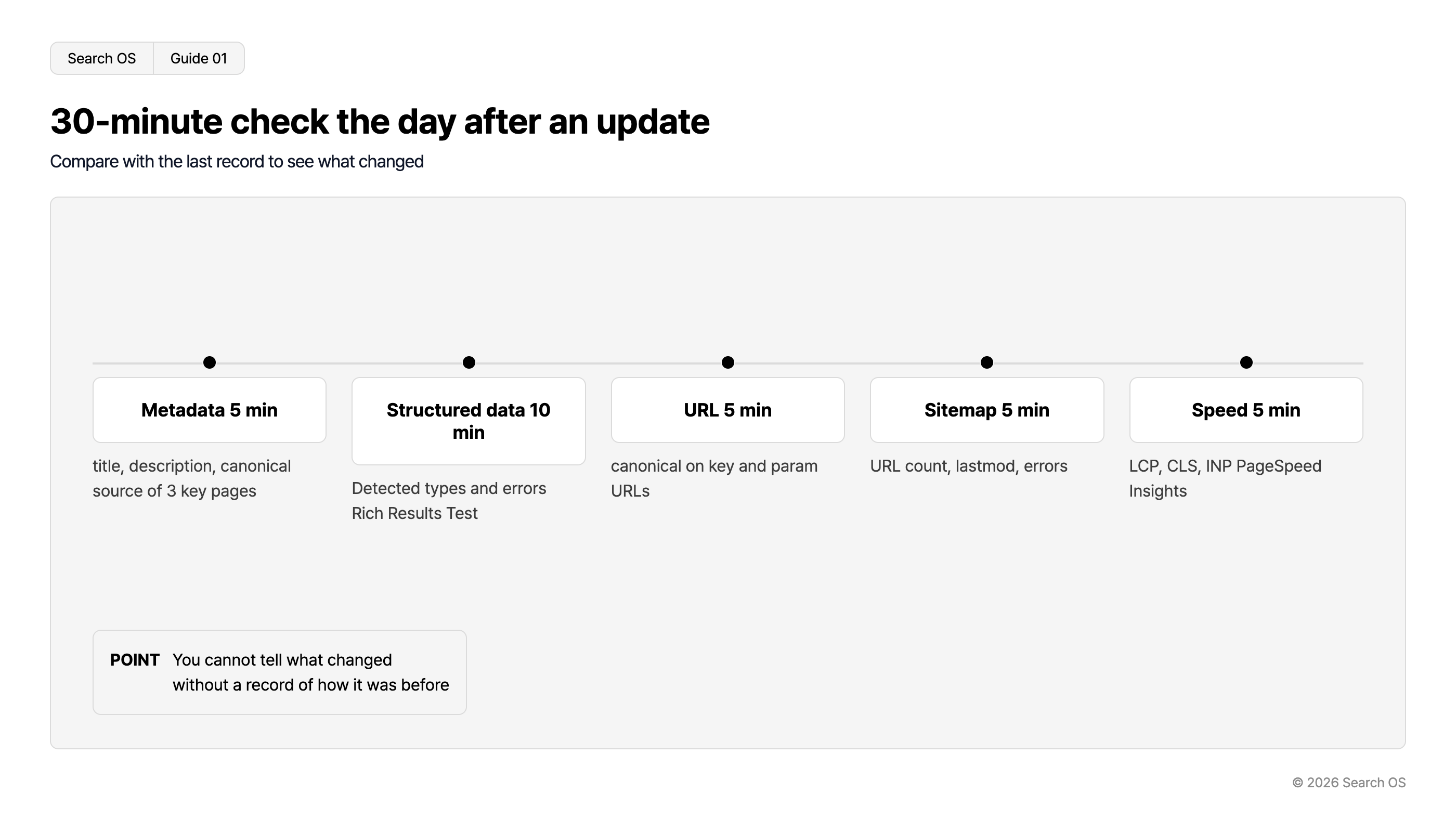
Conclusion: When you get an upgrade notice, check the five areas the next business day and compare against your previous record
Area | What to check | Tool | Time |
|---|---|---|---|
Metadata | title, description, and canonical output | Source of three main pages | 5 minutes |
Structured data | Detected types and errors | Rich Results Test (one product, one category, top page) | 10 minutes |
URLs | Main page URLs, and canonical on parameterized URLs | Browser | 5 minutes |
Sitemap | URL count, lastmod, errors | Sitemap URL and Search Console | 5 minutes |
Speed | LCP, CLS, INP | PageSpeed Insights (main product page) | 5 minutes |
Navigation
- Search OS
- Guide 01
30-minute check the day after an update
Compare with the last record to see what changed
| Task | Duration | Details |
|---|---|---|
| Metadata | 5 min | title, description, canonical source of 3 key pages |
| Structured data | 10 min | Detected types and errors Rich Results Test |
| URL | 5 min | canonical on key and param URLs |
| Sitemap | 5 min | URL count, lastmod, errors |
| Speed | 5 min | LCP, CLS, INP PageSpeed Insights |
- POINT
- You cannot tell what changed without a record of how it was before
© 2026 Search OS
Key idea: You can't tell whether something changed without a record of how it was before. If you don't know the number on the scale before you step on, you can't say whether you gained or lost. Before the checklist, prepare the previous record.
First, create the previous record
The first time, record the following before the upgrade. It plays the same role as photographing a room before you move out.
The title, description, and canonical strings on three main pages (top page, main category, main product)
The types the Rich Results Test detects on those same three pages, and whether there are warnings
The URL count in the sitemap
LCP, CLS, and INP values from PageSpeed Insights
The contents of robots.txt
Keep it in a spreadsheet with dates. From the next time on, you only need to compare against this record.
What to suspect in each area
Area | What to suspect if it changed |
|---|---|
The title generation rule changed (shop name position, separator) | Change to the platform-side title template |
The canonical target changed | Change in parameter handling |
A structured data type disappeared, or attributes decreased | Change to the platform-side default output, or a conflict with the template |
The sitemap URL count changed sharply | Change in scope, or generation stopped |
Speed got worse | Scripts added on the platform side |
robots.txt changed | Platform-side default change |
Navigation
- Search OS
- Guide 02
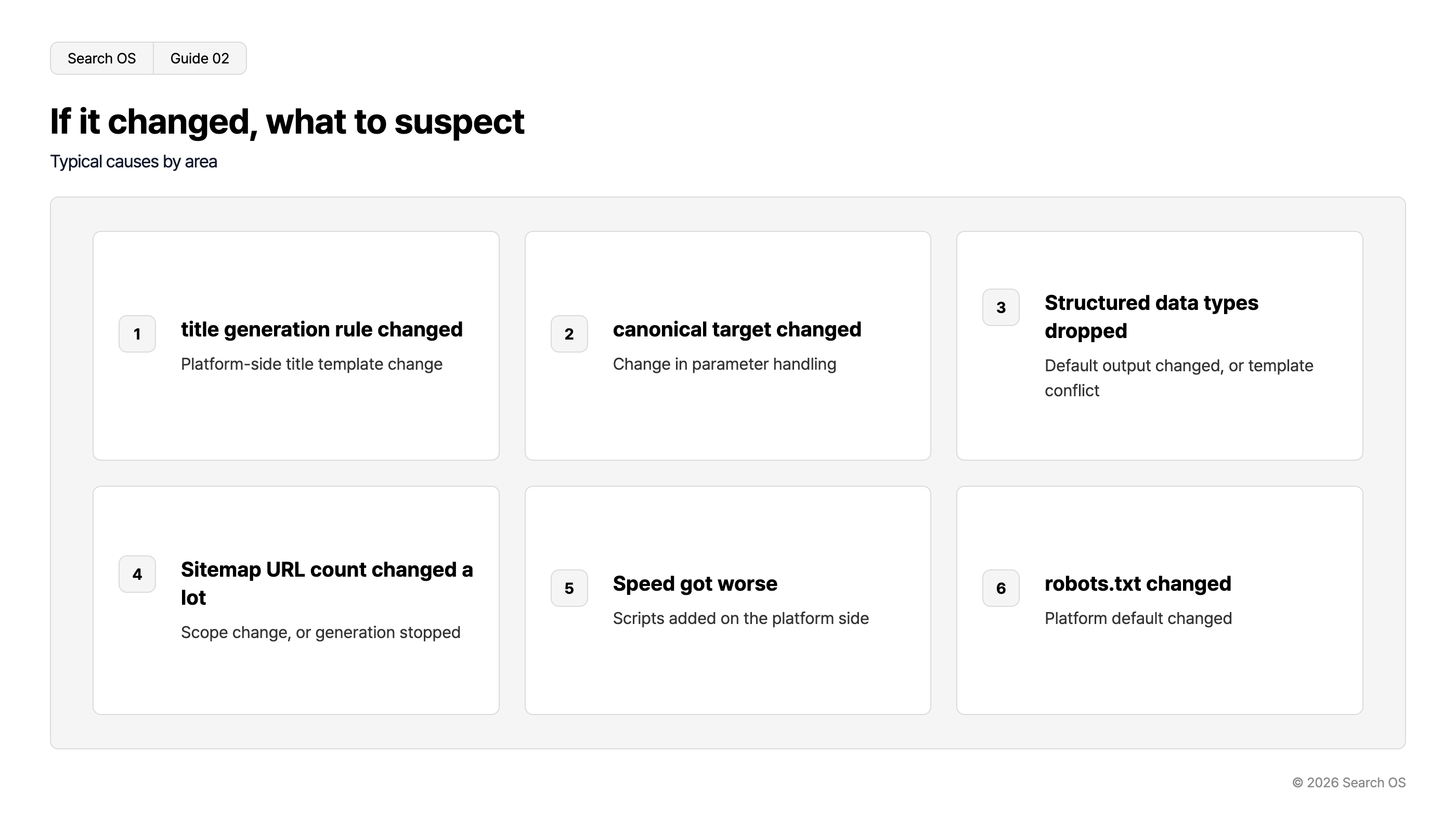
If it changed, what to suspect
Typical causes by area
| index | cause | description |
|---|---|---|
| 1 | title generation rule changed | Platform-side title template change |
| 2 | canonical target changed | Change in parameter handling |
| 3 | Structured data types dropped | Default output changed, or template conflict |
| 4 | Sitemap URL count changed a lot | Scope change, or generation stopped |
| 5 | Speed got worse | Scripts added on the platform side |
| 6 | robots.txt changed | Platform default changed |
© 2026 Search OS
What to do when you find a change
Check the ebisumart release notes for what changed in that version
Decide whether the change is intentional (a spec change) or a side effect
If it's a spec change, adjust templates and settings to the new spec
If it's a side effect, contact support. Attach the before-and-after diff you recorded
After adjusting, check the five areas again and update the record
When you contact support, "our rankings dropped" alone is hard to act on. State the diff concretely, such as "after version X.Y, offer disappeared from the Product structured data on product pages". Attach the before-and-after diff you recorded to the inquiry.
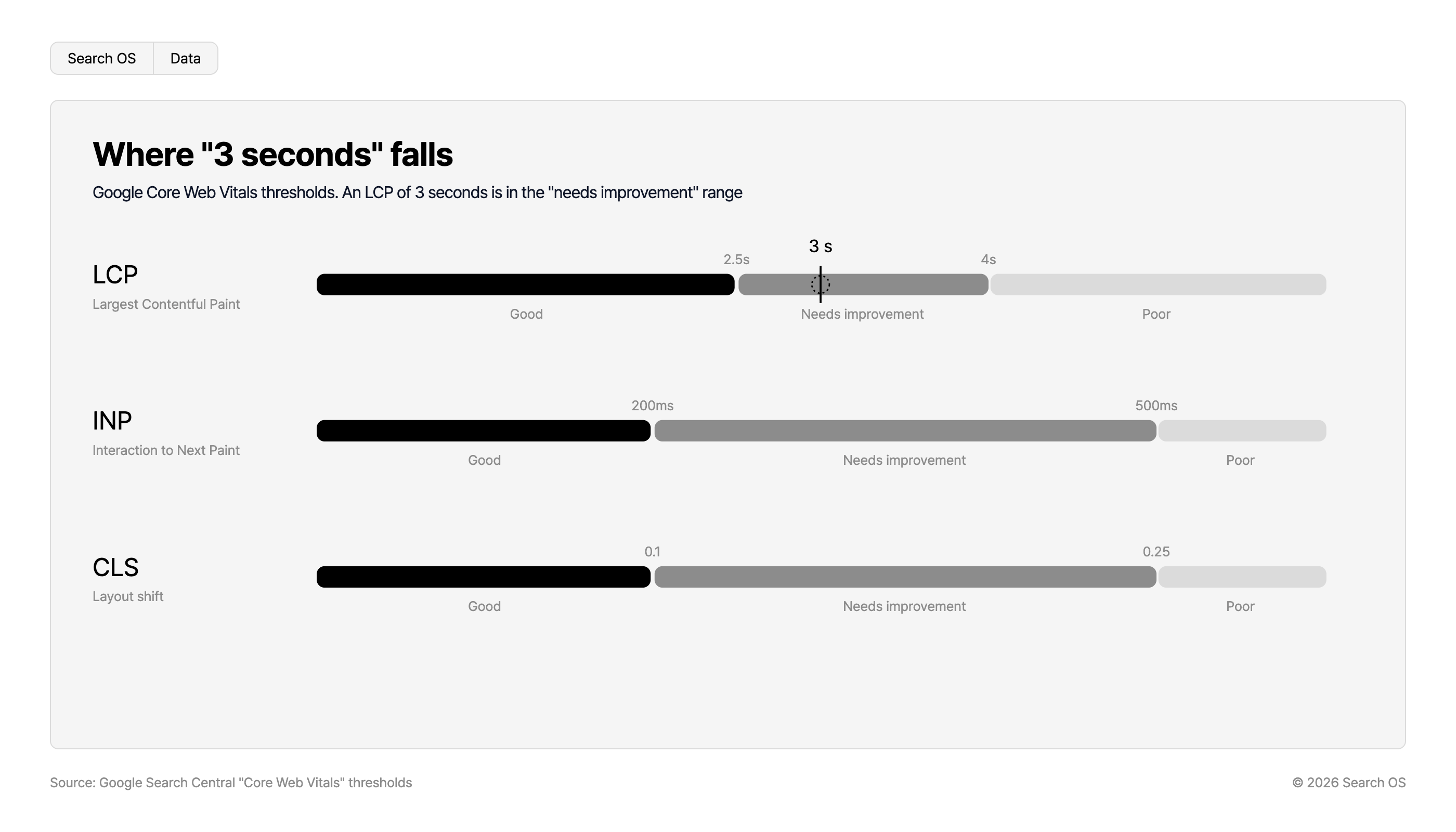
Where "3 seconds" falls
Google Core Web Vitals thresholds. An LCP of 3 seconds is in the "needs improvement" range
| Metric | Description | Good | Threshold 1 | Needs improvement | Threshold 2 | Poor |
|---|---|---|---|---|---|---|
| LCP | Largest Contentful Paint | Good | 2.5s | Needs improvement (3 s falls here) | 4s | Poor |
| INP | Interaction to Next Paint | Good | 200ms | Needs improvement | 500ms | Poor |
| CLS | Layout shift | Good | 0.1 | Needs improvement | 0.25 | Poor |
Source: Google Search Central "Core Web Vitals" thresholds
© 2026 Search OS
A mechanism for keeping the checks going
Automatic upgrades happen on a regular basis. To keep doing the 30-minute check every time, decide who is responsible and how upgrade notices are received. Miss the notice and you miss the timing of the check. Two things to decide: where notices go, and who owns the check.
Where the checklist doesn't reach
The checklist covers what a person can go and look at. If the change happened on thousands of pages other than the three main ones, checking three pages won't find it. It is like judging a whole beach from a few grains of sand. Whether AI crawlers can still fetch your pages after the upgrade shows up in neither Search Console nor PageSpeed Insights.
Search OS continuously validates the state of metadata, structured data, canonical, and sitemap across all pages on automatically updated platforms, including ebisumart. It detects what changed before and after an upgrade as a diff and sorts it into fix targets. It isn't a layer that stops upgrades. It places a mechanism on the operations side that keeps watching what changed with each upgrade.
Frequently asked questions
Can I stop the upgrades?
Automatic upgrades are a characteristic of the ebisumart platform, and normally not optional. Rather than stopping them, set up operations that detect the changes.
If I've customized my templates, am I unaffected?
Customized parts are usually preserved. Platform-side default output that you haven't customized still changes, though. Check regardless of whether you have customizations.
How do I tell whether a ranking change came from the upgrade or from a Google update?
Record the timing of both. If the five areas show a diff right after the upgrade, the cause is on the platform side. If there is no diff, the search engine side is more likely.
Related reading
How to Design the Index Boundary on ebisumart BtoC and BtoB Sites
SEO and AI Measures for SI-Built Sites: How to Proceed Without a Development Cycle
An SEO Self-Check Checklist for Maintaining Results Yourself After ShopServe Consulting
References
Google Search Central: Page Indexing report
Google: Rich Results Test
Google: PageSpeed Insights